
March 5, 2012 7:45 am
A Dash of Inspiration, A Cup of Creativity by Doreen
A Digital Artist’s Journey
The year was 1995, I was an owner of an art gallery with three other artists. Two were painters, one was a textile artist and then there was me; a photographer who was still developing film and prints in my own darkroom. These partners decided to have a show titled ‘Faces’. Their idea was to create HUGE faces to put out in the garden and in the windows. I was at a loss . . . it would cost a fortune for me to pay a lab to produce photographic prints that were 36-inches or larger, not to mention I’d have to pull out the old 4×5 view camera in order to capture photographs capable of being enlarged to that size. That evening, I sat down at my computer and for the first time opened the only photo-processing software I had; Micrografx Picture Publisher.
This began a very fun, but fruitless journey in applying funky digital filters to my photos and thinking I was creating awesome works of art just because I thought they cool. A few years later, thinking I had a portfolio full of worthy digital art, I began submitting to publishing and licensing companies only to discover that in the professional world of digital art, these post processed pieces were a red flag to the pros, indicating they had been created by an amateur and the declines flooded my mailbox. It was a hard lesson, but one that was necessary for it brought tremendous growth.
Needless to say, whether you call it digital art, photo manipulation, digital post processing or a digital composite; there are three basic elements to remember:
Much of what I’ve learned over the years started by referring to books and following the step by step instructions. Once I applied what the book suggested, I would then spend time modifying my technique and application to suit the results I wanted, usually developing a technique that is unique to me. Free tutorials on the internet to grow in this aspect of digital art are hard to find. The pros who share their techniques, charge for this whether online or in books. Scott Kelby’s books and tutorials are fantastic, simple to understand full of step by step instruction. The Photoshop WOW books are wonderful and so are books by Matt Kloskowski – there are many of them to choose from once you decide you’re ready to move into the digital art world be sure to learn from the pros.
Here are a few links I found which may be a step to better digital manipulation
Overused Post Processing Effects – by Hannah Gordon
Digital Darkroom Techniques — 5 Post Processing Techniques To Add “WOW” Factor To Your Images
Harnessing the Power of Layer Masks – Advanced Photoshop Tutorials by Jay Kinghorn
5 Crucial Post-Processing Adjustments For Professional Photographs
Photoshop Tutorial – How To Make a Vignette Effect – by EngageTutorials
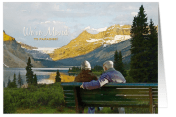 This image of mine is made up of two photographs. The couple on the bench taken in the city, and the mountain scenic. This composition was painted using watercolor brushes of various sizes and opacity settings. Notice the water – Although I needed to paint it with watercolor brushes so that it would blend with the overall scene, I added a layer mask and painted over the water with the light touch of a smoothing filter to give the water a more realistic feel and add depth to the image. The clouds have a light touch, yet the mountains a heavy hand to show texture in the rocky formations.

Posted by GCUAdmin
Categories: Dash of Inspiration
Tags: digital painting, doreen erhardt, salon of art
Mobile Site | Full Site
Get a free blog at WordPress.com Theme: WordPress Mobile Edition by Alex King.
I’m curious – one of the new marketability guidelines says not to use digital filters to “save” a photo when I have in fact rescued some to say the least – even got some nice compliments on the rescues from two professional nature photographers. So, why can’t digital filters be used to rescue images and then those resulting images used for greeting cards??? Or did I again miss the mark?
By Donna Lorello/Sunshine's Creative Endeavors on March 5, 2012 at 11:31 am
As with all things, I think it’s more of a general rule rather than a hard-fast rule. I don’t think that GCU is saying they won’t EVER accept these types of images – again it’s how well the process was performed. I use many digital filtering tools to save or improve a shot where I just had no time to control the situation, but it is rare that anyone can point out in my finished piece what if any filters I used. So again, it simply is knowing how to use digital filters for a professional result. IF a photograph has severely washed out highlights or is obviously out of focus, usually all these types of filters (poster effect, dry brush, etc…) will do is make those areas look different not necessarily better.
By Salon of Art on March 5, 2012 at 3:55 pm
thanks for the additional info. Yeah, the “professional” background is a plus too… I’m so feeling hindered by a real lack of background. Hopefully I can change that with a class here and there via the local camera shop – at least start that process.
By Donna Lorello/Sunshine's Creative Endeavors on March 5, 2012 at 10:59 pm
an artist’s journey always make for an interesting read…THANKS
By judith Cheng on March 5, 2012 at 4:36 pm
Thank you Doreen, Very beautiful card and very inspiring read.
Janet Lee
By Janet Lee Designs on March 8, 2012 at 6:53 am