Blast From the Past: Typography

To continue with this week’s theme, we present a Blast from the Past (April 2012) – enjoy!
_________________________
Typography … why should you care?
Because you can have the most beautiful illustration, the most fabulous idea for the front of a greeting card, but if you choose the wrong font or set up your text in an ill-advised manner, it spoils the whole thing. Typography is important.
Bottom line: any typography you choose MUST be pleasing to the eye. When you choose a font or fonts, be aware of contrast, leading (that’s the space between the lines), kerning (that’s the space between the letters), length, and point size.
Remember, THE SOLE PURPOSE OF TYPOGRAPHY IS TO BE READ. Look at your typography at arm’s length. Get up and take a step back. Can you still read what you typed? If the font isn’t clearly readable, don’t use it.
KERNING: Some fonts weren’t created with proper leading or kerning. That’s the space between the lines of text (leading) and the space between letters (kerning). Just dashing your text off and slapping it on the card won’t look good, but if the font is otherwise well designed, you can play around with the leading and kerning in your graphics editing program. TIP: If you’re not sure the kerning is right, flip the text upside down. That way, you can clearly see the space between the letters without the word itself getting in your way.

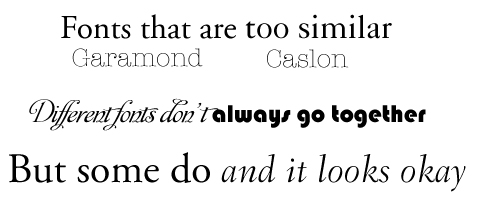
FONT CONTRAST: If you’re planning to mix fonts – which can be a very good thing – be aware that fonts which are too similar don’t look good together, but neither do fonts that are too different. Again, the most hard and fast rule of typography is to keep it PLEASING TO THE EYE. TIP: to create CONTRAST not CONFLICT, you must consider weight (that’s how fat the font appears), size (mixing sizes is okay for emphasis), and whether or not the two (or more) fonts look good together. Fonts that look too much alike don’t work. Neither do fonts that aren’t similar enough.
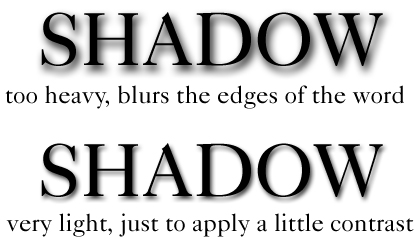
SHADOW EFFECT: Sometimes, using shadow for emphasis can work wonders on a website, but will shadow print well on a greeting card? In my experience, the answer is… sometimes. Too heavy shadow, or shadow that hasn’t been applied properly, WILL NOT work on a greeting card. Shadow that makes a too heavy contrast won’t look good, either. Beware of blurring the lettering. Keep in mind that what looks eye-catching on a computer monitor won’t necessarily pop when printed on a card. TIP: When using darker background colors like green and blue, instead of black shadow, try a shadow in a shade darker or lighter than your background. This can provide the emphasis needed without overdoing it.
OTHER TEXT EFFECTS: I’ve said it before, and I’ll keep saying it – quit using text effects like beveling. Even web designers aren’t using beveling anymore. That effect came and went 20 years ago. It doesn’t look good printed 2D on a card. Let me repeat that – beveling does not print well. Period. Your cards will look much more professional if you are more judicious in your choices. There’s absolutely nothing wrong with flat text. It’s a flat card, after all. 🙂 In fact, most 3D type effects don’t print well. TIP: Print a sample out for yourself before submitting your design.
RIGHT FONT, RIGHT OCCASION: Fonts do have their own character (except Comic Sans, which has none). Choose the correct font considering the occasion you’re designing the card for. TIP: Avoid fonts that are too gimmicky unless you’re creating a “bespoke” font – that is, a font you’ve created with your own hand, which becomes more of an artistic element than an actual typeface.

Finally, just keep in mind the single most important thing: TYPOGRAPHY MUST BE READABLE AND PLEASING TO THE EYE. If you aren’t sure your design works, you can always submit a proposed design to the Critique Clinic for advice. Now go out there and have fun with fonts!


 GCU Community
Thank you! Very good information. I’m glad to be reminded.
Had a good chuckle with the Comic Sans comment! Thanks!
Thank you for the refresher!!