Understanding GCU’s AI Art Submission Policy: What’s Allowed and What’s Not.
🎨 Understanding GCU’s AI Art Submission Policy: What’s Allowed and What’s Not
As AI tools become increasingly popular among artists and designers, Greeting Card Universe (GCU) has updated its submission policy to clarify how AI-generated artwork can be used. The key? AI-assisted collaboration — not one-click, unmodified images.
GCU is committed to protecting original content and intellectual property rights, whether work is made by hand, digitally, or with the help of AI. So, what does that mean for artists using generative AI?

✅ What You Must Do When Submitting AI-Assisted Artwork
To have your AI-assisted designs approved on GCU, make sure your submission meets all of the following:
- List the AI tool you used (e.g. Midjourney, Adobe Firefly, Creative Fabrica) in the “Note to Reviewers.”
- Use a paid version of the AI program — free versions are allowed only if your own editing and enhancements are significant.
- Add real artistic value. Your own pre- or post-processing must be visible — no raw, untouched AI images.
- Ensure commercial usage rights are granted by the AI tool (check licensing/Terms of Use).
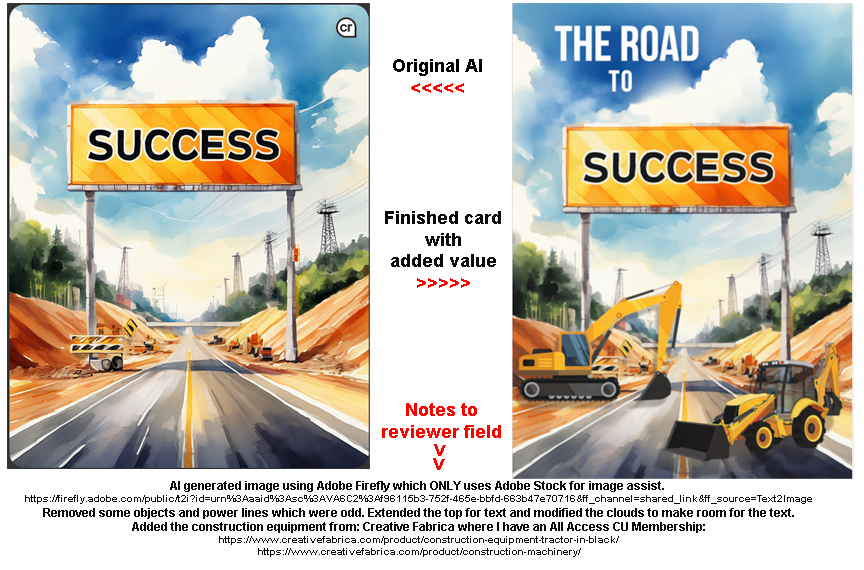
- Include a direct link to the original AI image before your enhancements.
- Explain your artistic contribution. Detail what you changed or added to the image in the Note to Reviewers.
Remember: GCU is not accepting “as-is” AI art. The final design must reflect your creative input.
🚫 What’s Not Allowed
GCU strictly prohibits any generative AI artwork that mimics or references living or copyrighted artists whose work is not in the public domain.
That means:
- Do NOT use prompts like “in the style of [modern artist name]”
- Do NOT create art that closely resembles the work of artists who are still under copyright
- Do NOT upload unedited or lightly edited AI-generated images from free platforms with no added artistic value
This mirrors GCU’s long-standing policy: If it wouldn’t be legal to paint or trace, it’s not legal to prompt.
Example by Doreen Erhardt©
🆗 Prompt Examples: What You Can & Can’t Say
Here are a few examples to help clarify acceptable prompts:
| ✅ Allowed Prompt | 🚫 Not Allowed Prompt |
|---|---|
| “Vintage botanical illustration with warm tones and detailed linework” | “In the style of William Morris” |
| “Fantasy forest scene with glowing mushrooms, soft lighting, painterly brushstrokes” | “Painted like Studio Ghibli background art” |
| “Cute cartoon animals in a flat, colorful vector style” | “Drawn like Mary Blair’s work” |
| “Art deco style pattern with geometric gold elements” | “Like Erté’s fashion illustrations” |
Tip: Focus on descriptive elements — color, composition, era, technique — rather than specific names.
Here are two links to prior guest posts from Stephanie Laird and me about our use of AI when designing cards:
🖌️ Final Thoughts
If you treat AI like a collaborator rather than a shortcut, you’re already on the right track. GCU celebrates creativity, but it must be yours — even when using advanced tools.
Happy creating — and keep those notes to reviewers clear and detailed!
Corrie


 GCU Community
Hi, Connie, Thank you for further clarification regarding Ai use. So far I have submitted three cards using elements from several Ai generated images. I only use my free META message/chat column on Facebook for generating images. Commercial use for Meta is permitted as long as the image is not replicating another artist’s work. Meta can get very weird, as you probably know, and sometimes it has taken over 20 images for Meta to create something usable. I would assume that GCU would not require seeing all images generated from multiple prompts but only the final one that the artist uses. However, I have no way of sending a url or direct link to the Review Team. Only a copy of the jpeg image file is available. I can send this directly to the Review Team in an email, but cannot add a link to the Artist’s Notes to Reviewer. Please advise what can be done to assure that GCU will be satisfied that I have the rights to use a Meta generated image. Thanks for your help, Ramelle Here’s my correspondence with Meta and its answer. * (Ramelle’s question to Meta)* When I give Meta a prompt to create an image, how can I share a link to that original image to a third party? (Meta’s response) You can share the image directly from the chat. When I generate an image based on your prompt, you should see the image displayed in our conversation. To share the image, you can follow these steps:
Click on the image to open it in full view. 2. Right-click on the image and select “Copy image” or “Copy image address” (the exact option may vary depending on your browser). 3. Alternatively, you can also save the image to your device and then share the saved image file.
If you’re looking for a direct link to share, some platforms might not support direct linking to images generated in this chat. In such cases, consider saving the image and uploading it to a hosting site or platform that allows image sharing, then share the link from there.
Hi Ramelle,
I’ll look here for Corrie’s reply as well. RE: your question about which image to show to the review team, you are correct: only the final one that the artist uses.
As for the link, some artists are maintaining a DropBox library of originating AI images and providing in their GCU submission the DropBox link.
Hope this is helpful.
Mindy