Promotion in Motion: Getting Started at Squidoo

Getting Set for Your First Squidoo Lens
What is Squidoo? Squidoo is a popular content-sharing site where users build a free webpage (called a lens) using modules. While no knowledge of HTML is required, you may want to brush up on your basic skills at some point.
How does Squidoo help you? To put it simply, Squidoo not only pays you according to how much traffic your lens pulls in, it also allows you to do some affiliate marketing to earn revenue by using “profitable” modules from Amazon, CafePress, Zazzle, etc. so if anyone buys something by clicking one of your links, you’ll earn commission.
However, that’s not the only reason you want to build a Squidoo lens. Quite apart from making revenue, you’ll be able to use your lens to increase sales of your greeting cards by using links to point customers to your product. More traffic = more sales. Currently, Squidoo allows up to 9 links to GCU per lens so choose your links wisely.
Before you jump in and begin building your first lens, you’ll need to consider a couple of things.
First, think long term. You aren’t going to see results overnight. In fact, it can take a year or more, not a few weeks, before you start seeing significant traffic to your lens and in turn, increased traffic to your GCU links. And you’re going to have to actively promote your lens, too. Cross-pollinate on your blog or website – that’s a good start. Comment on other relevant Squidoo blogs and include the URL of the lens you want to promote.
Don’t go into this thinking you’ll earn a thousand bucks a week in a month’s time. You need to be in this for the long haul and be prepared to work.
Second, choose your topic with care. While hot topics (topics that are currently trending) may get you a spurt of traffic at the get-go, they don’t last long and you’ll soon find your lens languishing. Consider a subject that’s a perennial favorite, one which you can tie into your cards. Or choose a seasonal theme. For example, I have a lens about all natural sunscreens for children that’s popular throughout spring and summer, but gets only a little traffic in autumn and winter. It’s your choice how you want to swing it.
Third, be aware that creating a lens which is nothing more than a promotion for your greeting cards with little or no additional content is unlikely to get you results. Therefore, once you choose your topic, consider how best you want to present your content, and how you can make that into a natural link to your greeting cards.
The best lenses – the lenses that achieve longevity and continue to draw traffic years after their creation – have CONTENT. Yes, the dreaded ‘c’ word (get your mind out of the gutter). Search engines and seekers LOVE content. Just don’t copy and paste someone else’s work. Be original, not naughty.
But how to make a natural fit between your topic and greeting cards? For example, suppose your cards feature nature photography, and you have some with butterflies on them. You can make a lens about photographing butterflies, how and when and where, give tips, etc., and link to a selection of your butterfly cards. It’s a natural fit, and doesn’t look remotely like the dreaded spam. And hey, you can include an Amazon module with books about butterflies, a Zazzle or CafePress module featuring butterfly designs, and so forth.
One of the best things to do at this point is download the free official Squidoo step-by-step guide.
I recommend this guide for anyone considering starting a new lens, and anyone who already has a lens (or two, or three, or more) under their belt. There’s a lot about promotion in there that I’ve found very valuable. There’s also a checklist for newbies they’ll find helpful.
What about me? I have 36 lenses at present (I added a new one yesterday, in fact). My oldest lens is 3 years old, and it’s a vehicle I use to promote a certain collection of my cards at GCU. I’ve mainly promoted it on one of my blogs and through commenting on other Squidoo lenses with relevant content. Guess what? I get well over 1,000 visitors a week (the numbers jump up considerably during the holiday season, believe it or not), and according to my stats, almost 3/4 of them click on one of my links. If I can do it, so can you. Believe me, I wasn’t born with this knowledge. I had to put my nose to the grindstone and work, learn what works for me, accept my failures as learning experiences, and move on.
Squidoo can be effective at promoting your card designs. It’s all in how you work it.
Registering at Squidoo

This is where you sign up for a Squidoo account. Even if you don’t particularly want to make lenses, it’s a good idea to register if you want to try and promote your blog or GCU store via commenting on relevant lenses and leaving a link. This is very straightforward. Fill in the blanks, and press CONTINUE.

Whatever you say your page is about, that will become the title of the lens. You can play around with this later, but don’t just plonk down the first thing you think of. Consider carefully, grasshopper. Then CONTINUE.
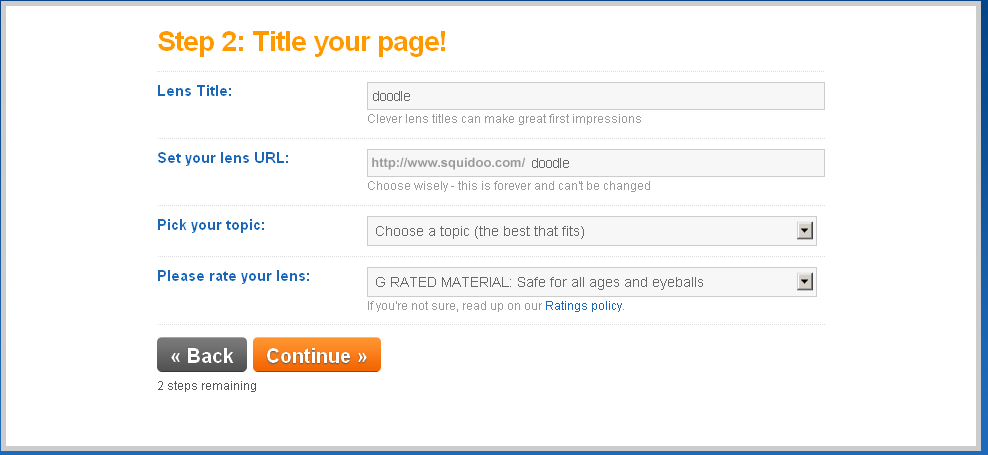
This is where you must take time and give serious thought to your lens. You can always tinker around with the lens title – that’s what will appear at the top of the lens page (don’t veer too far away from your topic – deceptive tactics won’t win you any brownie points) – but the URL is important. If possible, you want a URL to reflect the topic of your lens in a way that people can remember. For example, you’re writing a lens about photographing pets. You might try petphotography. Remember, if you use spaces between words when you’re setting up your URL, it will come out like pet-photography. People may not always remember to put in hyphens or underscores (like pet_photography) so avoid that if you can. When you’re done picking topics (and you’ll be asked to add relevant sub-topics as well), hit CONTINUE.

Add some keywords here. Long-tail keywords – that is, keywords that consist of a phrase rather than a single word, are super for zeroing in on your target audience. You can add more tags to your lens later. Now CONTINUE.

And voila! Here’s your dashboard. All you need to do now is CREATE A LENS. From here you can manage all your content, check your stats, see how you’re doing in the affiliate marketing, etc. Now go and get started making lenses!
Next time on Promotion in Motion, I’ll share a couple of my favorite tips for promoting your lenses.


 GCU Community
Another excellent piece of helpful advice. I’ve yet to get started on Squidoo, this is just what I need to give me the extra push to get started! Thank you 🙂
yup…today’s project…Squidoo lens!
What a fantastic, helpful post, Corrie!
Thank you!