Dash of Inspiration: Organizing Resources
A Dash of Inspiration, A Cup of Creativity by Doreen
Organizing Resources

Last week it was requested that I share how I organize all my resources (brushes, vectors, patterns, etc.), so that’s our topic this week. Although I have Adobe Bridge for CS-5, the fact that I keep all my files and resources on external drives rather than on my computer, makes Bridge simply too slow at gathering the files for my taste. I have considered purchasing software which supposedly makes organization of resource files easier, but as so many artists do, ended up developing my own process using the file manager my operating system came with.
My work area is an internal (home) network which looks something like this:
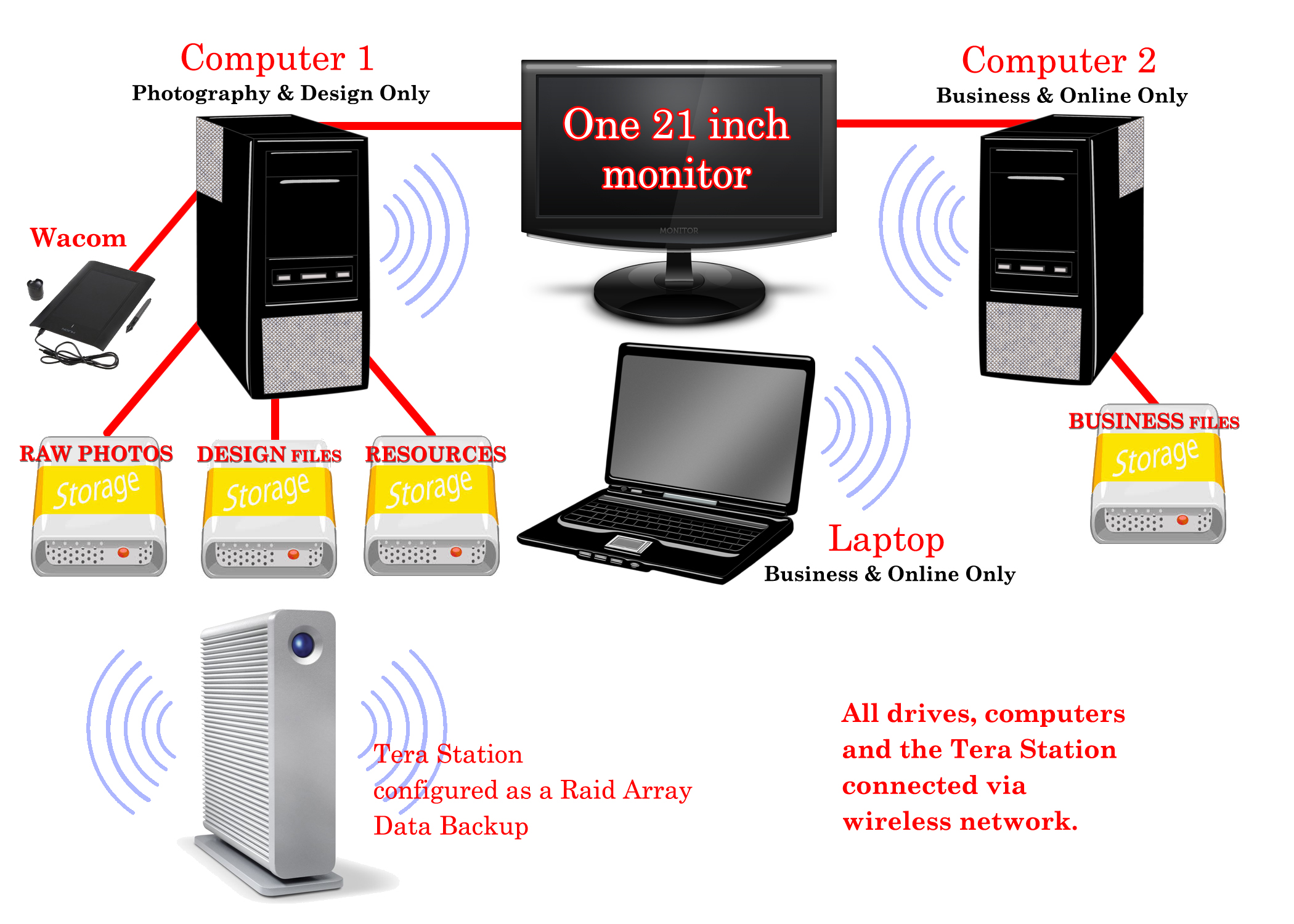
- ALL of my files are stored on external drives. 1 – I use solely for my Raw Camera files. 2 – is dedicated to resource storage. 3 – is dedicated to Design Files (cards, etc) and 4 – is dedicated to business file storage.
- ALL of my drives and computers (laptop included) are connected via a wireless home network so all can be accessed from any computer, anywhere in the house.
- The only files which are actually on any of my computers are the fonts (which I backup on the Tera Station) and installed software.
- Two computers. One is dedicated to photography and design, the other is dedicated to business and online use.
- The Tera Station is configured as a Raid Array and functions as backup for all my external drives and a place for storing common files used by various people in the house making file-sharing a breeze.
Benefits are:
- When a computer fails (and they always do) I never lose files and once the replacement computer arrives, I’m up and running in about an hour since all we have to do is attach the drives and install software.
- I can access any file, any time, on any computer, anywhere in my home.
- Even with the slickest set up to protect from virus/malware/spy-ware, you can never be 100% protected. Therefore by having a computer dedicated to online and one dedicated to design, I am further protecting my design files from exposure to the internet by never accessing the web on that computer.
I personally have found that the only File Organization Tool which is quick and will easily access all storage devices using my home network, is Windows Explorer and currently I’m using Windows 7.
Organizing Resources
Here is my method to keep resource files organized and easily accessible.
- Choose a file structure which works for you. My downloaded resources look like this: Chalkboard_Halloween_61614_byjzkdesigns_Brusheezy – The 1st section is the ‘category’ also the sub-folder title, the 2nd section is the identifier which will allow it to surface in a search for ‘Chalkboard’ or ‘Halloween’ or both. The 3rd is the date which I process the download (if I had more than one, I add a letter to that 61614A), this gives a unique file name. The 4th is who to credit for the resource. The 5th is where I obtained the resource.
- I have a “My Resources” Folder. Within that folder, I have folders for Brushes, Patterns, Backgrounds, Textures, Overlays, Actions, Gradients, Styles, Public Domain, Fonts, etc. Each of those folders have tiered sub-folders by subject under them and I do keep some consistency for ensuring search accuracy.
- I also have found that the more you can break down these folders into sub-folders, the faster it is to find what you need. So don’t be afraid to have a complex folder structure if it keeps you from having a folder flooded with elements which are too varied and time-consuming to look through.
This system offers me the freedom to do all of these things quickly:
- Search in Explorer for all of one kind of resource when viewed as extra large icons makes it easy to find what I want for my design.
- When I use the element in my design, I copy the file name to a notepad so that when I upload my card, I can quickly go to the site I downloaded the element from, search for my element by creator, copy the URL and add that to my Notes to Reviewer.
- I also have at that time, the name of who to credit for the elements in my Artist Notes.
So, my folder structure looks something like this:
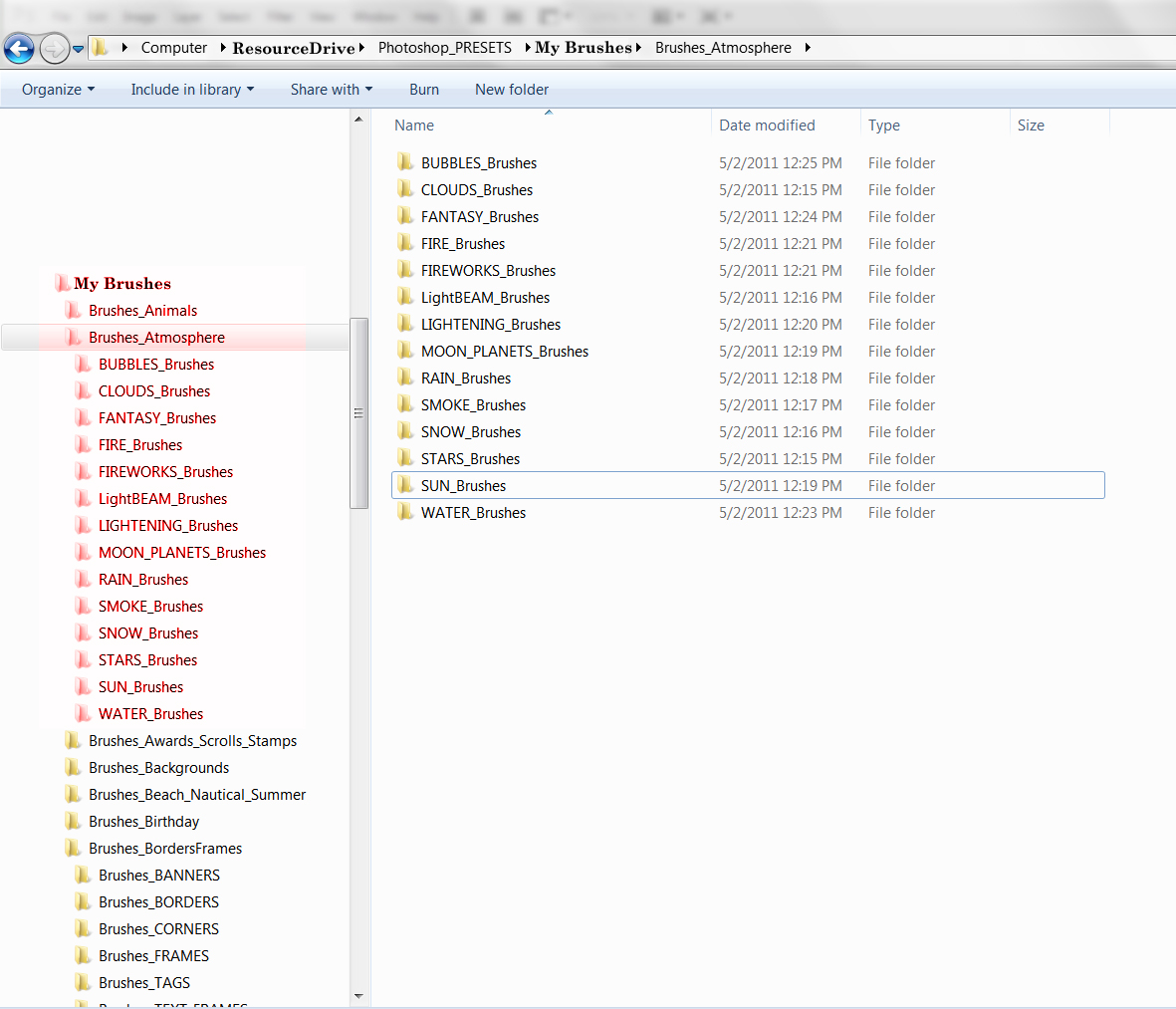
Here are some tips which I’ve found useful:
- Whenever I download TIFF, Photoshop or vector files I open them and re-save as PNG format to 1) to save storage space (file size is small and uncompressed), and 2) to have preview images show up in Explorer when I search.
- When I download brushes and patterns, I put them in a ‘Check’ folder before actually placing them in my resource folders. I do this when there isn’t a visual offered to show the size of the brushes or patterns. Many are created so small that for our usage, designs which are 300dpi, they are useless. Then once every couple of weeks, I’ll open those resources and make the decision to keep or toss. This stops the clutter in my resource folders of tools which do not meet my requirements.
- When it comes to presets, often there are those we use frequently and I simply create a BEST OF folder within my resources or you can set up a library folder, which ever works best for you.
- I’ve found over the years that categorizing by theme/subject rather than by creator or source, works better for me. Try both, decide what works for you.
- I keep all my licenses in one folder making it quick and easy to reference if needed.
Here is a search in My Resources for Chalk – notice that all my folders holding brushes, etc. show up in the search as well as all the image resources. It’s quick and easy to grab and go design.

Now you know my way, here are some other ways of organizing your resource files.
Digital Scrapbook Organization – 3 ways
Organize your Digital Scrapbooking Supplies in Photoshop Elements Organizer
There are also many choices such as iPhoto, Picasa, etc., which allow for better organization, however be very, very careful if you choose to use the editing tools which these programs offer. Most do not produce results which are high quality and non-destructive in application, so commercial designers stay away from these tools.
So until next week … Learn … Create … Inspire!


Simply put … WOW! I thought I was fairly organized, but not so much any more 😉 I’m impressed, Doreen. No wonder you can get so much accomplished in a day! Remember the old commercial, “Be Like Mike” (Michael Jordan)? Well, when I can retire from my regular job and work my business full time, I want to “Be Like Doreen” 🙂
LOL! Thank you Robin, I think? 🙂
Fantastic Doreen! Thanks so much for sharing your setup and organization. My lack of electronic technical skills made some of this greek to me. However, I have a super grandson who works in electronics. I sent him your post and he’s willing to give me some help setting up a better backup system. Your folder organization will really help … I never thought of putting where I obtained the resource in the title. I really appreciate you and your willingness to share your expertise.
You’re welcome Kati and kudos to your grandson for helping you improve your hardware set up 🙂 I too am fortunate in that I have a techno-wizard hubby, so though I have a brief understanding of my hardware setup, I don’t have to do the actual setup … LOL!