Design Spotlight: Dreaming Mind Cards

Today we’re focusing our Design Spotlight on Heather at Dreaming Mind Cards – thanks for giving us some insight into your fabulous creations!
_________________________
 I am a self taught Canadian photographer, graphic designer, and artist and like most artists here, I have always looked for ways to do what I love for a living. Thanks to GCU and the confidence setting up shop here has given me, I can now say that is true.
I started on GCU at the end of May 2009 and growing my shop here, and now in other markets, has been one of the most rewarding professional experiences of my life. Dreaming Mind Cards is now a family enterprise as my wonderful and talented spouse was able to join me in our work last year which has been such a great experience and really is the motivation to grow and develop the shop, spending time doing what you love with those you love the most. The community here is second to none in terms of allowing artists to learn and grow and discover new possibilities for their art to become more than just a much loved hobby.
My favorite card and one of my most popular as well would have to be this mother’s birthday card. It is a mix of my own photography and graphic design and represents my style well. I designed this card for my mom originally and decided after she liked it so much to add it to my store and I’m glad I did because it seems others have enjoyed it as well. This card is very special to me because my mom is not only my biggest fan but she’s my hero and inspiration in life and there is no way I would have the confidence to succeed as an artist without her.
Thank you for the opportunity to share a bit of my story and thank you to all the many artist here who are an endless source of knowledge and inspiration.
Share this:

Rainbow Connection: Get Fruity

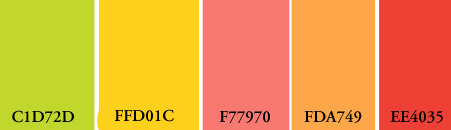
Here’s a fruit filled palette that’s great for spring and summer with a lineup of the freshest colors: lime, lemon, watermelon, tangerine, and cherry! I see luscious florals, tropical settings, picnics, summer camp, the beach, the hottest girls’ dresses, cupcakes, and lots more. Have fun!
Share this:

Dash of Inspiration – What’s Close to Your Heart
A Dash of Inspiration, A Cup of Creativity by Doreen
What’s Close to Your Heart

This time of year, I put my business and personal life on hold for a couple weeks and volunteer my time and expertise to my local Humane Society.
They have a big Whiskers & Wine Dinner event which raises funds for their five big programs such as; Feral Rescue, Pit Bull Rescue and Special Needs Animals. For the past seven years, their annual funds for these programs has been raised at this event through a DVD of photographs, statistics, quotes and music for each program which I put together and after each section is shown, they have an auction.
So my job is to create imagery that evokes the ‘ahhh’ factor and makes those guests take out their wallet and give to the animals! Over the years evolving from this project I created a book and collection of cards called “Stray Muses . . . A Language Unspoken” and 100% of the sales of this collection are donated to my local HS every year.
 So this week, needing to keep it short for my own time constraints, I thought it might be inspirational to share what organizations we help support through our art and I leave you with these 50 Superb Examples of Animal Photography since that’s what is close to my heart – enjoy!
“If you haven’t any charity in your heart, you have the worst kind of heart trouble” Quote by: Bob Hope
What’s in your heart?
See you next week!
Share this:

Critique Clinic – April 28-30, 2012

How does it work? For three days a week (Friday-Sunday midnight), I will open the clinic to any artist who wants an honest peer review and critique of a card which gets plenty of clicks but no sales, so something’s probably not quite right, or you’ve got a new design you want to test drive, or you’re unsure about the marketability of a card. Or perhaps you’re a newbie who isn’t sure if a recently submitted card is up to a marketable standard. Anyone is welcome to participate. In fact, I encourage everyone to at least look at the cards in question and read the critique comments – you may learn something. The purpose of the clinic is to help artists improve the commercial appeal and marketability of their cards.
THE RULES
- ONE card per artist only.
- Card must be for sale at Greeting Card Universe.
- We will take an unlimited number of artists, including those who have submitted recently, HOWEVER I reserve the right to close a clinic for the day if the submissions become overwhelming. If the clinic has been closed, and you submit a card, your comment will be deleted.
- To submit a card for critique, post a link to the card at GCU in the comments section of this clinic post. Allowances will be made if you’ve had a card declined, or made a new design you’d like advice on. Give us the link where we can see the card, such as your private gallery, Flickr, etc.
- Any artist is free to comment and/or give a critique of a submitted card. HOWEVER, post-and-run comments like “great card” or “you suck” will not be tolerated, nor will abuse. Criticism should be constructive, not destructive. Play nice or you will be banned.
- I also won’t tolerate temper tantrums if you decide your “artistic integrity” is being stepped on because you asked for a critique, and someone told you the photo you’re using isn’t in focus. If you can’t take honest criticism, don’t submit. Once gets you a warning; twice and you’re banned from submitting in the future.
- Artists who critique may do so by giving their opinion, posting an example of another card, or pointing the submitter to a video, on-line article, or other helpful suggestion.
- Don’t forget that artists who are giving you tips and helpful advice are volunteering their time and trouble. Be nice. A link back to their store on your website or blog is appreciated (but not mandatory).
- You are free not to take any advice offered. There’s no guarantee any card will be a bestseller, so don’t come into the clinic with unrealistic expectations.
- Rules may change as we go along and we see how things turn out, okay?
So without any further ado, I declare this week’s Critique Clinic open!
Share this:

Design Contest: Mum’s the Word

A fun subway art inspired word cloud card for Mother's Day featuring lots of popular sayings about mothers and sweet design elements like shoes, hearts, and other contemporary doodles.
Mother’s Day is on May 13th this year (the U.S. version of the holiday, anyway) so I thought, why not have a Design Contest to honor all those wonderful women we call Mom!
So here’s how Design Contest: Mum’s the Word works:
You have until May 3rd to give us a link in the comment’s section of this post to a Mother’s Day card at GCU. On May 4th, I’ll post all the entries and voting will begin. Voting will continue until May 9th. On May 10th, I’ll announce the winner. Sound good? Then get going and don’t miss the deadline!
The prize for the winning card will be the winner’s choice of a $10 Amazon.com gift certificate, $10 MyFonts.com gift certificate, or 5 free card credits!
BONUS VOTES:
For any artist who posts a card other than their own (another artist’s), I’ll award 5 bonus votes.
For any artist who pins 5 of the nominees on a Pinterest pinboard, I’ll award 5 bonus votes.
For any artist who does a post about Mother’s Day including at least one of the nominated cards, I’ll award 5 bonus points.
That’s 15 bonus votes up for grabs!
To claim your bonus votes, leave links in the comments section of this post. No link, no votes.
Share this:

Rainbow Connection: Juicy Summer

Summer isn’t too far away, and I wanted to share with you a set of wonderfully juicy summer colors that are really taking off. Use any of these colors (or all of them) in combination with white for the best effect.
That red’s so punchy, I can’t wait to use it myself!

Share this:

Dash of Inspiration – Don’t Dodge the Subject
A Dash of Inspiration, A Cup of Creativity by Doreen
In Collaboration with Sun at Night
Don’t Dodge the Subject
Back in the days of traditional darkroom print-making, photographer’s were taught the technique of Dodging and Burning to achieve a beautiful balance of tonal ranges from the whitest white to the blackest black. I used to save the black plastic and cardboard which came with the photo paper and cut them into varying shapes. I also saved those clear plastic florist ‘forks’ that holds the card in a bouquet delivery.
When I had a negative with blown-out highlights or deep shadows, these homemade tools were put to work by holding the shape on the end of my ‘florist fork’ over the area(s) requiring more or less exposure from the enlarger lamp. The trick was to hold a ‘mask’ approximately mid-way between the enlarger lamp and the paper to be exposed, while using a slight waving or circular motion to blend the exposure (digital term is feathering).
Though I’m glad to be out of a chemical darkroom, those dodging and burning techniques are still quite valuable and critical to the digital photographer. No matter our experience level, we all have photos that are taken ‘in the moment’ where we either could not modify the lighting, our position or offered no time to adjust the camera settings. Often those images are just too far gone, but just as frequently in the digital darkroom of today, these images can be turned spectacular using a variety of techniques.
Joining us today is SunAtNight, one of GCU’s many talented artists who has written a terrific article and created some very helpful imagery to provide you with an introduction to improving the tonal range/contrast of your images.
Introduction to Contrast in Monochromatic Digital Photos by SunAtNight
Contrast creates and stirs up visual interest in all photos but it plays an important role in monochromatic images. To quote photographer Bill Smith “the craft of photography is represented by, and visualized in, the beauty of a good black-and-white print, a translation of the world around us into shades of gray.” Contrast helps the photographer do just that. It defines shapes, areas, and regions within the picture and it makes edges clearly distinct and recognizable to viewers. It is a play between light and dark. It is what makes the image energized and pop with life.
Contrast is defined as the differences in tones. The brightest whites and the darkest shadows which make up the most distance on the tonal scale create a high contrast image. An image that is considered low contrast (often referred to as flat) has whites and darks that are closer or less of a distance on the tonal scale.

Figure1 : Broad range in tonal scale = high contrast.
Training the Eye – Practice Exercise
One of the most common learning exercises to assist in training the eye to observe and identify contrast is to simply circle the light and dark areas of the photo in your editing software. You can implement this in a new layer and delete at any time. It’s quick and easy. Once you do this a couple of times, your eye will start to gravitate to the tonal ranges and identify contrast automatically.
Once you have identified the light and dark regions the next step is to analyze. There are some basic characteristics to look for:
- Does the main subject pop from the background?
- Where are the trouble spots?
- What is the quality of existing light? Hard, Soft or Diffused?
- Are there any areas competing with each other?
- Below is an example of this process

Figure2 : Exercise in training the eye for contrast
For this example exercise the photo depicts a pear amongst a pile of cloves and cinnamon sticks. The first photo has the dark areas identified. The second photo identifies the light areas. The third photo indicates the analysis. In this case observations tell us that the image does not pop from the background; it does actually compete with it and that causes loss of detail in the stem. The image is dark overall. The quality of existing light is one hard and one diffused (soft). Loss of detail can also be seen in the lower right hand corner of the image where the mound of cloves are located.
Popular Corrective Actions – Remedies
How to fix low contrast is in the hands of the photographer. There are many remedies to try and you’ll probably have to try a few combinations to achieve wanted results. Here are some common corrective actions:
- Add more directional light
- Increase exposure
- Dodging and burning in photo editing software
- Increase and deepen shadows in editing software
- Increase in contrast settings
- Selective focus – blurring the background more
- Main subject isolation
- Digital photo filters
- Digital Levels adjustment – or curves
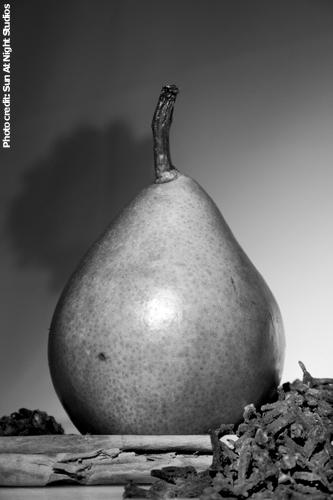
Figure 3: Remedy in post of increased exposure, contrast, shadows and dodging
The photo above utilizes multiple remedies in different areas. The first corrective action to take place is an increase in exposure and contrast. This lightened the background which enhanced the pear and cinnamon sticks. The second implementation was to deepen the shadows just a touch. The last remedy was to dodge the pile of cloves in the foreground. This enhanced the texture and shapes of the individual cloves adding detail that was not readily perceived by the eye.
I want to thank SunAtNight for taking the time and such great care to create these wonderful visuals to help you train your eye to see contrast and the important role it plays in making or breaking an image.
My personal experience in digital dodging and burning is that I never use the Dodge and Burn tools supplied by these programs, rather I use layer masks and the brush tool to effectively paint with light and shadow. The reason being if you use the Dodge and Burn tools in Photoshop for example, the undo feature leaves artifacts behind because it does not completely undo the process . . . so experiment! Once you learn to see a full range of contrast in a Monochromatic image you will be able to use the same technique to apply corrections to your color images. Below are links to some tutorials to get you started.
See you next week!
Dodging and Burning in Photoshop by Peter Pan-tsless
Selective Lightening and Darkening in Photoshop Elements by Retouching Academy
Paint Shop Pro Dodge and Burn by The Graphics Tablet
GIMP Tutorial Dodging and Burning by PIXLS.US
Share this:

Out of the Office
Just a note to let everyone know that there will be no post on Monday, April 23, and Doreen Erhardt’s usual post will be moved to Tuesday. My partner has an early morning appointment to get her prosthetic leg on Monday, and we won’t be home. See you guys on Tuesday! 🙂
Share this:

Critique Clinic – April 21-22, 2012
How does it work? For three days a week (Friday-Sunday midnight), I will open the clinic to any artist who wants an honest peer review and critique of a card which gets plenty of clicks but no sales, so something’s probably not quite right, or you’ve got a new design you want to test drive, or you’re unsure about the marketability of a card. Or perhaps you’re a newbie who isn’t sure if a recently submitted card is up to a marketable standard. Anyone is welcome to participate. In fact, I encourage everyone to at least look at the cards in question and read the critique comments – you may learn something. The purpose of the clinic is to help artists improve the commercial appeal and marketability of their cards.
THE RULES
- ONE card per artist only.
- Card must be for sale at Greeting Card Universe.
- We will take an unlimited number of artists, including those who have submitted recently, HOWEVER I reserve the right to close a clinic for the day if the submissions become overwhelming. If the clinic has been closed, and you submit a card, your comment will be deleted.
- To submit a card for critique, post a link to the card at GCU in the comments section of this clinic post. Allowances will be made if you’ve had a card declined, or made a new design you’d like advice on. Give us the link where we can see the card, such as your private gallery, Flickr, etc.
- Any artist is free to comment and/or give a critique of a submitted card. HOWEVER, post-and-run comments like “great card” or “you suck” will not be tolerated, nor will abuse. Criticism should be constructive, not destructive. Play nice or you will be banned.
- I also won’t tolerate temper tantrums if you decide your “artistic integrity” is being stepped on because you asked for a critique, and someone told you the photo you’re using isn’t in focus. If you can’t take honest criticism, don’t submit. Once gets you a warning; twice and you’re banned from submitting in the future.
- Artists who critique may do so by giving their opinion, posting an example of another card, or pointing the submitter to a video, on-line article, or other helpful suggestion.
- Don’t forget that artists who are giving you tips and helpful advice are volunteering their time and trouble. Be nice. A link back to their store on your website or blog is appreciated (but not mandatory).
- You are free not to take any advice offered. There’s no guarantee any card will be a bestseller, so don’t come into the clinic with unrealistic expectations.
- Rules may change as we go along and we see how things turn out, okay?
So without any further ado, I declare this week’s Critique Clinic open!
Share this:

Tips & Tricks: Foreign Language Cards

International artists at GCU have an advantage – they can include foreign language cards (non-English) in many categories. We do it, and try to incorporate cards in other languages with every new design if we can. But unless you’re a native speaker or studied a language in school, it can be downright impossible to get that non-English phrase right. Here are some tips that may help you.
TIP: Do not – and I mean, do not – rely on Google Translate, Babelfish, or any other on-line translation program. Such programs rely on literal translation, which is often incorrect. If in doubt, stick to basic phrases like Happy Birthday and leave well enough alone.
TIP: Don’t show up in translators’ forums or language forums and ask folks to help you with free translation services. Most of these people translate for a living and they charge for their time. Asking them to do it for free makes you look like a shmuck. And if you do it anyway, you’ll be interrogated as to why you’re asking in the first place.
TIP: If you want to do cards in Chinese, Japanese, Korean, Greek, Russian, Arabic, Hebrew, Sanscrit and other languages that don’t use a Western-style alphabet, you won’t be able to see the characters unless you download and install an appropriate font. And don’t assume that using romanization of a phrase (that is, phonetically spelling out a word or phrase as it sounds in the Western alphabet as opposed to using Cyrillic, for example) is going to fly. Most of the time, it doesn’t. Why? Because there’s little standardized spelling when converting to a Western format.
TIP: I’ve created several .psd files in Photoshop which contain, in layers, phrase such as Happy Birthday or Happy Easter or Merry Christmas in many languages, so it’s very easy for me to create a new series of foreign language cards from my design. Just pop them out assembly-line style! 🙂
The Translation Assistance thread in the GCU Forum is a good place to start. Ask fellow artists for help and you’ll likely get an answer along with the reassurance that a native speaker is giving you good information.
You can find Happy Birthday in many languages here.
Phrases and common words in a number of languages are available here.
Need to use diacritical marks? That’s the two dots over the a, the slash above the e, the wavy line above the n, etc? Don’t have or don’t know the keyboard shortcuts? Litetype’s Virtual Keyboard makes it cut-and-paste easy. And no, you can’t just drop the marks altogether and say good enough. You may be changing the meaning of the word if you do.
Now you should have a better idea of the do’s and don’t’s involved in creating foreign language cards. Good luck!


 GCU Community