Critique Clinic – April 21-22, 2012

How does it work? For three days a week (Friday-Sunday midnight), I will open the clinic to any artist who wants an honest peer review and critique of a card which gets plenty of clicks but no sales, so something’s probably not quite right, or you’ve got a new design you want to test drive, or you’re unsure about the marketability of a card. Or perhaps you’re a newbie who isn’t sure if a recently submitted card is up to a marketable standard. Anyone is welcome to participate. In fact, I encourage everyone to at least look at the cards in question and read the critique comments – you may learn something. The purpose of the clinic is to help artists improve the commercial appeal and marketability of their cards.
THE RULES
- ONE card per artist only.
- Card must be for sale at Greeting Card Universe.
- We will take an unlimited number of artists, including those who have submitted recently, HOWEVER I reserve the right to close a clinic for the day if the submissions become overwhelming. If the clinic has been closed, and you submit a card, your comment will be deleted.
- To submit a card for critique, post a link to the card at GCU in the comments section of this clinic post. Allowances will be made if you’ve had a card declined, or made a new design you’d like advice on. Give us the link where we can see the card, such as your private gallery, Flickr, etc.
- Any artist is free to comment and/or give a critique of a submitted card. HOWEVER, post-and-run comments like “great card” or “you suck” will not be tolerated, nor will abuse. Criticism should be constructive, not destructive. Play nice or you will be banned.
- I also won’t tolerate temper tantrums if you decide your “artistic integrity” is being stepped on because you asked for a critique, and someone told you the photo you’re using isn’t in focus. If you can’t take honest criticism, don’t submit. Once gets you a warning; twice and you’re banned from submitting in the future.
- Artists who critique may do so by giving their opinion, posting an example of another card, or pointing the submitter to a video, on-line article, or other helpful suggestion.
- Don’t forget that artists who are giving you tips and helpful advice are volunteering their time and trouble. Be nice. A link back to their store on your website or blog is appreciated (but not mandatory).
- You are free not to take any advice offered. There’s no guarantee any card will be a bestseller, so don’t come into the clinic with unrealistic expectations.
- Rules may change as we go along and we see how things turn out, okay?
So without any further ado, I declare this week’s Critique Clinic open!
Share this:

Tips & Tricks: Foreign Language Cards

International artists at GCU have an advantage – they can include foreign language cards (non-English) in many categories. We do it, and try to incorporate cards in other languages with every new design if we can. But unless you’re a native speaker or studied a language in school, it can be downright impossible to get that non-English phrase right. Here are some tips that may help you.
TIP: Do not – and I mean, do not – rely on Google Translate, Babelfish, or any other on-line translation program. Such programs rely on literal translation, which is often incorrect. If in doubt, stick to basic phrases like Happy Birthday and leave well enough alone.
TIP: Don’t show up in translators’ forums or language forums and ask folks to help you with free translation services. Most of these people translate for a living and they charge for their time. Asking them to do it for free makes you look like a shmuck. And if you do it anyway, you’ll be interrogated as to why you’re asking in the first place.
TIP: If you want to do cards in Chinese, Japanese, Korean, Greek, Russian, Arabic, Hebrew, Sanscrit and other languages that don’t use a Western-style alphabet, you won’t be able to see the characters unless you download and install an appropriate font. And don’t assume that using romanization of a phrase (that is, phonetically spelling out a word or phrase as it sounds in the Western alphabet as opposed to using Cyrillic, for example) is going to fly. Most of the time, it doesn’t. Why? Because there’s little standardized spelling when converting to a Western format.
TIP: I’ve created several .psd files in Photoshop which contain, in layers, phrase such as Happy Birthday or Happy Easter or Merry Christmas in many languages, so it’s very easy for me to create a new series of foreign language cards from my design. Just pop them out assembly-line style! 🙂
The Translation Assistance thread in the GCU Forum is a good place to start. Ask fellow artists for help and you’ll likely get an answer along with the reassurance that a native speaker is giving you good information.
You can find Happy Birthday in many languages here.
Phrases and common words in a number of languages are available here.
Need to use diacritical marks? That’s the two dots over the a, the slash above the e, the wavy line above the n, etc? Don’t have or don’t know the keyboard shortcuts? Litetype’s Virtual Keyboard makes it cut-and-paste easy. And no, you can’t just drop the marks altogether and say good enough. You may be changing the meaning of the word if you do.
Now you should have a better idea of the do’s and don’t’s involved in creating foreign language cards. Good luck!
Share this:

Nuts and Bolts: Typography

To continue this week’s theme, we’re talking Typography.
Why should you care? Because you can have the most beautiful illustration, the most fabulous idea for the front of a greeting card, but if you choose the wrong font or set up your text in an ill-advised manner, it spoils the whole thing. Typography is important.
Bottom line: any typography you choose MUST be pleasing to the eye. When you choose a font or fonts, be aware of contrast, leading (that’s the space between the lines), kerning (that’s the space between the letters), length, and point size.
Remember, THE SOLE PURPOSE OF TYPOGRAPHY IS TO BE READ. Look at your typography at arm’s length. Get up and take a step back. Can you still read what you typed? If the font isn’t clearly readable, don’t use it.
KERNING: Some fonts weren’t created with proper leading or kerning. Just dashing your text off and slapping it on the card won’t look good, but if the font is otherwise well designed, you can play around with the leading and kerning in your graphics editing program. TIP: If you’re not sure the kerning is right, flip the text upside down. That way, you can clearly see the space between the letters without the word itself getting in your way.

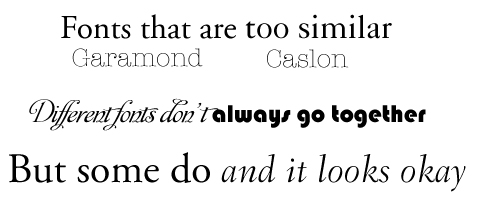
FONT CONTRAST: If you’re planning to mix fonts – which can be a very good thing – be aware that fonts which are too similar don’t look good together, but neither do fonts that are too different. Again, the most hard and fast rule of typography is to keep it PLEASING TO THE EYE. TIP: to create CONTRAST not CONFLICT, you must consider weight (that’s how fat the font appears), size (mixing sizes is okay for emphasis), and whether or not the two (or more) fonts look good together. Fonts that look too much alike don’t work. Neither do fonts that aren’t similar enough.
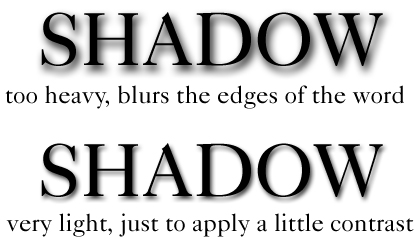
SHADOW EFFECT: Sometimes, using shadow for emphasis can work wonders on a website, but will shadow print well on a greeting card? In my experience, the answer is… sometimes. Too heavy shadow, or shadow that hasn’t been applied properly, WILL NOT work on a greeting card. Shadow that makes a too heavy contrast won’t look good, either. Beware of blurring the lettering. Keep in mind that what looks eye-catching on a computer monitor won’t necessarily pop when printed on a card. TIP: When using darker background colors like green and blue, instead of black shadow, try a shadow in a shade darker or lighter than your background. This can provide the emphasis needed without overdoing it.
OTHER TEXT EFFECTS: I’ve said it before, and I’ll keep saying it – quit using text effects like beveling. Even web designers aren’t using beveling anymore. That effect came and went 20 years ago. It doesn’t look good printed 2D on a card. Let me repeat that – beveling does not print well. Period. Your cards will look much more professional if you are more judicious in your choices. There’s absolutely nothing wrong with flat text. It’s a flat card, after all. 🙂 In fact, most 3D type effects don’t print well. TIP: Print a sample out for yourself before submitting your design.
RIGHT FONT, RIGHT OCCASION: Fonts do have their own character (except Comic Sans, which has none). Choose the correct font considering the occasion you’re designing the card for. TIP: Avoid fonts that are too gimmicky unless you’re creating a “bespoke” font – that is, a font you’ve created with your own hand, which becomes more of an artistic element than an actual typeface.

Finally, just keep in mind the single most important thing: TYPOGRAPHY MUST BE READABLE AND PLEASING TO THE EYE. If you aren’t sure your design works, you can always submit a proposed design to the Critique Clinic for advice. Now go out there and have fun with fonts!
Share this:

Design Spotlight: Patty Cimlov-Zahares

We’re putting the Design Spotlight on Patty Cimlov-Zahares today – thanks for the smiles, Patty!
_________________________
 Like probably most of us here at GCU, I’ve loved creating art since I first picked up a crayon. As a kid, I was always making greeting cards for friends and family. I can’t imagine doing any other kind of work for a living, although I don’t consider what I do as work, it’s more like a hobby where I get paid to do what I love.
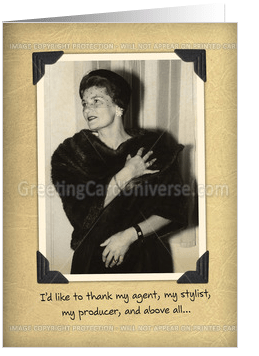
This is my Mom in the early 50’s, striking a dramatic pose. She was actually imitating my grandmother (her mother-inlaw) who was a bit of a drama queen. My Mom loved spoofing people. The photo was taken by my Dad and I added the vintage background and photo corners to give it a nostalgic look. The Academy Awards came to mind when I found this photo, so I thought it would be a fun and unique way for a woman to send a thank you card to someone. I work in Photoshop and/or Illustrator and layout my cards in InDesign.
With my warped sense of humor and wild imagination, I love that I can do just about anything with Photoshop. To create this fun birthday card, I photographed the pansies and took some self-timer shots of myself. I exaggerated my features with Photoshop and laid out this card in Indesign.
I’m a native Californian and live in Discovery Bay with my husband, Mike and Riley, our spoiled Golden Receiver. I’ve been a graphic designer and art director for various ad agencies since the early 70s. In 1980, I started freelancing full time as Patty Cimlov-Zahares, Another Artist, designing everything from logos to ad campaigns, annual reports, brochures, point-of-purchase displays, web sites, etc. for large high tech companies and retail accounts.
After winning a few Hallmark Card contests, I got hooked on creating my own line of greeting cards, so I opened a store at GCU in November 2011. I have so much fun creating cards now, I sometimes have a tough time focusing on my advertising accounts. For fun, I also wrote and illustrated my children’s book, “Ugh! I’m a Slug.“
I love seeing everyone’s creations here at GCU and honored to be in the spotlight. Thank you! You guys are great!
Share this:

Dash of Inspiration – Typography Speaks
A Dash of Inspiration, A Cup of Creativity by Doreen
Typography Speaks Louder Than Words

Every week I stop by some of the online graphic art magazine sites to see the latest articles for designers. This past week, Smashing Magazine published a wonderful read about “visual language” and a designer’s use of typography to explore the interaction between the look of type and what the type actually says. Carolyn and Jessica; the authors of this article, do a fantastic job of providing both written and visual examples of how showing the same message in a design can be presented in a number of ways to convey and encourage a diversity of responses.
I think you’ll see here how important typography is to the overall design and that it should be kept in the forefront of the designer’s mind from the early moments of creating that design, particularly in greeting cards where both imagery and message are paramount to the customer. Typography should NEVER be an afterthought on the card face that gets stuffed wherever there is space left, the designer should know at the beginning of their card design where the text will go, what it’s visual attributes will be and how it will convey the message of the imagery it shares space with.
We’ve talked about typography before; so if you are new to the GCU Community Blog, be sure to visit our old posts where both Corrie and I have shared many great articles on typography for greeting cards as well as some terrific fonts for you to grab!

Image courtesy of SmashingMagazine.com
On my Facebook Fan page, I post links weekly to great CU downloads and often those are fonts. Here are links to some from the previous months posts and feel free to stop by and Like the Salon of Art Facebook Page to grab new goodies for your design arsenal every week!
See you next week!
When Typography Speaks Louder Than Words by Carolyn Knight, Jessica Glaser
Curse Casual Regular by Jayvee D. Enaguas
SpicyRice-Regular by Astigmatic
Share this:

Critique Clinic – April 14-15, 2012
How does it work? For three days a week (Friday-Sunday midnight), I will open the clinic to any artist who wants an honest peer review and critique of a card which gets plenty of clicks but no sales, so something’s probably not quite right, or you’ve got a new design you want to test drive, or you’re unsure about the marketability of a card. Or perhaps you’re a newbie who isn’t sure if a recently submitted card is up to a marketable standard. Anyone is welcome to participate. In fact, I encourage everyone to at least look at the cards in question and read the critique comments – you may learn something. The purpose of the clinic is to help artists improve the commercial appeal and marketability of their cards.
THE RULES
- ONE card per artist only.
- Card must be for sale at Greeting Card Universe.
- We will take an unlimited number of artists, including those who have submitted recently, HOWEVER I reserve the right to close a clinic for the day if the submissions become overwhelming. If the clinic has been closed, and you submit a card, your comment will be deleted.
- To submit a card for critique, post a link to the card at GCU in the comments section of this clinic post. Allowances will be made if you’ve had a card declined, or made a new design you’d like advice on. Give us the link where we can see the card, such as your private gallery, Flickr, etc.
- Any artist is free to comment and/or give a critique of a submitted card. HOWEVER, post-and-run comments like “great card” or “you suck” will not be tolerated, nor will abuse. Criticism should be constructive, not destructive. Play nice or you will be banned.
- I also won’t tolerate temper tantrums if you decide your “artistic integrity” is being stepped on because you asked for a critique, and someone told you the photo you’re using isn’t in focus. If you can’t take honest criticism, don’t submit. Once gets you a warning; twice and you’re banned from submitting in the future.
- Artists who critique may do so by giving their opinion, posting an example of another card, or pointing the submitter to a video, on-line article, or other helpful suggestion.
- Don’t forget that artists who are giving you tips and helpful advice are volunteering their time and trouble. Be nice. A link back to their store on your website or blog is appreciated (but not mandatory).
- You are free not to take any advice offered. There’s no guarantee any card will be a bestseller, so don’t come into the clinic with unrealistic expectations.
- Rules may change as we go along and we see how things turn out, okay?
So without any further ado, I declare this week’s Critique Clinic open!
Share this:

Fonts: Kimberly Geswein
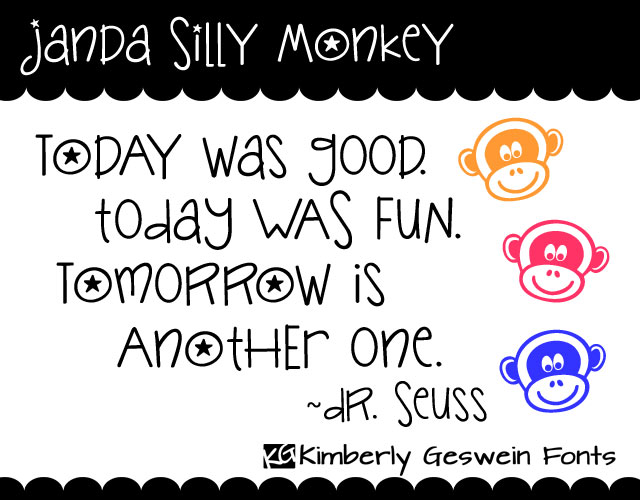
If you’re looking for cute, handwritten fonts, look no further: Kimberly Geswein makes Fonts with Heart.
The best thing is that she allows pretty unlimited commercial use for just a $5 licensing fee per font which can be easily paid via PayPal. Here’s an example of her work. She has many more fonts in her collection.
For just $5, you can have a lot of fun!
Share this:

Lightning Round: Hippity Hoppity – RESULTS
We’re hopping around blogs today in our Lightning Round: Hippity Hoppity! Here are the entries. Participants, thanks for playing, and please share the links on your blogs. And everybody, don’t forget to visit our wonderful entries and leave comments.
And the winner of our random drawing is… Renae Frankz! Congratulations, Renae!
__________________________
Aura 2000
I Spotted the Easter Bunny
Renae Frankz
Easter – Some Bunny Loves You
Betty Matsumoto-Schuch
Filling In Fur Pete’s Sake
Betsy Bush
Hippity Hoppity Challenge
Eliz Designs
Cute Frogs on Cards and Gifts
Janet Lee Designs
My Favorite Frogs
Christi Madden
Bernard the Easter Frog
Share this:

Design Spotlight: Nancy Mink
Today’s Design Spotlight is on Nancy Mink, who has a unique and visually interesting style. I really like her cards. Thanks for the glimpse, Nancy!
_________________________
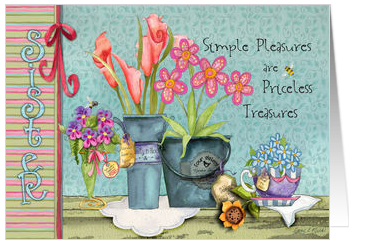 My favorite card is Sister Birthday Treasures.
As a licensed watercolor artist for home decor and fabric design, I look to the countryside for inspiration; whether it is as close as my backyard in northwest Oregon or across our beautiful country. This was painted with my sisters in mind (their names are on the flower labels!) We all enjoy flowers, spring and anything to do with gardening.
Simple pleasures really are priceless treasures; one only has to slow down a bit to notice and appreciate them.
Share this:

Dash of Inspiration – Happy Easter
A Dash of Inspiration, A Cup of Creativity by Doreen
Happy Easter!
I write this article each Sunday so it’s ready for all of you 1st thing Monday mornings, so this week for me it’s Easter and it actually looks like spring outside in the foothills of California.
March brought a somewhat regular routine of sun followed by rain followed by snow which seemed to rotate through each week. Our yard is filled with buds of growth making us want to begin planting, yet I know in my heart that the last frost has not arrived and I’ll be sorry if I put tender new plants in the garden!
This week I thought I’d give you a couple links to some beautiful spring art. For those of you who have not yet felt the touch of spring in your own gardens, perhaps you can warm up a little inside and enjoy some beautiful blooms!
See you next week!
Lovely Spring Art at Fine Art America
Beautiful Spring Art at RedBubble


