Design Spotlight: Anura Design Studio

Today, the Design Spotlight falls on Kathleen Cheldelin of Anura Design Studio. Her chosen card is a recent Design of the Day winner. Thanks for stopping by, Kathleen!
_________________________
 I grew up loving to draw and paint. Creating Christmas designs is a special pastime for me because at an early age my Mom encouraged me to share my talent. She would wrap the gift packages in white paper and I would draw and later paint holiday designs on each package. These childhood treasures became a big hit with family members and bring back many fond memories.
For many years I did commissioned portrait drawing, mostly of children and pets, that provided supplemental income for college, family and later teaching projects. After retiring from teaching and struggling with arthritis in my hands, I discovered digital art and it has opened up a whole new world of creative expression for me.
I feel so fortunate that I found Greeting Card Universe as an outlet for my creative juices. I’ve learned much from the many creative artists on the site who are very supportive and willing to share their expertise. It is great fun and very rewarding to create a design that someone finds meaningful for expressing and/or celebrating a memorable moment in their life.
This little snowman with blue fuzzy hat and mittens was first created for my first grandchild many years ago and what a surprise for me when I discovered that I could recreate him digitally. The pen tablet, mouse and supportive art applications are a wonder!
Share this:

Custom Corner: Barbara Schreiber
Today is the first of a new series I’m calling Custom Corner, where we’ll be highlighting an artist who’s done a custom job for a shopper, and experienced a success story. Our own Mindy came up with the idea, and is providing the information. We invite all featured artists to add their own story in the comments.
Today, for our inaugural post, we’ve chosen Barbara Schreiber, whose recent holiday greeting card featuring a lacy Christmas box with tags on a gray background has a lot of modern flair. Good luck, Barbara, with your sales!
_________________________

Christmas Blessings - Barbara Schreiber (original design)

Custom design by Barbara Schreiber
Request: “Please change Merry Christmas to Season’s Greetings on the red tag. Add “CCSO” on green tag to read: To a great CCSO colleague.”
Result: “Thank you so much for accommodating my requested change on the holiday card. The Sheriff loved the card so much, we ordered an additional 21 cards to send to his Command staff in addition to the Admin Assistants.”
Share this:

Dash of Inspiration – December 5, 2011
A Dash of Inspiration, A Cup of Creativity by Doreen
Scanning Tips

There have been some discussions on the forum centered around scanning so I wanted to offer some good tips and inspire you to learn more about this process that some even call more of an art than a process. I’ve certainly found scanning photography, film and watercolors to be a more in-depth process than one might think to achieve a high-quality scan.
Your first step is to choose a scanner that is right for your needs. Photographers who have old negatives and transparencies will require a scanner dedicated to film and photography. Artists who are scanning their small works will need a scanner capable of handling their size requirements in addition to high-quality capture if you work in smaller sizes. For those who work in large format you can find services that use large commercial grade scanners or those which provide studio quality digital capture to transfer larger works of art into a digital format suitable for selling on POD’s and/or as fine art prints.
It’s more important to learn how to use your scanner well than to purchase the latest, greatest model.
Five fab photo scanners compared by CNET

(c) Ginette Callaway
Scanning Fine Art
A mistake often made is the assumption that scanning art for selling online in print form is different than scanning fine art for giclee reproduction. Anything which sells online, such as our greeting cards, are reproductions of our artwork and therefore the transfer to digital format needs to be done with the same quality and attention to detail that you would in preparing the capture for a limited edition print. This article might help you understand the need for a high quality scan of your artwork.
What Are the Best Scanners for Drawings & Watercolor Art?
Turn Paint into Pixels by Dani Jones
How to Scan Artwork From Artists Resources Wiki
Tutorial: Scanning Drawings to Color in Photoshop
Scanning Software, Tips and Help
And remember . . . as with anything worth doing, when it comes to scanning artwork, photographs, and film – garbage in, garbage out – in other words, if there is dust and scratches on your film, they will be there when you scan. If your photograph is out of focus, so will your scan.
Share this:

Critique Clinic – December 2-4, 2011

How does it work? For three days a week (Friday-Sunday midnight), I will open the clinic to any artist who wants an honest peer review and critique of a card which gets plenty of clicks but no sales, so something’s probably not quite right, or you’ve got a new design you want to test drive, or you’re unsure about the marketability of a card. Or perhaps you’re a newbie who isn’t sure if a recently submitted card is up to a marketable standard. Anyone is welcome to participate. In fact, I encourage everyone to at least look at the cards in question and read the critique comments – you may learn something. The purpose of the clinic is to help artists improve the commercial appeal and marketability of their cards.
THE RULES
- ONE card per artist only.
- Card must be for sale at Greeting Card Universe.
- We will take an unlimited number of artists, including those who have submitted recently, HOWEVER I reserve the right to close a clinic for the day if the submissions become overwhelming. If the clinic has been closed, and you submit a card, your comment will be deleted.
- To submit a card for critique, post a link to the card at GCU in the comments section of this clinic post.
- Any artist is free to comment and/or give a critique of a submitted card. HOWEVER, post-and-run comments like “great card” or “you suck” will not be tolerated, nor will abuse. Criticism should be constructive, not destructive. Play nice or you will be banned.
- I also won’t tolerate temper tantrums if you decide your “artistic integrity” is being stepped on because you asked for a critique, and someone told you the photo you’re using isn’t in focus. If you can’t take honest criticism, don’t submit. Once gets you a warning; twice and you’re banned from submitting in the future.
- Artists who critique may do so by giving their opinion, posting an example of another card, or pointing the submitter to a video, on-line article, or other helpful suggestion.
- Don’t forget that artists who are giving you tips and helpful advice are volunteering their time and trouble. Be nice. A link back to their store on your website or blog is appreciated (but not mandatory).
- You are free not to take any advice offered. There’s no guarantee any card will be a bestseller, so don’t come into the clinic with unrealistic expectations.
- Rules may change as we go along and we see how things turn out, okay?
So without any further ado, I declare this week’s Critique Clinic open!
Share this:

Design Contest: Let It Snow!

We’re doing a Design Contest with a difference!
This time, we want to see one of your existing Christmas cards on GCU featuring SNOW – that could be snowmen, snowflakes, a snowy landscape, etc. Photo card, regular card, customizable text card – anything goes as long as it snows.
Just give us the URL or PID# of your submission by December 12, 2011 by leaving a comment on this post. On December 13th, I will post all entries with a poll and open the voting. The poll will be open until December 18th. On December 19th, I will announce the winner.
What will you win? A $15 Amazon gift certificate + the knowledge that your fellow artists like you, they really like you!
One submission per artist, please. Feel free to spread the word when voting opens. And merry Christmas!
Share this:

Design Spotlight: Kay Murphy

We’re putting the Design Spotlight on Kay Murphy, a delightful artist – thanks, Kay!
_________________________
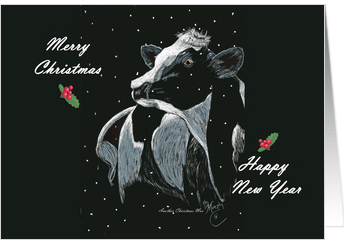 I grew in an only child in the Shenandoah Valley of Virginia, my Mom was artistic, I used art as a means to entertain myself, often on the back of a horse with a sketchbook. When I married my husband Bill, we would visit art shows, and he would bug me to sell/show my art. Finally I gave in. He took early retirement to help do the shows.
Share this:

Design Spotlight: Culinary Greeting Cards

Today, we’ve got our Design Spotlight on Margaret Chayka of Culinary Greeting Cards – a perfect example of a niche business that’s doing well. It’s a brilliant idea. Thanks, Margaret!
_________________________
 This card has been a best seller since it was created 5 years ago, and was created for people who love to express the holidays through food (and humor). In my store, people love their veggies! I sell more vegetable Christmas holiday cards than anything else.
As a former personal chef I have a bit of an “inside” to the culinary and food industries, and I began my graphic design business several years ago, serving the needs of fellow personal chefs and have met many other types of foodies along the way. Culinary Greeting Cards began as a year-round resource for greeting cards featuring food, cooking, and baking subjects, but my customers typically only buy cards for the holidays so it’s evolved into a Christmas card store.
Christmas sales are good, as well as good for you! About 1/3 of my customer orders are for 50 or more cards, and a few orders of 300-500 every year is normal. My customers include chefs who cook or bake, grocers and food vendors, kitchen and gourmet stores, catering companies, restaurants, plus home cooks and bakers who love to give gifts of homemade goodies.
Share this:

Dash of Inspiration – November 28, 2011
A Dash of Inspiration, A Cup of Creativity by Doreen
A Blast From the Past
I began contributing A Dash of Inspiration to the GCU Community Blog on April 25th this year, wow how time flies! Since I can never find these posts based on title, I’ve been putting a list together so I can find them when I want to reference something. In doing this, it dawned on me that all the new artists who have joined GCU might have missed some of these posts, so thought a recap of a few might be nice for any newcomers. I will be adding the entire list by category on my website so they will be easy to find when needed, I’ll pass that link on by the end of the year.
Enjoy and see you next week!
Dash of Inspiration – May 9, 2011 – The Text Says it All
Dash of Inspiration – August 22, 2011 – Frame It!
Dash of Inspiration – September 6, 2011 – Tools and Resources for Grammar and More
Dash of Inspiration – September 19, 2011 – Better Designs = More Approvals = More Sales
Dash of Inspiration – October 17th, 2011 – How the Heck Did They Do That?

Share this:

Critique Clinic – November 25-27, 2011
How does it work? For three days a week (Friday-Sunday midnight), I will open the clinic to any artist who wants an honest peer review and critique of a card which gets plenty of clicks but no sales, so something’s probably not quite right, or you’ve got a new design you want to test drive, or you’re unsure about the marketability of a card. Or perhaps you’re a newbie who isn’t sure if a recently submitted card is up to a marketable standard. Anyone is welcome to participate. In fact, I encourage everyone to at least look at the cards in question and read the critique comments – you may learn something. The purpose of the clinic is to help artists improve the commercial appeal and marketability of their cards.
THE RULES
- ONE card per artist only.
- Card must be for sale at Greeting Card Universe.
- We will take an unlimited number of artists, including those who have submitted recently, HOWEVER I reserve the right to close a clinic for the day if the submissions become overwhelming. If the clinic has been closed, and you submit a card, your comment will be deleted.
- To submit a card for critique, post a link to the card at GCU in the comments section of this clinic post.
- Any artist is free to comment and/or give a critique of a submitted card. HOWEVER, post-and-run comments like “great card” or “you suck” will not be tolerated, nor will abuse. Criticism should be constructive, not destructive. Play nice or you will be banned.
- I also won’t tolerate temper tantrums if you decide your “artistic integrity” is being stepped on because you asked for a critique, and someone told you the photo you’re using isn’t in focus. If you can’t take honest criticism, don’t submit. Once gets you a warning; twice and you’re banned from submitting in the future.
- Artists who critique may do so by giving their opinion, posting an example of another card, or pointing the submitter to a video, on-line article, or other helpful suggestion.
- Don’t forget that artists who are giving you tips and helpful advice are volunteering their time and trouble. Be nice. A link back to their store on your website or blog is appreciated (but not mandatory).
- You are free not to take any advice offered. There’s no guarantee any card will be a bestseller, so don’t come into the clinic with unrealistic expectations.
- Rules may change as we go along and we see how things turn out, okay?
So without any further ado, I declare this week’s Critique Clinic open!
Share this:

Happy Thanksgiving!

Wishing all my friends and colleagues at Greeting Card Universe
a very happy Thanksgiving tomorrow –
hope you all have fun making heart-warming memories with your loved ones!
There will be no post tomorrow.
The Critique Clinic will be open as usual during the weekend.
Enjoy your holiday and be safe!


 GCU Community