Skip to content

Rainbow Connection: Honey Gold

May 14, 2019

Honey Gold is this week’s color to get inspired by:


Nuts and Bolts: Best of 2018 Feature Page

May 10, 2019

Nuts & Bolts – Best of 2018 Feature Page
 
In January, GCU proudly announced the Best of 2018 Founders’ Choice Award winners!  See all the winners here on their very own landing page which is linked from the site and will soon be shared via social media.


This was GCU’s third annual “Best of” awards as part of the monthly Design Challenge series.  Be sure to check each month’s challenge as it may be a perfect opportunity for you to submit a design that’s been on your mind, or something totally new getting you outside of your comfort zone or overcoming artist’s block.


Design Challenges are run each month and announced on both the GCU community blog and GCU Design Challenge forum board.  There is plenty of time to enter May’s challenge, see details here.

Tip: for a design challenge, and any new card for that matter, take a look at what is currently offered in the category and do a little brainstorming to offer something DIFFERENT not just more of the same. This will help your card stand out from the crowd and offer shoppers more choices, and ultimately sales!


The difference is made in the details!


Mindy
GCU Community Manager


Freebie Wednesday: Magical Unicorn Watercolor Set.

May 9, 2019

Freebie Wednesday:


The Hungry Jpeg has a lovely set of free watercolors available for another 5 days! Don’t miss out!


This product comes with a complete commercial license.


Wanted New Cards: Re-entering the Workforce.

May 9, 2019

wanted new cards head

Wanted Cards – Re-entering the Workforce


There are many reasons why someone may return to a career and the workforce after an extended absence.  The first that comes to mind is after maternity or paternity leave.  But there are many other reasons why someone returns to work and not just to the same job – returning to the workforce and picking back up a career or starting a new career.


After an extended leave, there are many challenges like a resume gap, outdated skills, and self confidence. Some encouragement and wishes of good luck will be appreciated!

The cards will go here in the appropriate sub-category:
Occasions >> Good Luck >> Job Hunt / Job Search >> Re-entering Workforce / Job Market after Long Absence

>> General
>> After Divorce
>> After Health Issues
>> After Stay at Home Dad / SAHD
>> After Stay at Home Mom / SAHM
>> After Retirement
>> Other

Rainbow Connection: Summery Drinks

May 7, 2019

Get inspired by the color schemes of summery drinks:


Nuts and Bolts: Stock Card Creations – Unmatched Image Card Tips

May 3, 2019

Nuts & Bolts – Stock Card Creations – Unmatched Image Card Tips


On the heels of the relaunch of Stock Card Creations, we bring you a guest post from GCU artist, Doreen Erhardt of Salon of Art and Exclusive Creations, loaded with tips on updating unmatched cards with a new stock image.


See the announcement Stock Card Creations Online.


Doreen shares …


I volunteered as ‘guinea pig’ for Mindy and Nasser to ‘test’ the changes to this tool and library of images before it went live, so I may have picked up a few things that might be helpful.


Back in January in anticipation of unknown changes to the stock cards I had created ways to copy/save both front and inside verse images of the approved cards to use as a reference. If you can still do this –
or are an artist who followed my example back in January – this is a helpful tool to make sure you get your previously approved card front text and verse recreated properly which will ensure your resubmit
with a new image will fly through.


The next thing I did was to enter all my cards into a spreadsheet format with a visual and PID. Here is where I recorded potential options to swap my images by recording the (new) stock image number. Usually I would collect up to three possible replacements (stock images). Having more than one option ensured that one of them would work the best to keep the ‘feel’ of the card and support the text placement.


When you find an image that is close to what you are looking for, look at it’s title and consider entering some of the title into the search field to narrow down more images which might be a more exact match
than the broader search was finding. What you might have called a cat in a hat, some photographers might call a kitty in a cap. So continue to refine your search. Don’t just ‘settle’ for the first image you
come across.


Determine the value of the card. Has it sold? If so, frequently? I deleted about 8 out of approx. 150 (unmatched) cards if a suitable replacement stock image could not be found.


REVIEW, REVIEW, REVIEW before resubmitting. Remember, although stock cards may now be returned for edits, if the issue is on the card front, you will have to start over and completely redesign the
whole card, just to add a comma. This is why you want to make sure you follow your previously approved card front text EXACTLY as it was on the approved version.


A new feature to this revised tool is that we can match background colors along with choosing text colors to match the image. To do this, once the image you have chosen is up in the creation tool, hit your
keyboard’s PrtScr (print screen) button and paste the image into a new file in Photoshop or other design software. Use the color picker to click on various areas of the image and simply copy the Hex#.
In order to get your text to line up properly when using more than one text box, create a text box with a line. Place this as an ‘invisible’ line, line up your different text boxes and then once it looks good in
preview mode, delete the text box with the line.


Here is a visual of the HEX code color sample:


Another thing to remember when working with text boxes is that once you type your text and choose the font/size you want – size the box to the minimum length and depth possible.
When you are sizing the box with text inside and see the ‘slide bar’ show on the right, it’s too small. Size enough that the slide bar doesn’t show and you’ll have a better chance of seeing the text placed where you wanted it when viewing in the preview screen.


Also keep in mind that unlike the Custom Front Text tool, text boxes on Stock Card Creations can overlap. This allows for more creativity when it comes to adding card front text. If you choose to experiment with this, play with the alignment of each text box to snuggle them in better. Some aligned left, some right, some center can often create a lovely line of text in two different fonts.


Example:
Go into this process with an open and willing mind. No design tool is easy to use. There are idiosyncrasies in all software and getting frustrated with them is a waste of time, not to mention, takes
the fun out of the process. Instead, pay attention to those oddities and learn your own workarounds.


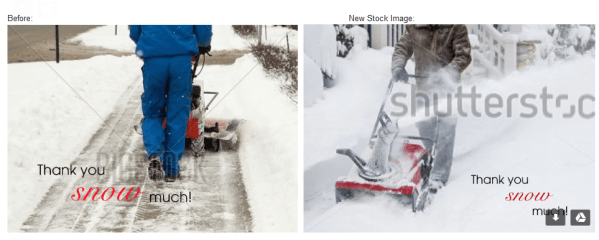
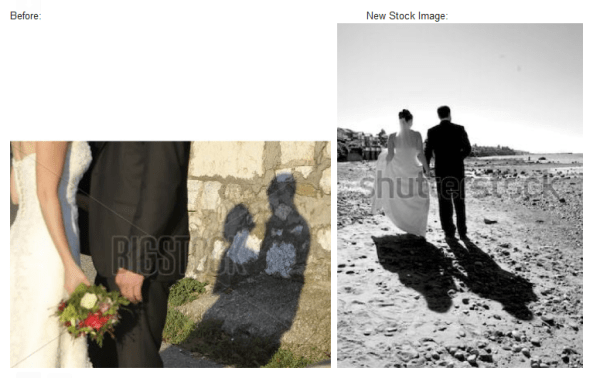
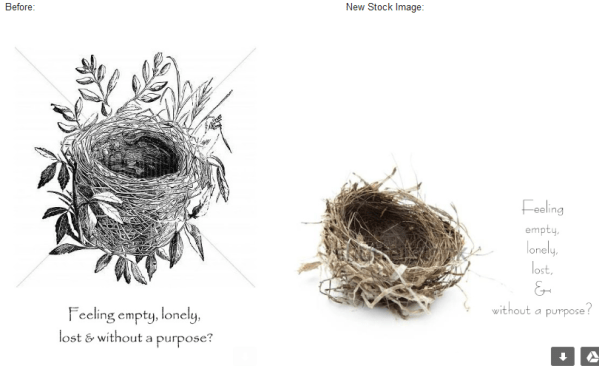
Here are some comparatives of before (original stock image) and after (with a new stock image) cards:


Additional Tips:
1. Where to start?
Consider starting with your best selling stock cards or upcoming seasonal cards to get them back online quickly. (IE: Mother’s Day, Graduation, Father’s Day)


2. Can’t find a suitable substitute image?
If you cannot find a suitable replacement stock image consider one of these alternatives:


a)  Use Your Own Image – You cannot replace a stock card image with your own image. You will need to create and submit a new card (standard). In the Notes to Reviewer on your new submission, please add a note like “this card is a replacement for stock card pid#xxxxx as I could not find a suitable replacement stock image”. Finally please delete the original stock card.
See how artist Laughing Hippo Studio has made a new submission with his own image here:

b) Purchase the Stock Image – if a card has proven to be a hot seller for you, consider purchasing the commercial usage license for the stock image and make your own card (standard). You cannot replace a stock card image with your own image. You will need to create and submit a new card (standard). In the Notes to Reviewer on your new submission, please add a note like “this card is a replacement for stock card pid#xxxxx as I could not find a suitable replacement stock image so I have purchased the commercial usage license for this stock image from xyz provider”. Finally please delete the original stock card.

c) Remove the Card – if the card has no to low sales, consider deleting it and not replacing it.

The difference is made in the details!
Mindy
GCU Community Manager


Wanted New Cards: Youth Fire Truck Birthday

May 2, 2019

wanted new cards head

Wanted Cards – Youth Fire Truck Birthday


Little boys are fascinated with large trucks, construction equipment and vehicles. Anything on wheels is eye candy and very popular for birthday party themes. Fire trucks are at the top of the list!  Bright red with wheels, ladders, hoses, sirens and maybe even a spotted dog.  So many eye catching, moving parts. Perfect for busy little ones who desire “a job” and fascinating role playing.


Please consider adding to GCU’s offering of fire truck themed birthday cards and birthday party invitations for young boys. Consider birthday designs that are general, age specific, relationship specific, name specific.
Most cards will go in their functional category (age, name, relationship specific). General fire truck birthday cards would likely go here:


And for general invitations (not age specific):

Freebie Wednesday: Shantik Font

May 1, 2019

Freebie Wednesday:


Shantik font is a beautiful and unique typeface. It includes amazing swashes which will add an elegant touch to your designs and it’s free at Creative Fabrica for another 5 days so you better make sure you don’t miss out!


This product comes with a complete commercial license.


Dash of Inspiration: May 2019 Design Challenge

April 30, 2019
  • DashInspirationBanner_2015

Hello everyone! We’re a bit early on this post, so you get an extra day. I’ll be out and about tomorrow morning and didn’t want you to lose time on this fun and different design challenge for May …

……………………………………………………………

Theme: Oxymoron Fun!

Requirements:

  • Create a brand new design which incorporates an Oxymoron phrase from this enormous list: OxymoronList.comNOTE: If you choose a quote from this site, make sure it’s in public domain by looking up the quote/author BEFORE submitting your challenge card.
  • Write your own verse/message, be creative and write a message that clearly speaks to your imagery, occasion and recipient.
  • Blank verse will not be considered for entry in this challenge.

……………………………………………………………

Entry Deadline: Friday, May 31st

……………………………………………………………

How to Enter: Post the PID (card number) and the URL (public storefront link – please WAIT for the card to be available in the public marketplace, please DO NOT post a link to your Manage Cards area) as a post in the challenge blog. We’ll forward your entry to the jury.

……………………………………………………………….

Category:

  • Any category well-suited to your Oxymoron message.

…………………………………………………………….

Rules:

  • Submission must meet GCU’s Submission Guidelines and be Approved through the usual Review Cycle– Fast Track your submission with this in the Notes to Reviewer: May Design Challenge Submission here is the link to the blog post: (include THIS blog post URL)
  • Only ONE card per artist per challenge.
  • Submissions must be NEW, no existing designs.
  • Your entry must meet the Challenge Requirements and Theme or it will not be included in the challenge.
  • Stock Card Creations entries will not be accepted.
  • Your designs should differ from those already offered in the category of your choice to offer shoppers a variety of choices, not more of the same.

……………………………………………………………………

BLIND Judging: We hope each of you enters every month. Entries are submitted anonymously for judging by the GCU Challenge Jury which means that before and during the challenge, judges do not have any way of knowing what artist is behind each entry. This eliminates any and all concerns with ‘favoritism’. Results will post on the Community Blog. The jury will judge the entries on the following criteria:

  • How well the card meets the Challenge Requirements and Theme.
  • How well the card speaks to the Category the artist chooses for the card submission.
  • Creativity, Execution and Marketability.

……………………………………………………………………

Winners: 1st Place:

  • The winning designer’s card and store will be featured on the GCU Public Blog the blog which customers view and follow.
  • As well as featured on the GCU Public Facebook Page over 57,000 followers, now THAT’S exposure!
  • The winning card will be Design of the Day following the announcement of the winners (within 48-hours).

    EXCEPTION: Horizontal (landscape) cards may not be featured as DOD due to GCU Home Page space restrictions. In these cases, GCU will choose a different vertically oriented card from your store to feature as DOD. Thank you for your understanding and apologies for this limitation.

  • The winning card will be added to the Greeting Card Universe Design Challenge Winners Pinterest Board – currently GCU’s Pinterest Page followers: 4K!
  • The winning card, should the artist choose, may be referenced in a new series by the winning artist and he/she may Fast Track all cards in the new series (being sure to give the Challenge URL and winning card PID in your Notes to Reviewer for each card in this series).
  • Winning card will be included in a marketing email to over 100,000 customers!
  • GCU will create a Meet the Team board for the winning artist under the Pinterest GCU account where the winning artist will be able to pin and promote her own storefront and all that makes them a unique card designer and one of GCU’s artistic community team member.
  • Winning card will be posted on GCU’s Instagram with 6,800 followers and counting!
  • GCU will create a Meet the Team board for the winning artist under the Pinterest GCU account where the winning artist will be able to pin and promote her own storefront and all that makes them a unique card designer and one of GCU’s artistic community team member.
  • NEW! – 10 free greeting card credits added to your GCU account. Apply them at checkout and they never expire.
  • NEW! – A Design Challenge GCU digital award!

2nd Place:

  • Your submission will be Design of the Day the following week of announcing the Challenge winners (within 7-days).

    EXCEPTION: Horizontal (landscape) cards may not be featured as DOD due to GCU Home Page space restrictions. In these cases, GCU will choose a different vertically oriented card from your store to feature as DOD. Thank you for your understanding and apologies for this limitation.

  • Your card will be added to the Greeting Card Universe Design Challenge Winners Pinterest Board.
  • Winning card will be included in a marketing email to over 100,000 customers!
  • Winning card will be posted on GCU’s Instagram with 6,800 followers and counting!
  • NEW! – 5 free greeting card credits added to your GCU account. Apply them at checkout and they never expire.
  • NEW! – A Design Challenge GCU digital award!

………………………………………………………………………

Tips:

………………………………………………………………………

Be inspired to create and learn something new!

by LillyARTS

Rainbow Connection: the Colours of Morocco.

April 30, 2019

Discover the unique colors of Morocco: