Dash of Inspiration: Inspirational Freebies

Fun exploration today from InspirationHut.net!
Check out this list they’ve put together of 25 Must Have Fonts. Though they suggest these are all Free and acceptable for Commercial Use – PLEASE CHECK THE LICENSE for each as you visit the sites offering these fonts. There may be special limitations.

Visit great post from InspirationHut.net!
………………………………………
Until next time … Learn … Create … Inspire!
Don’t forget, this is the last week for entries in our August Dash of Inspiration Design Challenge
Share this:

Wanted New Cards: Congratulations Semi-Retirement

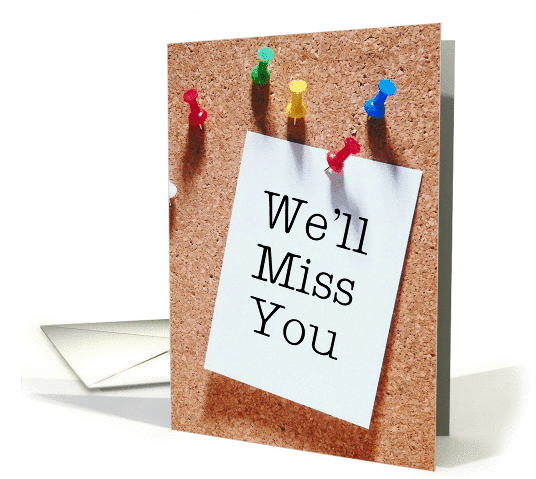
At the moment there are 0 cards in this category.
We’d like you to create at least one card for these categories using the Stock Cards function (Bigstock) or your own graphic designs.
Remember, when you’re submitting your new card, add a little note about the intended category in your Notes to Reviewers. Be inventive, be clever, be creative. Go for it!
Share this:

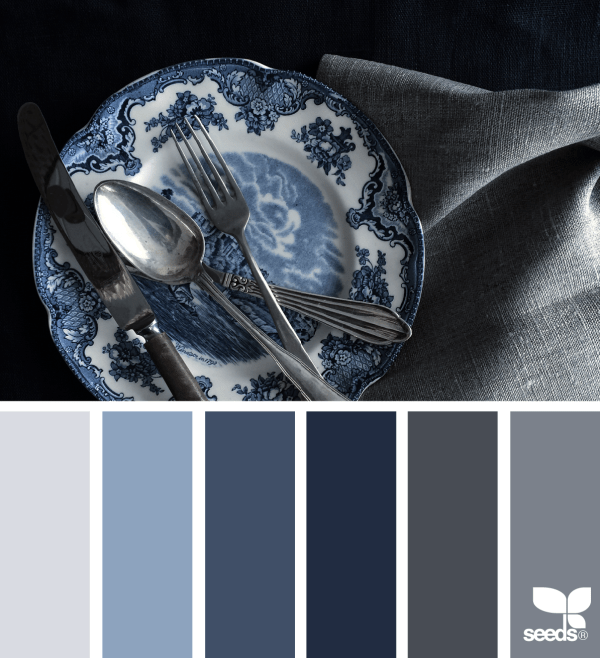
Rainbow Connection: Blue Hues

Look at the gorgious Blue color inspirations I found on the internet this week:



Share this:



Mindy
GCU Community Manager
Share this:

Wanted New Cards: Encouragement Health Lupus
We have a new category that needs your attention:

We’d like you to create at least one card for these categories using the Stock Cards function (Bigstock) or your own graphic designs.
Remember, when you’re submitting your new card, add a little note about the intended category in your Notes to Reviewers. Be inventive, be clever, be creative. Go for it!
Share this:

Font Frenzy: Australian Script

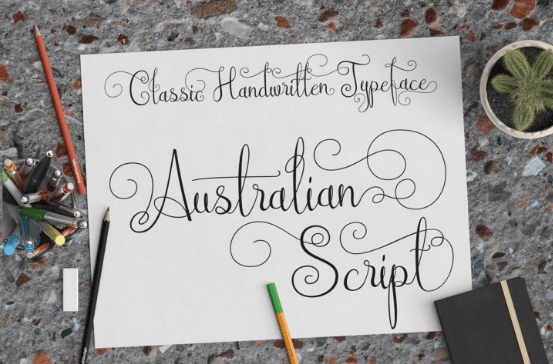


Australian Script is a cute and playful script, with natural and dynamically handmade touch. This font uses two alternate lowercase letters to avoid the same letter in a pair and there are hundreds of swashy characters to make your text look nice for a wedding invitation card.This font contains 811 glyphs and supports basic Latin characters and eastern Europe language.
File contains:
- – .otf and .ttf font file.
- – Tutorial image how to use OpenType features at Adobe Illustrator
- – Tutorial image how to use OpenType features at Adobe Photoshop
- – Tutorial image how to use OpenType features at AdobeIndesign
This amazing font comes complete with a full commercial license, allowing you to use these beautiful fonts across a wide range of commercial activities.
Share this:

Rainbow Connection: August Color Inspiration
Here is some August color inspiration I found on the internet this week:


Share this:

Dash of Inspiration: August 2016 Design Challenge
This month we have three of our esteemed judges on vacation this week, as is Mindy, therefore we are going to postpone the voting of the July Challenge until August 8th. So we thank you for your great “Peace Theme” entries and will have your results around the 10th of August.
In the meantime, let’s kick off our August Dash of Inspiration Design Challenge to infuse a sparse category with some fresh new designs!
Theme: First Halloween In Your New Home
Requirements:
- The message of the category/recipients must be clear in the card front text and/or inner verse.
- Must be approved for the Holidays > Halloween Cards > 1st / First Halloween > In your New Home category.
- Recipient must be ‘general’, in other words; any relation-specific creations should be done after the challenge – not for the challenge.
- Imagery must include a home, house, or castle (haunted house okay too) – big or small somewhere in the image.
……………………………………………………………
Entry Deadline: Wednesday, August 31st
……………………………………………………………
How to Enter: Post the PID (card number) and the URL (public storefront link – please WAIT for the card to be available in the public marketplace, please DO NOT post a link to your Manage Cards area) as a post in the challenge blog. We’ll forward your entry to the jury.
……………………………………………………………….
Category:
Holidays > Halloween Cards > 1st / First Halloween > In your New Home
…………………………………………………………….
Rules:
- Submission must meet GCU’s Submission Guidelines and be Approved through the usual Review Cycle– Fast Track your submission with this in the Notes to Reviewer: August Design Challenge Submission here is the link to the blog post: (include THIS blog post URL)
- Only ONE card per artist per challenge.
- Submissions must be NEW, no existing designs.
- Your entry must meet the Challenge Requirements and Theme or it will not be included in the challenge.
- Stock Card Creations entries will not be accepted.
……………………………………………………………………
BLIND Judging: We hope each of you enters every month. Entries are submitted anonymously for judging by the GCU Challenge Jury which means that before and during the challenge, judges do not have any way of knowing what artist is behind each entry. This eliminates any and all concerns with ‘favoritism’. Results will post on the Community Blog. The jury will judge the entries on the following criteria:
- How well the card meets the Challenge Requirements and Theme.
- How well the card speaks to the Category the artist chooses for the card submission.
- Creativity, Execution and Marketability.
……………………………………………………………………
Winners: 1st Place:
- The winning designer’s card and store will be featured on the GCU Public Blog – the blog which customers view and follow.
- As well as featured on the GCU Public Facebook Page – nearly 35,000 followers, now THAT’S exposure!
- The winning card will be Design of the Day following the announcement of the winners (within 48-hours).
EXCEPTION: Horizontal (landscape) cards may not be featured as DOD due to GCU Home Page space restrictions. In these cases, GCU will choose a different vertically oriented card from your store to feature as DOD. Thank you for your understanding and apologies for this limitation.
- The winning card will be added to the Greeting Card Universe Design Challenge Winners Pinterest Board – currently GCU’s Pinterest Page followers: 1.9K!
- The winning card, should the artist choose, may be referenced in a new series by the winning artist and he/she may Fast Track all cards in the new series (being sure to give the Challenge URL and winning card PID in your Notes to Reviewer for each card in this series).
- Winning card will be included in a marketing email to over 100,000 customers!
- NEW starting this month, GCU will create a Meet the Team board for the winning artist under the Pinterest GCU account where the winning artist will be able to pin and promote her own storefront and all that makes them a unique card designer and one of GCU’s artistic community team member.
2nd Place:
- Your submission will be Design of the Day the following week of announcing the Challenge winners (within 7-days).
EXCEPTION: Horizontal (landscape) cards may not be featured as DOD due to GCU Home Page space restrictions. In these cases, GCU will choose a different vertically oriented card from your store to feature as DOD. Thank you for your understanding and apologies for this limitation.
- Your card will be added to the Greeting Card Universe Design Challenge Winners Pinterest Board.
- Winning card will be included in a marketing email to over 100,000 customers!
………………………………………………………………………
Tips:
Check out these tips, tricks, freebies, and tutorials from our own GCU Community Blog which might be helpful in this month’s Challenge.
- Nuts and Bolts: Categories
- Tips and Tricks: Card Designer Checklist
- Nuts and Bolts: How to Write Greeting Card Verse
………………………………………………………………………
Be inspired to create and learn something new!

Doreen Erhardt©
Share this:

Nuts and Bolts: Update Custom Request Availability
GCU Community Manager
Share this:

Wanted New Cards: Cochlear Implant
Consider cards not only for elderly but also people of all ages who have hearing loss.

We’d like you to create at least one card for these categories using the Stock Cards function (Bigstock) or your own graphic designs.
Remember, when you’re submitting your new card, add a little note about the intended category in your Notes to Reviewers. Be inventive, be clever, be creative. Go for it!


 GCU Community