Nuts and Bolts: Artist’s Notes and Product Description

ARTIST’S NOTES:
A Reason You May Be Invisible to Potential Buyers
Let’s talk about the Artist’s Notes field, shall we? This field accompanies every single card you make at Greeting Card Universe, yet many of us (myself included) don’t always take advantage of it. I’ve also seen artists use this field to add some puzzling, irrelevant information to their cards. Few of us use it properly, which is big shame, because the Artist’s Notes field is a lot more important than you think.
Why? Well, there are two reasons. One has to do with shoppers, the other with search engines (that SEO thing, but don’t run away – I swear it isn’t that complicated).
I’ll start with SEO (which stands for Search Engine Optimization). Simply put, search engines use complex algorithms to determine a web page’s place (ranking) when it comes up in search results.
So that part is pretty clear, but what can you do to improve your web page’s ranking, and make it appear higher in the list of results? And why is should you care?
You need to care because each and every one of your cards sits on its own web page. Yes, those pages are hosted on GCU, but there are still individual pages, each of which will be indexed by search engines. For example, when someone does a search on Google for “purple elephant niece’s 14th birthday card,” your lovely lavender elephant 14th birthday for niece greeting card on GCU will come up in the results. Where your card appears in the results – on page one, two, three, or page two million – will likely affect your sales.
Being number one on page one is preferred (much like an Olympic athlete would much rather win gold than bronze, or nothing at all).
How do you improve that ranking? Search engines are constantly tweaking and changing their algorithms so they can offer the most relevant results in a search. Exactly WHAT criteria is used by a search engine is secret and complex. However, I can tell you that while good and relevant keywords remain an important part of allowing your cards to be indexed properly, it’s HOW you use those keywords that will affect you the most.
Search engines love original content. Let me repeat that because it’s important to our discussion – search engines LOVE original content. What that means is, while search engines will definitely use strings of keywords as part of their ranking system, they tend to give preference to sites that use those keywords as part of original content.
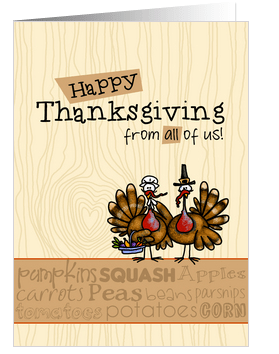
Inside Verse: “Hope you gobble till you wobble!” – artist Corrie Kuipers
I’ll give you an example. This is a card I recently designed and uploaded (yes, I’m kind of late for this year’s Thanksgiving, but I tend to work a year ahead). It’s a “Happy Thanksgiving from all of us” card.
These are the keywords I used: thanksgiving card from all of us, thanksgiving card from group, turkey, happy thanksgiving, gobble till you wobble, pilgrims, thanksgiving dinner, feast, harvest.
So far, so good. HOWEVER, to take maximum advantage, I now include a brief description in the Artist’s Notes, using as many keywords as possible in a relevant way.
Here’s what it says: “A turkey pilgrim pair stands on top of a “subway art” inspired banner in autumn colors with a Thanksgiving feast mini word cloud on a light wood grain background. A playful and trendy Thanksgiving card that can be sent by a group.”
Notice how I’ve covered my bases in the description?
That will make the search engines happy.
It will make shoppers happy, too. This is the second reason you shoud be using your Artist’s Notes this way. Have you ever seen a catalog that didn’t have product descriptions, just pictures and prices? Of course not! And if you put on your shopper’s hat, you’ll realize that someone shopping for greeting cards really likes to see a nice description of what they’re buying. It just make your design that much more attractive.
Unless you’ve only got a few cards in your store, I’m not advocating you go back and add descriptions like that to all your greeting cards at GCU. Lord knows, I sure can’t. Not enough hours in the day! But since I learned this trick, I will be adding product descriptions to my cards from now on.
Writing good, relevant product descriptions is, I admit, not for everyone. To help you out, tomorrow I’ll be posting another Nuts & Bolts, this one explaining how to write a product description, what to include, and what to avoid.
Share this:

Tips and Tricks: Diwali / Deepawali FAQ

Diwali – also known as Deepawali – is a Hindu holiday celebrated globally every year. The date changes each year according to a special calendar.
Themes of Diwali include fireworks, crescent shaped oil lamps with a small flame in any color, abstract geometric shapes including flowers, squares, swirls etc. Colors should be bright – hot pink, turquoise, bright green, bright blue, gold, silver, peacock blue, oranges and reds.
Recommended texts: Happy Diwali, Life Light and Joy to you in the Diwali Season, Wishing you Prosperity and Love in the Season of Light. Do not attempt Hindustani or other non-English writing unless you know exactly what you want to say and how to say it.
Happy creating!

Share this:

Wanted New Cards: Holidays, First Diwali

Every Friday from now on, we’ll be showcasing a GCU category that has few or no cards. We’d like you to create at least one card for this category using the Stock Cards function (Bigstock) or your own graphic designs.
Remember, when you’re submitting your new card, add a little note about the intended category in your Notes to Reviewers – cards submitted for underused categories are much more likely to be approved provided they follow the Submission Guidelines. Be inventive, be clever, be creative. Good luck!
Today’s category with 0 cards is:
Holiday – Diwali / Deepawali – 1st / first Diwali / Deepawali
All sub-categories of Diwali except General need cards.

Share this:

Wanted New Cards: Difficult / High Risk Pregnancy
Every Friday from now on, we’ll be showcasing a GCU category that has few or no cards. We’d like you to create at least one card for this category using the Stock Cards function (Bigstock) or your own graphic designs.
Remember, when you’re submitting your new card, add a little note about the intended category in your Notes to Reviewers – cards submitted for underused categories are much more likely to be approved provided they follow the Submission Guidelines. Be inventive, be clever, be creative. Good luck!
Today’s category with 2 cards is:
Occasions – Encouragement Cards – Pregnancy / Expecting – Difficult / High Risk Pregnancy

Share this:

Nuts and Bolts: Keywords

KEYWORDS ARE THE KEY (TO SUCCESS)
How do people find your greeting cards at Greeting Card Universe? Usually either by doing an on-site search, or using a search engine, which is why your keywords are important.
When a user does a search, they enter words or phrases as their search terms, refining the terms as necessary to refine the results. Here’s an example: a shopper wants to buy a 59th birthday card for their aunt, who is a butterfly collector. They might search for “birthday card for aunt” or “59 birthday card for aunt.” Once they get the results for this search, they may want to refine the results further, such as “butterfly birthday card for 59 year old aunt.”
Are you starting to understand the importance of keywords? If you don’t use the right specific and relevant keywords when submitting your greeting cards to GCU, your cards won’t come up in search results, and you won’t make many sales.
Don’t use fraudulent keywords, though. Not only is it naughty, but I promise you won’t make many sales of misleading cards. GCU reviewers frown on the practice, too. You should be choosing keywords that are relevant to the card.
Do try to find unique keywords to help you stand out from the crowd.
Use GCU’s Traffic Analytics to show you what shoppers are searching for within any date range you select. When you’re logged in, go to MANAGE STORE > TRAFFIC ANALYTICS. You’ll be able to view a variety of reports including Top Overall Keywords (default), Google search keywords, Yahoo search keywords, Top Exit Pages, Top Landing Pages, Most Visited Pages, and All Traffic Sources.
(P.S. – This powerful tool also informs you what kind of cards you should consider adding to your store. For example , if 2,450 folks are searching for Nurse’s Day 2011, and you have no cards represented in the current crop on GCU, you’d best get designing if you want to get some of those sales next year.)
If you’re stuck for keyword ideas, there are other free tools that may help point you in the right direction.
For example, let’s take this card of mine:

The title is very important to search engines, so I’ve titled this card Christmas Tree – Believe – Customizable Photo Card. That should hit some of the right buttons. Next, I need keywords. Obvious choices are snow, Christmas ornament, personalized photo card. Notice I used “customizable” in the title and “personalized” in the keywords? That’s because different people will search for photo cards using different terms. I’m covering my bases.
Now I’ll check to see how I did. Opening a new tab in my browser, I go to Google AdWords: Keyword Tool.
When I plug words and phrases into this tool, it will tell me how many people are searching Google for these terms on a monthly basis, and it may give me ideas on other keywords I can include on my card. For demonstration purposes, I’ll start with just “greeting cards.”
“Christmas photo greeting cards” is on the list of terms people are looking for, so good thing I’ve got that covered in my title. Going further to look at “Christmas cards,” I see “personalized Christmas cards” and “customized Christmas cards” rank high with thousands of monthly searches, so I was right to include both terms in my title and keywords.
I also see “modern Christmas card” and “contemporary Christmas card” are being searched, so I’ll include “modern” and “contemporary” in my keywords, as well as “fashionable” and “trendy.” Not misleading, since the design is everything I say it is. A thesaurus is sometimes an artist’s best friend! To conclude, in my Artist’s Notes section, I’ll write a little blurb and use words like “stylish” and “up to date” to increase the possibility of shoppers finding my card. I could take my searches even further, but for now I’m done.
While valuable, this free service has its limitations. It’s intended to help advertisers placing AdSense ads with Google, but it can be used to assist you in targeting sellers who are looking to buy the kind of greeting card you’re selling.
Another way to get a general idea of keywords other artists are using on cards in the same vein as yours is to enter this into the Google search box:
site:http://www.greetingcarduniverse.com yourkeyword
Your search results will contain every card on GCU containing that keyword. By seeing what terms other artists have used in their keywords, you may get a better sense of what you need to include when uploading your own cards.
Suppose you want to confine your search to just Christmas cards, for example. Your Google search terms will look like this:
site:http://www.greetingcarduniverse.com/Holidays-Christmas yourkeyword
Refine it even further to subcategories:
site:http://www.greetingcarduniverse.com/Holidays-Christmas-Photo+Cards+Your+Picture+Here yourkeyword
And that’s how you do it. You can easily find out the URL you want to search by going to the GCU homepage, scrolling down the list of categories until you find the one you want, then refining your search to the sub-categories until you get where you want to go. Once you have the unique URL showing all cards in that category or sub-category, you’ll be able to search among those cards for specific keywords by using the Google search trick above.
I can’t emphasize this enough: make sure any keywords you choose are relevant to the card. In other words, don’t put “merry Christmas” in your keywords unless that phrase is on the front of your card or in the inside verse. The rule is to use only those keywords that describe your card AS IT ACTUALLY IS, not what you think it’s suitable for.
Yes, I know there are cards out there that break the rules. Please don’t get upset about what other people have done in the past. There was a time in GCU’s early days when cards weren’t reviewed, and some artists overdid things a little in their enthusiasm. Those days are long gone. It doesn’t really matter what somebody did years ago. What counts is what we’re doing today.
As a final note, just remember that if we, as artists, work hard to reduce the number of errors in our cards (including keyword mistakes and oversights), it will reduce the review times for everyone. Wouldn’t that be nice?
Share this:

Wanted New Cards: Thank You Concierge
Every Friday from now on, we’ll be showcasing a GCU category that has few or no cards. We’d like you to create at least one card for this category using the Stock Cards function (Bigstock) or your own graphic designs.
Remember, when you’re submitting your new card, add a little note about the intended category in your Notes to Reviewers – cards submitted for underused categories are much more likely to be approved provided they follow the Submission Guidelines. Be inventive, be clever, be creative. Good luck!
Today’s category with 9 cards is:
Occasions – Thank You Cards – Occupation Specific – Concierge

Share this:

Tips and Tricks: Changing Old Designs
Quite often, when we first start designing greeting cards, we don’t know what we’re doing. We try things. We experiment. We create more from the heart than the head. Sometimes, that totally works and you get a classic card straight out of the gate. Other times, not so much.
We know GCU is slowly but surely weeding through older cards and applying their (relatively) new standards. Cards that no longer fit the bill will be declined. But we say, why wait? Surely you know that by going through older cards yourself, tweaking here, making changes there, using a more critical eye, can only increase your chances of making a sale, especially since you’ve got experience under your belt and can apply the new standards yourself.
Here’s an example of why we should be weeding our old cards:
Alda Monteschio received the following message from an unhappy customer –
“I purchased product # 193559 ‘My Heartfelt Prayers’. I loved the sentiment of the words but the printing was way too light in color. On the front of the card the words got lost in the vines & foliage. Inside card words are printed way too small. As I stated, I loved the sentiment, but was unable to use this card because of the printing. Was disappointed. Had to go out to a store and purchase a card.”
The card looked like this:
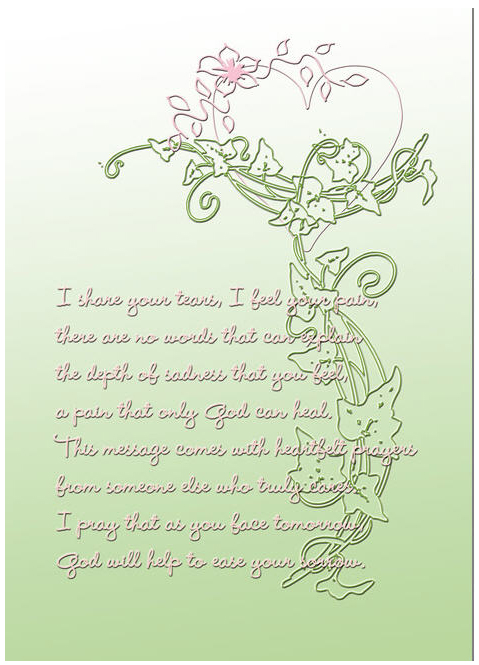
This was one of the first designs Alda made for GCU and she’d sold quite a number of them over time. Now being aware of the printing problem (there’s just not enough contrast between the background color and the text color), she quickly revised and updated the design. Here’s the new version:

Much better and a heck of a lot more readable! We’re sure Alda will continue selling this popular card.
When I worked in customer service many years ago, we were taught something that has stuck with me all these years. “For every customer who complains, there are nine others who don’t say a word and just take their business somewhere else.”
Do go back and take a look at older designs. Apply the new standards. Be self critical. By now, you should know if something will print well or not, or if a design has run over the margins, or if the composition is off. Freshen up your cards, do a little spring cleaning, and your sales will soar!
Share this:

Wanted New Cards: In Remembrance, First Christmas Alone
We showcase a GCU category that has few or no cards. We’d like you to create at least one card for this category using the Stock Cards function (Bigstock) or your own graphic designs.
Remember, when you’re submitting your new card, add a little note about the intended category in your Notes to Reviewers – cards submitted for underused categories are much more likely to be approved provided they follow the Submission Guidelines. Be inventive, be clever, be creative. Good luck!
Today’s category with 7 cards is:
Holidays – Christmas Cards – In Remembrance – 1st/First Christmas Alone Bereaved

Share this:

Wanted: New Cards – Congratulations, Learning to Ride a Bike
Every Friday from now on, we’ll be showcasing a GCU category that has few or no cards. We’d like you to create at least one card for this category using the Stock Cards function (Bigstock).
Remember, when you’re submitting your new card, add a little note about the intended category in your Notes to Reviewers – cards submitted for underused categories are much more likely to be approved provided they follow the Submission Guidelines. Be inventive, be clever, be creative. Good luck!
Today’s category with only 12 cards is:
Occasions – Congratulations – Learning to Ride a Bike/Bicycle – No More Training Wheels

Share this:

Font Frenzy: Bobber

Bobber is an Art Deco kind of typeface, elegant yet with a touch of fun. There are 2 versions: one is free for commercial use (see the About section on the upper right side of the page) and the pro version costs $5. You can decide if you want the extra features or not. An example is below. Have fun!


 GCU Community