Nuts and Bolts: Card Titles

You may not think much about the title of the card you’re submitting for approval. It may seem an unimportant detail, but an effective card title is vital to the health of your card for a couple of reasons.
WHY ARE CARD TITLES SO VALUABLE?
The title is part of what will be used to index the card in off-site search engines. If the only thing you put in your title is “Birthday,” you aren’t doing yourself any favors. Many shoppers come to GCU via a search engine – wouldn’t you want your card to appear on the first page of results? The title will have to be relevant for that to happen. You may have designed the world’s best greeting card, but if nobody can find it, you won’t sell very many.
When a shopper does an off-site search for “Happy 43rd Birthday to My Aunt” – and you can bet that searches very similar to this one are done all the time – they’ll get pages of results. The results don’t contain images, just text links and descriptions, so how will you make YOUR card stand out? How will you make YOUR card sound appealing enough to make a shopper click that link?
WHAT GOES INTO A GOOD CARD TITLE?
The key is – be descriptive. You do have a limit of how much you can say, but the more descriptive you are, the better your chances. An effective card title should contain a reference to the occasion, age or relationship if applicable, and a brief description of something that makes the card unique.
For example, suppose you have a beautiful photograph of a local waterfall with a rainbow shining in the spray. You make the photo into a relationship specific birthday card. In a case like that, what you’ll want to use in the card title will be something like: Rainbow Waterfall at Silver Springs, PA – Birthday for Uncle.
You’ll notice the occasion is addressed – birthday – as is the relationship – uncle. There’s also a brief description of the photo giving the content and location. Now if somebody is looking for a birthday card for their uncle who lives in Pennsylvania, or somebody who just likes waterfalls, they’ll see that title, be curious, and likely give it a click.
Made a baby boy announcement with a giraffe on it? Try something like: Cute Giraffe Baby Boy Announcement. Just be descriptive. Find a unique selling point and go for it.
Every artist should know how to write a good card title. It’s not hard, but it’s just as important as the design on the front of the card and the verse on the inside. A title is the first thing a customer sees when they’re looking at a page of search results. Make your cards stand out from the crowd!
Share this:

Design Spotlight: Karyn Lewis

Today’s Design Spotlight shines on Karyn Lewis, a wonderful artist who’s created some fabulous cards – thanks, Karyn!
_________________________
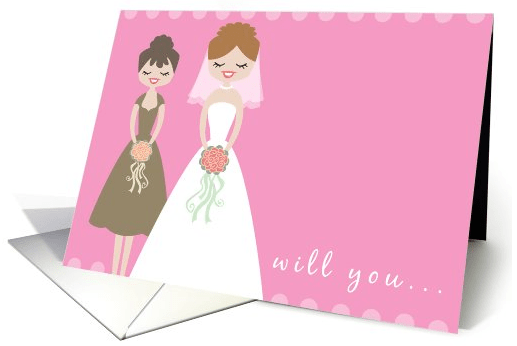
My hands-down most popular card is this Bridesmaid Invitation card.
I sell quite a few of these, and I think it’s because the card is sweet and feminine, and has a modern feel with the crisp vector design and stylized bride and bridesmaid. And I love it whenever one sells. It’s great to know that one of my designs is being used in such a special occasion in someone’s life.
About me, I am freelance illustrator and stay at home mom living in Indiana with my journalist husband and young son. I love all things creative, having been a theater geek, a writer for a newspaper, and an artist. I did buckle down and focus enough of my creative attention to receive a BFA in drawing back in college.
Currently I work mostly in Photoshop, and my style ranges from whimsical to mod, graphic to abstract. I also love to make jewelry and have just started making my own beads out of polymer clay.
Here are some sites where you can see my work:
Share this:

Dash of Inspiration – A Tribute to Mothers
A Dash of Inspiration, A Cup of Creativity by Doreen
A Tribute to Mothers

I prepare this week’s Dash of Inspiration on Mother’s Day, so thought it would be inspiring to just reflect on motherhood through some beautiful imagery and articles. You may just be inspired to get a head start on next year’s Mother’s Day cards!
Happy Mother’s Day to all Moms out there, even those whose only children are furred or feathered!
See you next week!
Beautiful Motherhood Art at Fine Art America
Beautiful Photography: Bumps & Bebes by Emma Collins
Motherhood by Karin Taylor “My process is drawing with a mechanical pencil on paper, then photographing the drawing and painting it digitally in Photoshop CS4 with a wacom pen and tablet. This method is a cross between traditional and digital, translating as ‘tradigital’.
The 8 Best Mothers In The Animal Kingdom – You’ll be surprised!
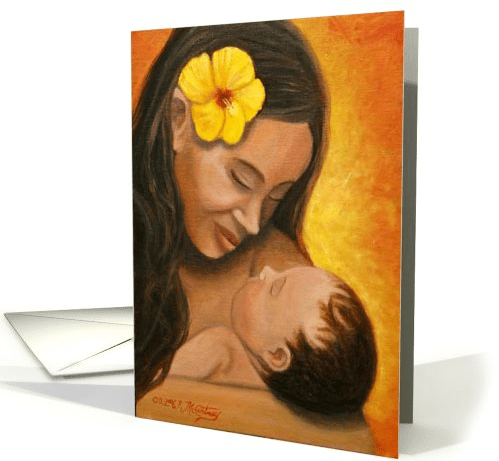
© McCartneyFineArt.com
Share this:

Critique Clinic – May 12-13, 2012

How does it work? For three days a week (Friday-Sunday midnight), I will open the clinic to any artist who wants an honest peer review and critique of a card which gets plenty of clicks but no sales, so something’s probably not quite right, or you’ve got a new design you want to test drive, or you’re unsure about the marketability of a card. Or perhaps you’re a newbie who isn’t sure if a recently submitted card is up to a marketable standard. Anyone is welcome to participate. In fact, I encourage everyone to at least look at the cards in question and read the critique comments – you may learn something. The purpose of the clinic is to help artists improve the commercial appeal and marketability of their cards.
THE RULES
- ONE card per artist only.
- Card must be for sale at Greeting Card Universe.
- We will take an unlimited number of artists, including those who have submitted recently, HOWEVER I reserve the right to close a clinic for the day if the submissions become overwhelming. If the clinic has been closed, and you submit a card, your comment will be deleted.
- To submit a card for critique, post a link to the card at GCU in the comments section of this clinic post. Allowances will be made if you’ve had a card declined, or made a new design you’d like advice on. Give us the link where we can see the card, such as your private gallery, Flickr, etc.
- Any artist is free to comment and/or give a critique of a submitted card. HOWEVER, post-and-run comments like “great card” or “you suck” will not be tolerated, nor will abuse. Criticism should be constructive, not destructive. Play nice or you will be banned.
- I also won’t tolerate temper tantrums if you decide your “artistic integrity” is being stepped on because you asked for a critique, and someone told you the photo you’re using isn’t in focus. If you can’t take honest criticism, don’t submit. Once gets you a warning; twice and you’re banned from submitting in the future.
- Artists who critique may do so by giving their opinion, posting an example of another card, or pointing the submitter to a video, on-line article, or other helpful suggestion.
- Don’t forget that artists who are giving you tips and helpful advice are volunteering their time and trouble. Be nice. A link back to their store on your website or blog is appreciated (but not mandatory).
- You are free not to take any advice offered. There’s no guarantee any card will be a bestseller, so don’t come into the clinic with unrealistic expectations.
- Rules may change as we go along and we see how things turn out, okay?
So without any further ado, I declare this week’s Critique Clinic open!
Share this:

Design Contest: Mum’s the Word RESULTS

The voting is over and the results are in – Nancy’s Nook wins our latest design contest with 55 votes!
Congratulations to our winner!
Share this:

Font Frenzy: Katie Rose

Like every other artist (I imagine), I’m completely besotted by fonts. I have a huge collection of various fonts, from casual to cartoonish, formal and everything in between. Granted, I love free (for commercial use, of course) fonts. But I don’t mind paying for a font I particularly like, which is also why I like bringing nice fonts to your attention.

As you can see, Katie Rose is a cursive font which reminds me of those fancy and expensive hand lettering calligraphy jobs on envelopes and invitations for weddings, and yet… there’s a casual side at work here, too. It’s a very fine hand that could be put to many different purposes, and would pair up nicely with a classy, more traditional, non-cursive font (like Copperplate Gothic, for example) or just stand very well on its own.
Right now, the font is on sale for $12.80 at MyFonts.com – and no, they don’t pay me to endorse their fonts. It’s normally $16, so in my book this is great value for money.
Share this:

Rainbow Connection: Pretty in Pinks

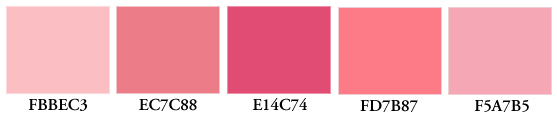
Every artist needs pinks in their repertoire – everything from the palest pastel shades to old roses to vibrant, in your face raspberries and corals. It can be difficult to get a pink right. Too much into the red or purple zones and you’ve lost the lusciousness. Well, here are a pair of pretty in pink palettes to help you out (RGB colors, not CMYK, since that’s what GCU uses). All things girly and sweet, here we come. Enjoy!

Share this:

Design Spotlight: Silvina De Vita

We’re putting today’s Design Spotlight on artist Silvina De Vita – really love her illustrative style!
_________________________
 I always wanted to be an illustrator. Since I was little I loved to paint and draw things anywhere, on friend’s diaries, walls (my mum was not grateful).
After graduating as a Graphic Designer in Buenos Aires I started to work in different areas, book publishers, magazines, newspapers, agencies. It was nice but not very fulfilling.
I always knew that my dream was to work with children illustrations and be a painter. So when I got pregnant, as a kind of therapy I started taking painting lessons again, and it was there that I discovered my true passion. I decided that I want to try to make a living from my art and illustrations, and since then I’ve been lucky that I’ve been able to do it.
Moving to London was a big change for me, this city is absolutely amazing and you can find inspiration everywhere you look, it is full of exhibitions and exciting stuff. Working part time in between taking care of my son gave me more time to start developing my art, and to continue studying at the same time. I started an illustration course at Putney School of Art and an MA in Art History at Birkbeck University that I’m currently finishing. As well, I started doing illustrated e-books for children, and a whole new world opened up before my eyes.
Discovering GCU was fab because it allowed me to give cards to my friends with things that I love, and it is a great way of personalising cards. It all started because a friend of mine told me, “you should do cards” and now I am fan of the site. There are so many fantastic artists here which I really admire.
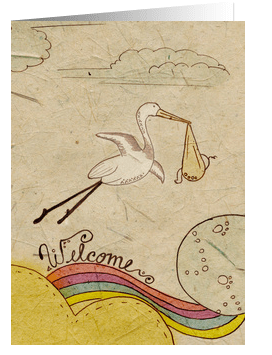
I think my favourite of my cards is “Welcome” which was the first card I did for a friend, and the one that gave me the idea of developing my illustrations into cards. It is one of the most popular now. It is also very significant because all of this developed with the arrival of my first son Rafael. That was my “key experience” that motivated me to put my energy into art, a way to say Welcome to this new life of being a mum, and trying to find time to develop my art at nights when my kid sleeps. And I love it all immensely.
So if you ask yourself, when does this woman sleep? Well, I do when something is not in my mind kicking very hard to get out and be put onto paper.
Share this:

Dash of Inspiration – Out of This World
A Dash of Inspiration, A Cup of Creativity by Doreen
Out Of This World!
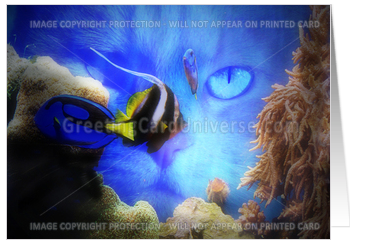
Once again I was inspired this week after viewing an amazing ‘exhibit’ of true Digital Manipulation art, one of our newest recognized art forms. While viewing these amazing creations I was reminded of the tremendous talent it takes to create this type of imagery. I’m not referring to the type where a pre-made filter has been applied and now it’s called a watercolor, I’m referring to those talented digital artists who blend bits and pieces of many different photographs to create imagery only found in their imagination.
Many years ago, when digital software first came out and before digital cameras were in everyone’s homes, I began a series I call “Endangered Planet” using a program called MicroGrafx (later bought by Corel). Each of the four in my series were made of many different photographic elements to create the vision in my mind. Sadly, I never finished this project because digital tools of that time were not sophisticated enough to allow the blending I needed to do in these images. Now that the tools are available, I may get back to this project . . . some day.
In the meantime, I am always fascinated by the creative minds of the pros in this medium. True Digital Manipulation takes a tremendous amount of accuracy, a highly advanced knowledge of the ‘tools of the trade” and hundreds of hours of practice to pull off a true work of art; one which is seamless in it’s blending of elements and in it’s viewer believability. I’m thrilled with how far this form of art has come, offering creative minds who were not talented in traditional methods the tools to create imagery purely from their imagination without ever putting brush to canvas and without limitations; just like the masters of old.
I’ll share these 50 Stunning Examples of Photo Manipulation Art from Noupe.com for inspiration and appreciation of this award-winning medium, and below are some tutorials to get you started on an ‘out of this world’ creation of your own!
See you next week!
3-Part Photo Manipulation Tutorial by FlewDesigns
35 Superb Photo Manipulation Tutorials by Top Design Magazine
Share this:

Critique Clinic – May 5-6, 2012
How does it work? For three days a week (Friday-Sunday midnight), I will open the clinic to any artist who wants an honest peer review and critique of a card which gets plenty of clicks but no sales, so something’s probably not quite right, or you’ve got a new design you want to test drive, or you’re unsure about the marketability of a card. Or perhaps you’re a newbie who isn’t sure if a recently submitted card is up to a marketable standard. Anyone is welcome to participate. In fact, I encourage everyone to at least look at the cards in question and read the critique comments – you may learn something. The purpose of the clinic is to help artists improve the commercial appeal and marketability of their cards.
THE RULES
- ONE card per artist only.
- Card must be for sale at Greeting Card Universe.
- We will take an unlimited number of artists, including those who have submitted recently, HOWEVER I reserve the right to close a clinic for the day if the submissions become overwhelming. If the clinic has been closed, and you submit a card, your comment will be deleted.
- To submit a card for critique, post a link to the card at GCU in the comments section of this clinic post. Allowances will be made if you’ve had a card declined, or made a new design you’d like advice on. Give us the link where we can see the card, such as your private gallery, Flickr, etc.
- Any artist is free to comment and/or give a critique of a submitted card. HOWEVER, post-and-run comments like “great card” or “you suck” will not be tolerated, nor will abuse. Criticism should be constructive, not destructive. Play nice or you will be banned.
- I also won’t tolerate temper tantrums if you decide your “artistic integrity” is being stepped on because you asked for a critique, and someone told you the photo you’re using isn’t in focus. If you can’t take honest criticism, don’t submit. Once gets you a warning; twice and you’re banned from submitting in the future.
- Artists who critique may do so by giving their opinion, posting an example of another card, or pointing the submitter to a video, on-line article, or other helpful suggestion.
- Don’t forget that artists who are giving you tips and helpful advice are volunteering their time and trouble. Be nice. A link back to their store on your website or blog is appreciated (but not mandatory).
- You are free not to take any advice offered. There’s no guarantee any card will be a bestseller, so don’t come into the clinic with unrealistic expectations.
- Rules may change as we go along and we see how things turn out, okay?
So without any further ado, I declare this week’s Critique Clinic open!


