Design Spotlight: Stephanie Laird

Today’s Design Spotlight shines on Stephanie Laird – nominated by LJ Maxx – who has a dreamy style when it comes to photography. Thank you, Stephanie!
_________________________
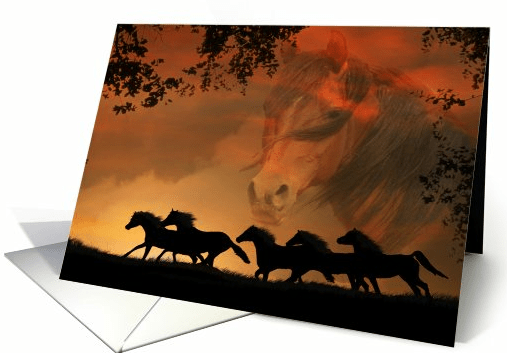
“Forever Free” was specifically designed as a horse sympathy card. It seems to be my niche market, although I have cards for just about every occasion. I find consolation in the fact that someone finds comfort in my words or image enough so to share with someone that is in need. That is what is so great about Greeting Card Universe, you can literally find a card for any specific need or occasion.
My artwork is done using my photos and editing them in Adobe Photoshop Elements. I have always loved photography but my pictures were far from interesting or spectacular. I found that with the help of Elements, my photos could take on a creative life of their own. This inspired me to write tutorials on some creative techniques in Elements beyond just photo editing. To see more on this you can visit my website.
I love the outdoors and am a huge animal lover. Most of my designs are influenced by all the beauty that mother nature shares with us.
I am a huge fan of this site and feel honored to have a place here with the outstanding artists that are on it.
Share this:

Dash of Inspiration – What’s In a Verse
A Dash of Inspiration, A Cup of Creativity by Doreen
What’s In a Verse?

Ever wonder why people buy greeting cards, sometimes by the handfuls? What draws you to a purchase and send a card to someone you care about? If you can remove your designer’s hat and think purely from the standpoint of a consumer, I think you’ll find that for most specific holidays and occasions. consumers choose a card based on what it says… inside and out. Let’s face it, why else would customers stand in mobs in the card aisles of department stores opening card after card before making their final choice?
As I browsed a couple of card categories last week in search of that perfect combination of verse and imagery, I was actually surprised to run across so many cards which had the same message on the front and on the inside. Some artists may feel that since customers can change the inside verse what they write doesn’t matter; I’d guess that logic to be very wrong. Though it is true customers can change the inside, I’d surmise that 8 out of 10 customers do not change the verse, but rather buy them because of that message.
Saying Merry Christmas on the front of a card and repeating that same Merry Christmas on the inside, frankly lacks imagination… you are better off leaving the inside blank. For some, the verse is the most difficult part of card design and in all fairness to you, most greeting card publishing companies license artwork separately and hire writers to add the accompanying verse. If you have cards with tons of clicks but little sales and you know that the imagery is not the problem, I’m betting that your inner verse either doesn’t match the feel of the imagery, or it doesn’t say enough.
Here are some tips and below are a couple of links which offer further explanation to help you start writing inside verses that can bring you sales!
- Get inspired – When I’ve done a card design specifically for a holiday or occasion, but can’t quite come up with the right inside message I seek inspiration to get my creative juices flowing. Say you have created a Father’s Day card… do an internet search for quotes about fathers. Don’t just use those quotes in your cards, but do use them for inspiration. I will often grab a couple that have the feel I’m looking for, paste them into a word-processing document and write something completely different, but inspired by the quotes.
- Match the feeling and imagery of the card! Much, if not most of the time your imagery has a theme, evokes feelings which can be drawn into the verse you use on the inside.
- There are four ‘styles’ of greeting card verse –
- TRADITIONAL are those using rhymed, metered verse. The number of lines is generally divisible by four.
- CONTEMPORARY PROSE or sometimes call “conversational prose” are those with a soft, gentle and realistic feeling – verses that would actually be spoken out loud if one could find the words to express them.
- HUMOROUS reflect current trends, life’s frustrations and shared experiences written in a cutting edge style or pun-filled voice.
- ALTERNATE is those cards which use both contemporary prose and humor. These are very much influenced by the times and events around the world.
- As all writers will tell you write what comes out – do not stop to go back and fix spelling or grammar, do not stop until the words stop coming . . . then go back over what you wrote and start refining. Take out words which are not needed to get the message across and make a Thesaurus your best friend!
Technical Writing Skills : How to Write Greeting Card Verse by Laura Turner
Writing Greeting Card Verse by Pamela S Stevens
If you missed it back in June 2011 here is a Nuts & Bolts article about Inside Verse from Corrie
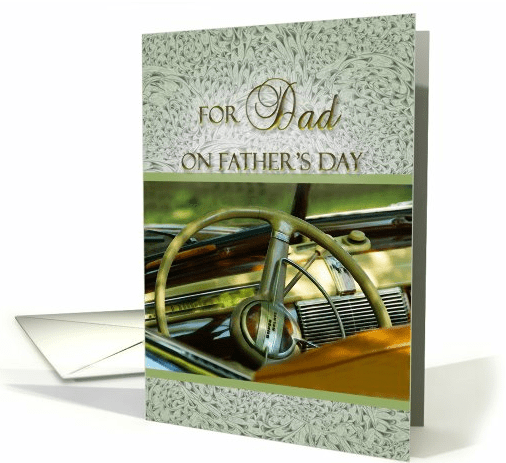
Inside verse: “Though I have probably driven you crazy on more than one occasion, you have always been supportive of the road I travel! When it comes to Dads, you’re a classic! Happy Father’s Day!”
Share this:

Memorial Day

Image by William Martin
“These heroes are dead. They died for liberty – they died for us. They are at rest. They sleep in the land they made free, under the flag they rendered stainless, under the solemn pines, the sad hemlocks, the tearful willows, and the embracing vines. They sleep beneath the shadows of the clouds, careless alike of sunshine or of storm, each in the windowless Place of Rest. Earth may run red with other wars – they are at peace. In the midst of battle, in the roar of conflict, they found the serenity of death. I have one sentiment for soldiers living and dead: cheers for the living; tears for the dead.”
—–Robert G. Ingersoll
Share this:

Critique Clinic – May 25-27, 2012

How does it work? For three days a week (Friday-Sunday midnight), I will open the clinic to any artist who wants an honest peer review and critique of a card which gets plenty of clicks but no sales, so something’s probably not quite right, or you’ve got a new design you want to test drive, or you’re unsure about the marketability of a card. Or perhaps you’re a newbie who isn’t sure if a recently submitted card is up to a marketable standard. Anyone is welcome to participate. In fact, I encourage everyone to at least look at the cards in question and read the critique comments – you may learn something. The purpose of the clinic is to help artists improve the commercial appeal and marketability of their cards.
THE RULES
- ONE card per artist only.
- Card must be for sale at Greeting Card Universe.
- We will take an unlimited number of artists, including those who have submitted recently, HOWEVER I reserve the right to close a clinic for the day if the submissions become overwhelming. If the clinic has been closed, and you submit a card, your comment will be deleted.
- To submit a card for critique, post a link to the card at GCU in the comments section of this clinic post. Allowances will be made if you’ve had a card declined, or made a new design you’d like advice on. Give us the link where we can see the card, such as your private gallery, Flickr, etc.
- Any artist is free to comment and/or give a critique of a submitted card. HOWEVER, post-and-run comments like “great card” or “you suck” will not be tolerated, nor will abuse. Criticism should be constructive, not destructive. Play nice or you will be banned.
- I also won’t tolerate temper tantrums if you decide your “artistic integrity” is being stepped on because you asked for a critique, and someone told you the photo you’re using isn’t in focus. If you can’t take honest criticism, don’t submit. Once gets you a warning; twice and you’re banned from submitting in the future.
- Artists who critique may do so by giving their opinion, posting an example of another card, or pointing the submitter to a video, on-line article, or other helpful suggestion.
- Don’t forget that artists who are giving you tips and helpful advice are volunteering their time and trouble. Be nice. A link back to their store on your website or blog is appreciated (but not mandatory).
- You are free not to take any advice offered. There’s no guarantee any card will be a bestseller, so don’t come into the clinic with unrealistic expectations.
- Rules may change as we go along and we see how things turn out, okay?
So without any further ado, I declare this week’s Critique Clinic open!
Share this:

Design Contest: World’s Best Dad!

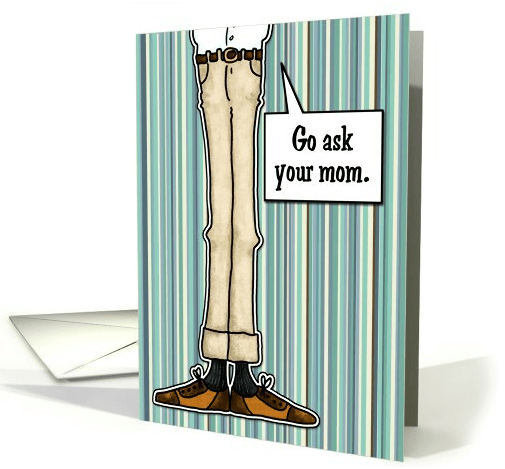
Father’s Day is around the corner (June 17 this year), so let’s do Design Contest: World’s Best Dad!
Post a link to your Father’s Day card on GCU in the comments of this post. On May 31, I’ll post all the nominees and open the voting, which will commence until June 7. On June 8, I’ll announce the winner, who will receive their choice of prize: a $10 Amazon.com certificate or 5 free card credits.
BONUS
Artists will have TWICE the opportunity to win this time around! Nominate your own card + you can nominate another artist’s card too. If the artist you nominated gets the most votes, BOTH OF YOU will receive a prize. How’s that for fun? 🙂
Now show us your best work, and good luck to all our participating artists!
Share this:

Design Spotlight: Alda Monteschio
Today’s Design Spotlight shines on Alda Monteschio of Heart Tugs and her unique, poetic style – thanks, Alda!
_________________________

I became a poet either by accident or by God’s design.
I work for a gift company, and was asked to write a verse for a mother’s day piece they were developing. Although I hadn’t written any poetry since I was an adolescent, I gave it a shot and to my surprise, the verse was a success. The item even won an award. I have been writing poetry ever since.
As a result, I began to develop more and more ideas and verses of my own. I began to write poems for friends and family. I took a few computer graphic design classes and began experimenting with photography as well, and was thrilled when I stumbled across GCU as an outlet for my budding hobby. My best selling cards are in the wedding category, as I enjoy writing from the heart about those special relationships in a person’s life.
I have a day job, and some of the professional projects I have helped develop over the years are the Reunion Heart and No Tears in Heaven product lines, which are memorial gift lines that offer comfort and hope to those who have experienced the loss of a loved one.
Because I know that God has given me this talent, I try to use it to inspire and encourage, and hope that my card designs are accomplishing just that. I am so thankful for the GCU community too, as they are easy to work with and produce a quality product which I can be proud of. I think most GCU artists will agree, it is always so amazing to see your designs come to life, and I still celebrate every sale as if it was the first.
One of my best selling cards is “Be My Husband On Our Wedding Day.” I sometimes would love to be a fly on the wall when this card is given to the husband-to-be to witness his response, but since I can’t, I just give thanks that I was able to put into words what someone else was feeling in their heart.
I truly enjoy those moments of inspiration that develop into a unique creation. Being able to share them with the rest of the world via GCU is just icing on the cake.
Share this:

Rainbow Connection: 2012 Fall Colors

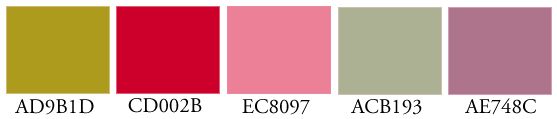
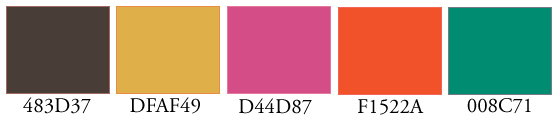
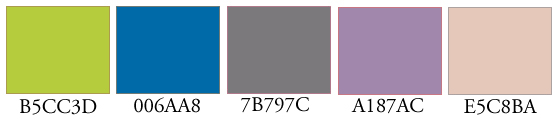
Just in time for your designing needs, here’s Pantone’s 2012 Fall Color Report. While I wouldn’t advocate using every single color on one card – unless you’re doing retro 60’s psychedelia – I can certainly see pairing up some of these earthy tones to create the right note for autumn related designs. Have fun!
Share this:

Dash of Inspiration – Facelifts for Old Cards
A Dash of Inspiration, A Cup of Creativity by Doreen
Facelifts for Old Cards
(Note: Doreen is hosting an annual motorcycle event in her area, so this week we bring you a classic Dash of Inspiration from December 12, 2011 – enjoy!)
When I joined GCU in April of 2009, I came with no experience for Greeting Card creation; certainly not the All Occasion type that are big sellers at GCU. As most artists who’ve spent time in the gallery and art show environments, I sold my work on Fine Art Greeting Cards; those blank cards with the same art which was offered as Open Edition or Limited Edition prints, but had never attempted cards for specific relations and occasions. So my time at GCU has been a huge learning experience.
The cards that I create today are far superior in the quality of design layout and typography to those cards in my first year with GCU. This does not mean that some of those cards never sold, in fact many did, but that doesn’t mean I don’t cringe when I see them in my store today. I have always been my worse critic and as I’ve grown in all areas of my art and photography over the years, I often look back at work I once was proud of and am embarrassed to have it sitting next to my current creations. Knowing that the ‘weeding process’ was in full swing, I began giving my old cards a facelift.
This week, I thought I would share my own redesign efforts to offer examples of what was considered, even if only by me during my own weeding efforts, designs with an unprofessional look along side the same card with it’s new facelift. Perhaps this will inspire more of you to take another look at cards you created a year or two ago. You should all see a significant change and improvement in your style of layout, use of text and overall design qualities. Every time we create a new card we should be learning something new which we can apply to future designs and to these much needed redesigns.
Each of these examples has a link below it which can be clicked on, and you will be taken to a nice large view in Flickr so you can see the difference between old and new.
Image 1:

The reviewers beat me to this series of cards and many of these cards had sold (as is) both at GCU and elsewhere, but the reviewers were right. The photograph with the carpet and baby feet was not professional and not appealing. Since these were returned to me to improve the image, I was able to swap the image out for the whole series with a much more professional looking photograph. While I was at it, improve the text and even the color . . . what was I thinking when I made these? Surely you will all agree that what the reviewer saw made perfect sense and in returning it to me I was able to redesign the entire series with a much improved design.
Image 2:

This patriotic card series had unprofessional text effects; the unsightly ‘glow’ to get the text lifted off the background I now understand to be a technique which professional designers do not use excessively like I did. Also the overall tonal values of this card and the denim background are flat and just not appealing. My redesign of this series improved the saturation, but also used professional techniques for text layout. The result is a much more professional looking design.
Image 3:

YUCK! Again, why people are buying these cards is beyond me! The sepia tone looks for like jaundice and the text is not only TOO BIG as if I’m yelling at the recipient, but once again I used that awful beveling technique which on text is rarely professional looking. Wedding and anniversary cards either need to be very elegant or fun, anything in between is usually ignored by the consumers. I now understand that text choice, color combinations and visual harmony are critical to standing strong against the competition for these categories and my redesign reflects what I’ve learned.
Image 4:

Oh, I cringe at this card and yet again it sold many times for male relations most likely because of the wording rather than the image and layout. This image was from those days (well in the past now) that I played too much with Photoshop filters, in this case Posterization; a filter I never go near anymore unless I’m making a poster for a play or event. About four years ago I stepped foot into art licensing world for getting my art on products and learned the lesson about digital manipulation using these types of filters. Professional agencies, such as Art Licensing & Publishing Companies see this as an immediate red flag that the artist is an amateur. Unfortunately when I created this card, I didn’t remember that lesson! The redesign has the imaged changed for a painting I’d done, but I wished to keep the nautical theme because the message was the key for this card and a MUCH improved text choice and layout.
Image 5:

This card series has also been quite popular. I’ve sold about 250 cards on GCU alone between custom sales and original versions, but when I look at this series, once again I don’t see professional designs, whether they sold or not. The overall design is cluttered with all the borders and the text on the background. The typography is also unprofessional, both because of the beveling and because of the layout. Again I realize that the main selling point of this series is the message, but this series is in-process as I write this with a facelift that softens the design, reduces the clutter and makes for a more elegant card that will stand proudly against the competition.
As I continue to weed my own designs and improve them with all that I’ve learned over the past couple of years, I hope that by offering these examples of my own embarrassments I might help some of you see your own cards with new eyes; or inspire those of you who haven’t found the time yet to dig in and see what treasures you can create with a few tweaks on those old designs!
Share this:

Critique Clinic – May 18-20, 2012
How does it work? For three days a week (Friday-Sunday midnight), I will open the clinic to any artist who wants an honest peer review and critique of a card which gets plenty of clicks but no sales, so something’s probably not quite right, or you’ve got a new design you want to test drive, or you’re unsure about the marketability of a card. Or perhaps you’re a newbie who isn’t sure if a recently submitted card is up to a marketable standard. Anyone is welcome to participate. In fact, I encourage everyone to at least look at the cards in question and read the critique comments – you may learn something. The purpose of the clinic is to help artists improve the commercial appeal and marketability of their cards.
THE RULES
- ONE card per artist only.
- Card must be for sale at Greeting Card Universe.
- We will take an unlimited number of artists, including those who have submitted recently, HOWEVER I reserve the right to close a clinic for the day if the submissions become overwhelming. If the clinic has been closed, and you submit a card, your comment will be deleted.
- To submit a card for critique, post a link to the card at GCU in the comments section of this clinic post. Allowances will be made if you’ve had a card declined, or made a new design you’d like advice on. Give us the link where we can see the card, such as your private gallery, Flickr, etc.
- Any artist is free to comment and/or give a critique of a submitted card. HOWEVER, post-and-run comments like “great card” or “you suck” will not be tolerated, nor will abuse. Criticism should be constructive, not destructive. Play nice or you will be banned.
- I also won’t tolerate temper tantrums if you decide your “artistic integrity” is being stepped on because you asked for a critique, and someone told you the photo you’re using isn’t in focus. If you can’t take honest criticism, don’t submit. Once gets you a warning; twice and you’re banned from submitting in the future.
- Artists who critique may do so by giving their opinion, posting an example of another card, or pointing the submitter to a video, on-line article, or other helpful suggestion.
- Don’t forget that artists who are giving you tips and helpful advice are volunteering their time and trouble. Be nice. A link back to their store on your website or blog is appreciated (but not mandatory).
- You are free not to take any advice offered. There’s no guarantee any card will be a bestseller, so don’t come into the clinic with unrealistic expectations.
- Rules may change as we go along and we see how things turn out, okay?
So without any further ado, I declare this week’s Critique Clinic open!
Share this:

Rainbow Connection: Modern Comfort
Today’s consumers – including greeting card shoppers – love elegant, contemporary designs and colors. This “modern comfort” palette is sophisticated enough to employ in a wedding invitation but is friendly to birthday cards, too. Incorporate these colors when you want to bring a touch of elegance to your work. I see all kinds of pretty cards can be made for either men or women – the scheme is pretty friendly for both.