Nuts and Bolts: Storefront Design

Why is the design of your storefront so important? Isn’t it just an extension of your artistic creativity, a way to further impress the beauty of your personal aesthetic on an audience of onlookers?
Um… no, not quite.
You see, those artists who do custom requests already know something you may not – a lot of shoppers don’t understand that Greeting Card Universe is composed of individual artists. No matter how many different styles of card they’re looking at, they believe it’s all just GCU itself. And that’s why I’m passing this tip along to you.
How to put this delicately… let me begin by saying I’m not pointing fingers here, and no names will be brought up, so don’t take anything personally. I’m just stating a fact: some artists go too far when customizing their storefronts. Dark blue or purple background with red text; badly designed, wrong size or distorted banner; an artist profile that’s either the size of War and Peace or full of spelling and grammar errors or both; HTML or Javascript like, God help us, Midi music. That’s what I’m talking about. See my hand? No pointed fingers.
So what? Who cares if another artist chooses to represent themselves that way? Why should you care about another artist’s errors or poor judgment? BECAUSE if a shopper happens to run across such a storefront, they’ll USE THAT STORE’S APPEARANCE TO JUDGE THE REST OF GCU… that includes me, you, and everybody else. Remember, many shoppers don’t understand we’re individuals. If they come onto a GCU page from an outside search (which happens often), then the first store they light upon is the one they think represents ALL of GCU.
Just as we’ve often talked about how an unappealing card design can drive shoppers away, not just from that card but from purchasing any card at all, we need to represent ourselves with a professional storefront. In this day of Web 2.0, Internet users expect to see sites that are clean, uncluttered and attractive.
Put it another way… would you trust your credit card details to an on-line retail company whose website was riddled with mistakes, and was shoddy and unprofessional looking to boot? Of course not.
Here are three examples of excellent storefront design. You’ll notice the banners are clean and well thought out; the background of the pages is white, so as not to detract from the card designs; no weird HTML or Java, no animated this and that. These artists present themselves as professionals, ready to do business with shoppers.

_________________________

_________________________

_________________________
I’m not saying you need turn your storefront into a clone of these examples. Far from it… as you see, there’s plenty of room for individuality and originality (particularly in your store banner). As artists and as business people – yes, if you’re selling your greeting cards to the public, you ARE in business – we need to give a good impression to the shoppers who visit us, so they’ll have an overall good impression of GCU.
Check your storefront with a critical eye. Look at it closely, not from the standpoint of an artist, but from the standpoint of a shopper who is considering giving her hard-earned money to GCU (and, by extension, to you as well). Ask people you trust to give you an honest assessment. Be aware that your storefront not only represents you, it represents GCU as a whole. What’s your storefront saying? Is it a message you want shoppers to hear?
A word to the wise… a little bird told me the Big Kahunas at GCU are considering removing some of the storefront customization options because of this issue. Don’t panic. The option is being discussed, that’s all. However, if we don’t clean up our act, we may find our toys taken away. ‘Nuff said.
Share this:

Design Spotlight: Rycky Creations
 Today’s Design Spotlight is on Rycky Creations, who shares a poignant story with us. If you would like to see your favorite and/or bestselling card spotlighted here, get in touch!
_____________________

In late 2006, a very special young friend named John underwent surgery to remove a malignant brain tumor. He was diagnosed with glioblastoma multiforme (GBM), a very aggressive form of cancer at 23 years of age. In 2008, I began designing cards, along with another friend, and selling them on the internet under the name “Rycky Creations.”
Wanting to “do something” not only in John’s honor, but also because I had lost my dad to a brain tumor, I designed a card called “Hope.” The background of the card is done in gray, which is the color that represents brain cancer, and I made the decision to donate any commissions earned to cancer research.
In 2009, we expanded our “Hope” card line to include several other “colors” of cancer. By the end of 2010, we had sold 642 Hope cards with 100% of the commissions going to cancer research. If you have a moment, check out our “Hope for Cancer” blog.
I feel so blessed to belong to such a wonderful community of artists… thanks GCU for giving us a great outlet to share our creations!
Share this:

Dash of Inspiration – April 25, 2011
A Dash of Inspiration…A Cup of Creativity by Doreen
Photomanipulation in Photoshop
 I love fantasy and sci-fi and I’m always fascinated by the creation process of this type of art. For those of us who are photographers, we can’t photograph what doesn’t exist which is probably what draws me this style of creation. In today’s digital world full of powerful tools, photographers can create ‘something out of this world’ using our own photographs; just like the painter puts imagination to canvas. This week I wanted to challenge all of the photographers out there to create something surreal and fantastic using bits and pieces of your photographs. Today’s Photoshop Tutorial gives you some initial technique and hopefully some inspiration to dip your toes into a whole new world of exploration.
Along with the How to create a fantasy Photomanipulation in Photoshop tutorial brought to us by Webgraphics, I’m also including two Brushes links to help you with your new creations into the world beyond! The first is a set of 30 Hi-Res Fairy Wing Brushes, the other a set of 22 Light Swirl Brushes. These come to us from Obsidian Dawn and should work for Photoshop 7 & up, Elements 2 & up and Gimp, so all of you should be able to play in this sandbox!
How to Create a FantasyPhotomanipulation in Photoshop Tutorial

Share this:

Guest Blogger: Tom Rent – April 25, 2011
Today’s guest blog comes from Tom Rent at Comical Captions, one of the most knowledgeable and helpful guys around the community. Thanks for the tip, Tom! — Corrie
_________________________
Your Artist Profile Is More Important Than You Think
Yikes! Being lazy one day, rather than typing in my store URL to see if my new cards were up, I just did a Yahoo Search and noticed something interesting and disturbing!
Look how our search results come up! The title line is from GCU, and we can’t modify that, but the first lines of our Artist profile is what comes next. This is so critical in helping the shopper decide to click the link or not – yes, CRITICAL.
I then tried a Google Search and they present the same way but they instead use part of the second sentence! They must know people are gaming the system by depending to much on the first sentence.
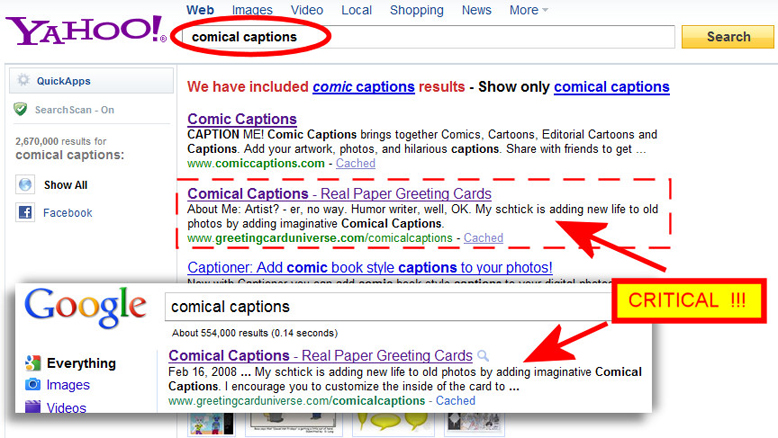
Oh man! I think I need to come up with something more inviting and that covers 2 sentences, perhaps with a similar message. I do know it is good to use the store title again in that first sentence to help in ranking high in search, so having Comical Captions has to stay. Perhaps something like “Over 5000 of the funniest Greeting Cards around now at Comical Captions. My funny Greeting Cards are some of the most popular around.” … (and then I’ll get into the personal stuff). The first lines need to be very “catchy.” If they are reading them then the “Real Paper Greeting Cards” is what they are looking for, so the next 2 sentences of our Artist Profile is what they will bite on next so we have to word them just right!
Obviously what we come up with also has to look “OK” to someone reading the artist profile once in our store. We don’t want to drive them away. This could take some noodling!
Just thought I’d share that with the group. You might try to see how your Artist Profile reads in search. Please share what you find out!
Share this:

Happy Easter!
Have a joyous Easter, everyone!

Share this:

Weekend Recap – April 23, 2011

Well, it was a short week but an exciting one! In just a couple of days, we’ve already helped out some artists with various issues, scattered some inspiration around, and had a great time jammin’ with our community peeps. So in case you missed the fun, here’s a recap of what’s gone on:
_________________________
FROM THE COMMENTS
LINKING TRICK:
Corrie (hey, that’s me!) taught a neat trick for linking to a page of related cards at GCU. First, do a site-wide search on GCU for your keywords INCLUDING your artist or store name, such as “corrie kuipers scooter cow.” This should bring up all the cards of YOUR design. Then copy and paste the URL wherever you want. Voila! If somebody clicks on the link, they’ll get that same page of cards, too.
SQUIDOO-BE-DOO-BE-DOO:
Sher gave us the valuable advice that the maximum width of a photograph or other picture you want to put into a Squidoo lens is 25o pixels.
Moonie at Moonlake Designs started a new Squidoo lens about We Love Cake.
Elizabeth has a Mother’s Day for Special Mothers lens.
Bright has a Squidoo lens about Art Appreciation for Kids.
When you make a new Squidoo lens, in addition to using the Amazon, Zazzle, etc. modules to make a little moolah, why not include your GCU cards as well? You can have up to 9 outbound links to GCU per lens, which is plenty to promote greeting cards without seeming spammy. Not sure how? Check out our latest Squidoo tutorial (link below).
NEED FOR FEED:
Want to add the GCU Community blog to your RSS news feeder so you can stay on top of all the latest? Here’s the link you need: https://gcucommunity.com/feed/
DON”T MISS:
This week’s GCU Community Newsletter.
A tutorial on linking GCU greeting cards in your Squidoo lens.
This week’s A Dash of Inspiration…A Cup of Creativity by Doreen at Salon of Art.
_________________________
COMMUNITY SHOUT OUT
Thanks to the artists who responded to our request for guest bloggers. If you want to volunteer to write about a subject close to your heart on any topic you think will interest and inform the community, get in touch. We’re also seeking artists who’d like to have a favorite/bestselling card spotlighted here. If you want to get some free exposure, contact us about being in the Designer Spotlight.
If you haven’t already, don’t forget to send in your links to your blog, Squidoo lensmaster profile, Twitter or Facebook so we can add you to our roll calls.
Got a question about GCU you want to Ask Mindy? Send it in to us and we’ll pass it on!
_________________________
COMING UP
What’s with the star on the right side of the page, you ask? In a few days, we have an exciting announcement to make about a new community-wide project we’ve been working on. We’ll give you a hint: if you haven’t started a blog to promote yourself and your designs, you’re going to miss out on the fun.
_________________________
A PEEK BEHIND THE SCENES
Shhhhh… (peering around)… come closer. I have a secret to whisper in your ear. Are you sure you’re alone? Okay, my spies at GCU headquarters have let me in on a super hush-hush project that’s very close to completion. From what I’ve heard, this new project is just for the artist community, and it’s going to totally rock! I’m already a little verklempt thinking about it. Stay tuned, ladies and gents… I’ll have more breaking news for you as it comes in.
_________________________
CONTACT US: You can get in touch anytime at gcucommunity(at)bigdates.com
Share this:

Community Shout Out – April 22, 2011

Hi everybody! In case you haven’t heard, GCU is seeking cards for upcoming promotions as these categories are EMPTY. Be the first to design and upload a card – and you get to Fast Track, too, so that’s almost instant gratification!
The categories are:
Holidays >> Mother’s Day >> Co-worker / Colleague >> Work Wife
Holidays >> Father’s Day >> Co-worker / Colleague >> Work Husband
What’s a Work Wife? What’s a Work Husband? According to the definition, a “Work Spouse” – work husband or work wife – is a co-worker or colleague of the opposite sex with whom you share an especially close (Platonic) relationship.
So get designing, people! This is YOUR chance to get YOUR card(s) into a category that isn’t already bursting, so it’s a golden opportunity. Go for it! And when you’ve submitted the card (don’t forget to Fast Track) you can post the PID# on this Forum thread.
Corrie
Share this:

Dash of Inspiration – April 22, 2011
Learn . Create . Inspire
by Doreen
A Dash of Inspiration…A Cup of Creativity
Each week I’ll be offering links to tutorials, free downloads and wonderful art & photography that should inspire you to ‘think outside the box’. Every artist should experiment with new tools, new mediums or just new subject matter. The difference between good and great in any field is whether you do an average job or whether you push yourself to do a great job…Every time! Being a great artist is no different. It’s about constant growth, becoming a master at your techniques, and being inspired by something so outside the bounds of your artistic ‘comfort zone’ that you simply MUST create something new!
Today, in honor of Earth Day, I bring you this wonderful exhibit of 40 Terrific Works of Art Made From Common Trash. This is wonderful collection is brought to us by Noupe.com. Look for A Dash of Inspiration…A Cup of Creativity each Monday for something that will spark your creativity!
Share this:

Squidoo-sday – April 22, 2011
BASIC – How to Link Your GCU Cards in a Squidoo Lens
GCU artist Moonie asked: “How do you actually get all the little picture links, etc., (for) posting cards (on Squidoo)?”
Answer: That’s easy, and I’ll show you how. There are two ways you can go about it.
First, you’ll need to add a TEXT module to your Squidoo lens. Why? Because a TEXT module is where that ol’ HTML magic happens. This is what it looks like:
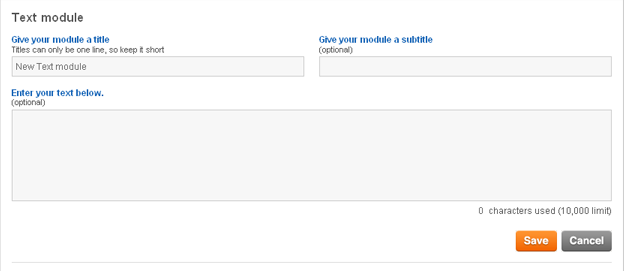
Next, pick out the card you want at GCU. See that row of symbols under the card? Click the dollar sign, you’ll get a pop up box with two HTML codes to choose from.
Copy the Image Link.

Go back to the TEXT module of your lens. Paste the HTML into the box. Click SAVE.

Voila! There’s your card with a clickable link to its Card Details page at GCU.
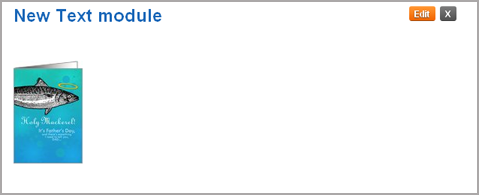
That size of image will fit five across (so that’s five “portrait” style cards, only four “landscape” style cards will fit) the width of the lens. To put a little space between images, add/ /at the end of each clump of image link HTML code – no spaces, please! It’ll look like this:

And the end product looks like this:

However, suppose you want a larger image as part of your text. First, re-size your chosen card with your graphic editor program to make it a reasonable size. While Squidoo prefers squares, as long as you don’t make your image too huge, it shouldn’t get distorted. You may have to play around with it a bit to find out what size works best for you.
Next, head over to GCU and click that dollar sign again. This time, you’ll want to copy the Text Link code.
Now back to the Squidoo TEXT module. You’ll see this:
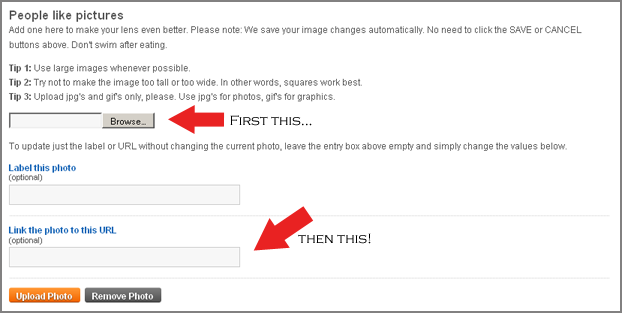
Browse and upload your picture, and use the Text Link you got from GCU to link it to a URL. UPLOAD the photo. Click SAVE. And you’ll get a lovely big photo on one side (your text will be on the other), and the photo will be linked to the Card Details page on GCU.

And there you have it.
If you have questions regarding Squidoo, send them to us, ‘cause we want to help! And if any of our super duper Squid lensmasters have tips, too, we want ’em!
Share this:

Community Shout Out

Guess what? Our own gracious and lovely lady Mindy (one of GCU’s Big Kahunas, in case you didn’t know) has agreed to answer your questions in our upcoming Ask Mindy feature. How cool is that! So send in your questions (either by leaving a comment on this post or sending them by email, and we’ll submit them to Mindy, who will choose her favorites to answer.
What have you always wanted to know about GCU? What burning question keeps you up at night? What head-scratchers do you yearn to pose? Now’s your chance! Get pondering and send us your questions ASAP.
____________________
We are seeking Guest Bloggers for the following topics: greeting card design tips, photography tips, GCU tips or how-to, Squidoo tips or how-to, blogging tips, social networking tips, marketing/promotion tips. In short, anything you think will benefit the GCU community is up for grabs. Submissions can be as long or short as you wish, and we’ll happily include graphics or embed video, and coordinate the publication date with you. Send an email letting us know what you’re interested in sharing as a guest blogger. Thanks!
____________________
Got a favorite card at GCU or a bestseller? Well, here’s a fantastic opportunity to toot your own horn AND get exposure at the same time! We’re seeking submissions for an upcoming feature, Design Spotlight. Your card (linked to GCU, of course) will be prominently displayed, along with your story of how the card was created, what inspired you, why you chose to make that design… whatever you want to tell us about it. Send us an email to join in!
All email should be sent to: gcucommunity(at)bigdates.com


 GCU Community