Design Spotlight: Rackafracka by Fritz

Our Design Spotlight falls today on artist Fritz at Rackafracka by Fritz, who joined GCU in August 2014. His cartoons really make us giggle and grin!
_________________________

My pen name is Fritz. I took this pen name when I moved to San Francisco California from Ames Iowa. Nobody knew me so I decided to change my name and sign my illustrations with the new name. My Grandpa was also nicknamed Fritz and he loves to tell jokes. And since I’ve also love to tell jokes and make people laugh I thought it would be a good thing to carry on. I’ve been drawing and reading cartoon as long as I can remember.
My heros are Gary Larson, Charles Schulz, and Bill Watterson. I started my first comic strip in high school with a character named Kumquat Boy. Most of the jokes were immature and involved farts and other bodily functions that at the time I thought were hilarious.
I moved to San Francisco and got my BFA in Illustration at the Academy of Art University. It was at AAU that I started my single frame comic strip called Rackafracka. I love the single frame comic. I love the challenge of telling a whole story in one frame. Single frame comics are versatile and flexible and are perfect for many applications. I also have the freedom to create new and funny characters every day.
One way I practice is in at a breakfast business networking group that I’m a part of that meets weekly. Every week there are three member speakers. Each speaker has seven minutes to talk. I challenge myself to come up with a joke and a illustration during that seven minutes and it has to be relevant to the topic they are talking about in their speech.
I pay the rent by doing custom cartoons for businesses that need custom illustrations for their marketing, websites, social media, and presentations. I’ve also done wall murals for companies that want to decorate their campus. My comic strip Rackafracka is a daily comic that will be re-launching on October 1, 2014.
I’ve always loved getting greeting cards for special occasions. Greeting cards are perfect for single panel comics like myself. I love the opportunity to think of comics for all the categories that are on GCU. It’s my challenge and my goal.
Share this:

Rainbow Connection: Color Resource

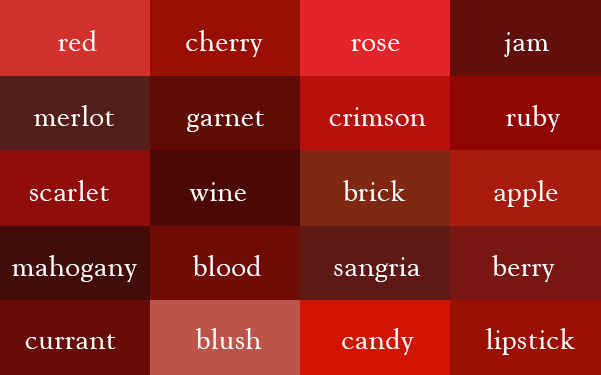
The blog Ingrid’s Notes has posted a very helpful Thesaurus of Colors with examples of some very lovely colors and their names. So not only will you nave pure, beautiful colors to work with (I particularly like some of the yellows, a difficult color sometimes), you’ll be able to augment your Artist’s Notes with creative, color-based text. An example is below. Have fun!
Share this:

Dash of Inspiration: Digital Watercolor Freebies
A Dash of Inspiration, A Cup of Creativity by Doreen
Digital Watercolor Freebies

I’ve always loved the watercolor medium. Whether it’s a light splash of color to create a lovely wash of hues; or rich, bold colors, this medium with it’s whites left uncolored technique has a recognizable artistic quality which stands out from all others.
For those of us who simply are not gifted with the talent to create traditional watercolor paintings, here are some fun goodies to use in your designs to create the illusion of watercolor. Those of you new to Photoshop or the digital art world, please refrain from plopping the ‘watercolor’ Photoshop filter on a photograph as a stand alone effect – this filter doesn’t even come close to resembling the watercolor medium, and will very likely appear as Excessive Effects causing your creation to be deemed unmarketable at GCU.
Watercolor Smudges – Vectors, Textures and Brushes
This resource includes 10 watercolor smudges and drips, each created by hand. The download includes vectors, brushes and the original jpg textures.
For those of you who love to layer textured backgrounds for mood and intensity, this set of backgrounds is a lovely addition to your texture collection.
25 Hi-Res Watercolor Textured Backgrounds by Daniel Davidson from Lost and Taken
Try digitally painting using digital watercolor brushes.
Free Hi-Res Watercolor Photoshop Brushes By Sandy
105 More Delicious Water Color Illustrator Brushes by Grant Friedman
There are two parts, so get both for a total of 211 Illustrator Brushes – mid-way down there will be a link to download the 2-part set of brushes.
I really love to paint in Corel Painter 11 and there are some wonderful brushes and tutorials for those of you who use this painting software. Such as this one:
Using Digital Watercolors (with Corel Painter & Wacom tablet) J. Solorzano
For those of you who would like to get serious about painting with digital watercolor in Photoshop, this tutorial set starts out with actions you can download to create realistic watercolor paper!
Watercolor Painting In Photoshop (including all tools, brushes, papers etc) Tutorials by Robert Ardill
Each of these cards I’ve created using digital painting techniques in watercolors and oils.


So until next week … Learn … Create … Inspire!
Share this:

Critique Clinic – September 20-21, 2014

How does it work? For three days a week (Friday-Sunday midnight), I will open the clinic to any artist who wants an honest peer review and critique of a card which gets plenty of clicks but no sales, so something’s probably not quite right, or you’ve got a new design you want to test drive, or you’re unsure about the marketability of a card. Or perhaps you’re a newbie who isn’t sure if a card is up to a marketable standard. Anyone is welcome to participate. In fact, I encourage everyone to at least look at the cards in question and read the critique comments – you may learn something. The purpose of the clinic is to help artists improve the commercial appeal and marketability of their cards.
THE RULES
- ONE card per artist only.
- Card must be intended for sale at Greeting Card Universe.
- To submit a card for critique, post a link to the card at GCU in the comments section of this clinic post. Allowances will be made if you’ve had a card declined, or made a new design you’d like advice on before submission. Give us the link where we can see the card, such as your private gallery, Flickr, Tinypic, etc. If you do give a private gallery link, be sure your private module gallery is ON. Please do not post links to your Manage Cards section – do you really want strangers tinkering with your cards? And please don’t ask us to critique a card that’s pending review – we can’t see it until it’s approved.
- Any artist is free to comment and/or give a critique of a submitted card. HOWEVER, post-and-run comments like “great card” or “you suck” will not be tolerated, nor will abuse. Criticism should be constructive, not destructive. Play nice or you will be banned.
- I also won’t tolerate temper tantrums if you decide your “artistic integrity” is being stepped on because you asked for a critique, and someone told you the photo you’re using isn’t in focus. If you can’t take honest criticism, don’t submit. Once gets you a warning; twice and you’re banned from submitting in the future.
- Artists who critique may do so by giving their opinion, posting an example of another card, or pointing the submitter to a video, on-line article, or other helpful suggestion.
- Don’t forget that artists who are giving you tips and helpful advice are volunteering their time and trouble. Be nice. A link back to their store on your website or blog is appreciated (but not mandatory).
- You are free not to take any advice offered. There’s no guarantee any card will be a bestseller, so don’t come into the clinic with unrealistic expectations.
- Rules may change as we go along and we see how things turn out, okay?
So without any further ado, I declare this week’s Critique Clinic open!
Share this:

Community Shout Out – GCU Down Time 9/23/2014

Greeting Card Universe will be down for scheduled maintenance on Tuesday, September 23, from 2:00 PM (Pacific Standard Time) until midnight (12:00 AM). Please don’t try to upload cards during this period.
If you need help figuring out the off-line period in your time zone, try this Time Zone Converter.
Thanks!

Share this:

Rainbow Connection: Color Palettes Resource – COLOR Crush
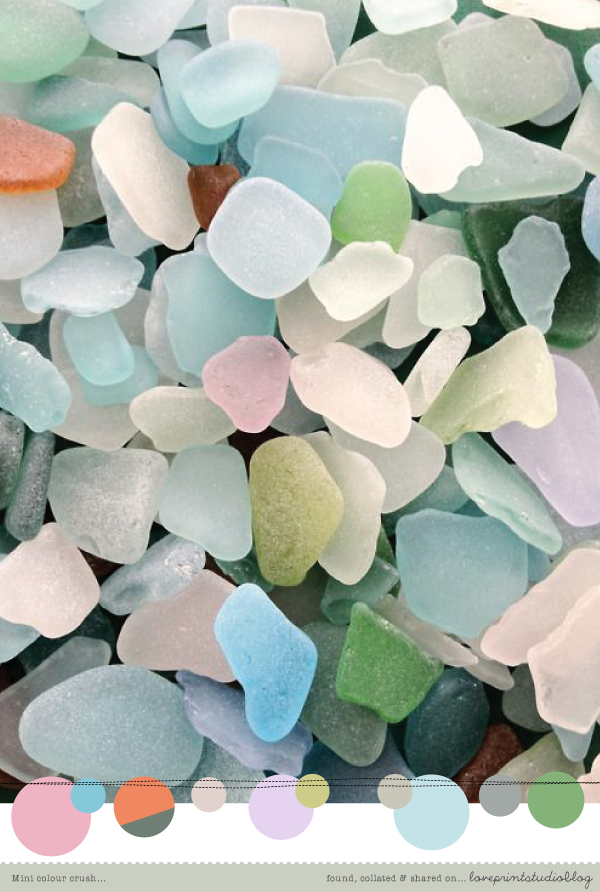
Here’s a great resource for hot, happening, trendy, fabulous color palettes – Love Print Studio’s COLOR Crush has lots of pretty pictures and palettes for you to play with in your new designs. Below is an example of what you’ll find there. Have fun!
Share this:

Design Spotlight: Charlyn Woodruff
Our Design Spotlight falls today on artist Charlyn Woodruff of CW Designs, who joined GCU in 2912 and has been making us smile since with her sweet designs.
_________________________

Hello, my name is Charlyn Woodruff, my husband and I have 3 daughters (20, 19 and 10) and 7 cats and live out in the countryside of WV where it takes 40 minutes to get to the grocery store!
Being that I am a stay at home mom and wife and a self taught artist in many different mediums, years ago I started looking for ways to work from home to help my family financially. I began my adventure as a polymer clay artist when the sculptures I created were loved by family and friends and I thought others might enjoy them as well, so I started selling my creations on Ebay, Etsy and my own website. I had even added a few photograph designs of my creations to Zazzle. To my surprise others loved my creations as much as I did creating them and they became in high demand being one of a kind creations of which I would only create once, never to be recreated again.
I created my sculptures until the beginning of 2011 and due to the high demand and stress of having so many orders to create and ship and only one of me, and most of all my father passing away on Dec 31, 2010 my heart was shattered and broken and I could no longer and no longer wanted continue creating or anything else at that time and so I closed down all my stores and website except for my Zazzle store.
After my Dad passing away, my heart just wasn’t there anymore, he was my best friend and I was so very lost without him, it was like nothing mattered anymore and over that year I decided to dabble more into graphic design due to it wasn’t as stressful or time consuming as the polymer clay sculptures and the thought of working on them made me even more sad. So I slowly started adding designs to my Zazzle store, more as to help me work through the pain of losing my Dad than anything else. It kept my mind occupied to the point where I could tune everything else in life out at least just for a little while.
And over the past 4 years, I have branched out to other POD sites, such as Cafepress, Skreened, and started a card store on GreetingCardUniverse, created my own website Stylish-Business-Cards.com ( which is still a work in progress lol) and this past year my own original graphic artwork Charlyn Woodruff CW Designs is also on Amazon.com. I enjoy having a wide range of art styles from cute to elegant to fractal art, it allows me to freely create what suits my mood for that day.
I know my Dad would be so very proud of me, he was and always will be my best friend and I am so grateful for POD companies and GreetingCardUniverse for not only giving artists a place to share their art with the world but it also helped me and is still helping me work through the most difficult time in my life when I lost my heart.
I picked this cute cat Christmas card that I created because Christmas was always mine and my Dad’s favorite time of year as we both loved decorating and just spending time with family and being that I am a cat lover and have 7 cats of my own, it is one of my favorite cards and makes me giggle when I see it! I know I don’t have many cards but I am looking forward to adding more fun cards to my GCU store as well as my other stores, it has taken time but I will keep on going, that is what he would want me to do. I know he is always with me no matter where I go ❤
For me the best compliment for any artist or designer is for others to enjoy your artwork and designs as much as you do when you create it by sharing it with their family and friends or displaying it in their home or office!
I hope you enjoy my artwork and designs and may you find something that makes you giggle or smile!
Share this:

Dash of Inspiration: GCU Color Chart
A Dash of Inspiration, A Cup of Creativity by Doreen
GCU Color Chart
This week I wanted to give all of you the GCU Color Chart which I created and use to match my inside and custom text colors to the front of my card designs.
For those who can use a Photoshop Color Swatch file, you can download that at the link.
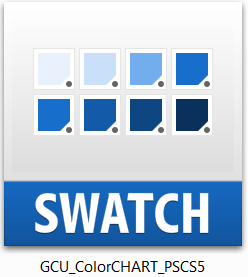
For those of you who can not use the Photoshop Color Swatch file, just right click on the image below and save this image. Then open the jpg in your editing program and use your color picker to match colors.

Hope you all find this useful and happy creating!
If you don’t know how to use Color Swatches in Photoshop, this tutorial will help:
So until next week … Learn … Create … Inspire!
Share this:

Critique Clinic – September 12-14, 2014
How does it work? For three days a week (Friday-Sunday midnight), I will open the clinic to any artist who wants an honest peer review and critique of a card which gets plenty of clicks but no sales, so something’s probably not quite right, or you’ve got a new design you want to test drive, or you’re unsure about the marketability of a card. Or perhaps you’re a newbie who isn’t sure if a card is up to a marketable standard. Anyone is welcome to participate. In fact, I encourage everyone to at least look at the cards in question and read the critique comments – you may learn something. The purpose of the clinic is to help artists improve the commercial appeal and marketability of their cards.
THE RULES
- ONE card per artist only.
- Card must be intended for sale at Greeting Card Universe.
- To submit a card for critique, post a link to the card at GCU in the comments section of this clinic post. Allowances will be made if you’ve had a card declined, or made a new design you’d like advice on before submission. Give us the link where we can see the card, such as your private gallery, Flickr, Tinypic, etc. If you do give a private gallery link, be sure your private module gallery is ON. Please do not post links to your Manage Cards section – do you really want strangers tinkering with your cards? And please don’t ask us to critique a card that’s pending review – we can’t see it until it’s approved.
- Any artist is free to comment and/or give a critique of a submitted card. HOWEVER, post-and-run comments like “great card” or “you suck” will not be tolerated, nor will abuse. Criticism should be constructive, not destructive. Play nice or you will be banned.
- I also won’t tolerate temper tantrums if you decide your “artistic integrity” is being stepped on because you asked for a critique, and someone told you the photo you’re using isn’t in focus. If you can’t take honest criticism, don’t submit. Once gets you a warning; twice and you’re banned from submitting in the future.
- Artists who critique may do so by giving their opinion, posting an example of another card, or pointing the submitter to a video, on-line article, or other helpful suggestion.
- Don’t forget that artists who are giving you tips and helpful advice are volunteering their time and trouble. Be nice. A link back to their store on your website or blog is appreciated (but not mandatory).
- You are free not to take any advice offered. There’s no guarantee any card will be a bestseller, so don’t come into the clinic with unrealistic expectations.
- Rules may change as we go along and we see how things turn out, okay?
So without any further ado, I declare this week’s Critique Clinic open!
Share this:

Dash of Inspiration: TOU – Terms of Use
A Dash of Inspiration, A Cup of Creativity by Doreen
TOU – Terms of Use
(Reposting this very helpful guide for artists who use free or purchased graphics)
Let me begin this week’s discussion about Commercial Use elements and their associated licenses by stating very clearly; “I am no expert”! What I offer here today is from knowledge acquired during my own research over the past few years of reading and respecting the terms given by the creator for each element I wish to use. With this information base I can get you on the road to better understanding what to look for and some of the associated terms you’ll find out there.
Here are some definitions to learn and look for as you begin to explore and understand the ‘fine line’ of using photographs and elements created by other artists:
CU = Commercial Use – what this means is that you are allowed to use the image/element in brochures, advertising, blogs, websites, business cards, and so on, but the contributor will often stipulate that you MAY NOT use it for financial gain. Often when you read what CU means to that creator they will say there are ‘no limitations’ or ‘free to use in your designs’ which means they are giving the okay for CU4CU.
CU4CU = Commercial Use for Commercial Use – you’ll see this sometimes, more on graphics than photographs. This is what we designers at GCU do. We create CU designs to sell in the Commercial Marketplace.
Note: It’s important to understand that just because something says CU (Commercial Use) that does not necessarily means it’s okay for using in something you plan to resell, like our greeting cards. Even photographs and art which have been ‘Released to Public Domain’, by law effectively fall into a Creative Commons license of some kind. Places like Morguefile for example exist for us designers, however these images fall into the Creative Commons law, so it’s important to not only respect the Morguefile TOU, but also look carefully for any additional terms the contributor places on their images.
Adaptation, Derivative Work & Remix – all mean the same thing: Any work created by the editing, modification, adaptation or translation of the work in any media. Using as a reference to paint is a derivative work. Using it as one element of several in a new design is a derivative work. Using the element in a collage, is a derivative work.
Attribution – means acknowledging all the parties who have contributed to and have rights in the ‘new’ work.
Attribution CC License – This license lets others distribute, remix, tweak, and build upon your work, even commercially, as long as they credit you for the original creation. Here is a link to the Creative Commons Attribution License Terms.
Here is a link to see the definitions for all types of Creative Commons Licenses:
Creative Commons (CC) Specifics:
Ownership — You may not claim ownership of this image in its original state. If you do not credit the originator of the work and put your name as the creator, then you are effectively claiming ownership.
Stand alone basis — You can not sell, license, sub-license, rent, transfer or distribute this image exactly as it is without alteration.
Without Attribution — to use without attributing the original author.
NOTE: Two things; 1) Though Morguefile states in their TOU that attribution is not necessary; be careful – many of the contributors do require in their image notes that you credit them. 2) I personally do not recommend waiving attribution when the element/photograph is recognizable in whole or in part in the new design. People change their mind, families inherit image rights and change the license; if you want to protect yourself and your creation, then always credit the originator of the elements/photographs you use and do so tastefully on the image itself so those credits stay with the image.
Here is more on that if you missed it: Credit Where Credit is Due
Hopefully I’ve opened the door to this complex world and you will feel more comfortable stepping through and learning more so you can create unique new works! To see some gorgeous examples of derivative works using various elements from resources explore deviantART.com here.
Editor’s Note: On purchased graphics like vectors and clip art, look for an Extended License, which usually allows the graphic to be used on merchandise for sale.

“Crying an Ocean” Image by Print-of-Hooves at DeviantART – notice the artist’s notes on the photos used to create this new work


 GCU Community