Inspiration Station: Card Ideas for 2014


Pinterest gives great visual inspiration to artists looking for ideas to fire up their imaginations when designing greeting cards. Quite often, you’ll find hand made cards instead of the kind found in retail shops. That’s actually a good thing. Mainstream greeting card publishers have to work months ahead of a holiday, where hand made card makers can adopt trends at the spur of the moment.
Here are some boards you can visit right now.
Cardmaking Ideas
Offers great examples of hand made cards that’ll not only inspire you, but you’ll glean information on color schemes and compositions, too.
Love Card Ideas
A board devoted to love and romance cards. Some of these are very sweet. Get inspired for categories in love/romance, anniversary, and of course, Valentine’s Day.
Stampin’ Up Cards
The company makes rubber stamps and stencils for the hand made card market. These examples will really give you understanding into what’s hot right now.
Penny Black
Another stamp company. This board contains the color illustrations of their cute designs.
Feel free to further explore Pinterest and discover those hidden gems that will inspire your work!
Share this:

Nuts and Bolts: 10 Rules of Typography

10 Rules of Typography
In the case of GCU artists, typography refers to the text you put on the outside of the card. Sometimes it’s difficult to choose the right font(s) to set the right mood for the card you’ve designed. And few things will make a card more unmarketable than poor typography. Savvy artists have learned the lesson well and use fonts to enhance and complete their card designs.
There are rules to design work, including typography. I ran across this infographic the other day and thought I’d share it with you. Click the image to see it in a larger and more readable size. Follow these rules and your cards will improve.
Can you break the rules? Yes, but to break the rules, you must first understand and use the rules so you’re completely familiar with how much you can get away with, otherwise – disaster strikes! 🙂

For more great visual examples, visit 10 Rules for Better Typography – a very helpful page every artist should go through and take lessons from.
There’s also Doreen Erhardt’s Dash of Inspiration: It’s All in the Type for a more information.
Share this:

Design Spotlight: Renee Peterson

Today’s Spotlight shines on brand new GCU artist Renee Peterson of Dollwumps Cards, a very talented artist with a style we really enjoy. Welcome, Renee!
_________________________

This is my card, “Seasons.”
I created this card because the change of seasons is always very moving to me. It reminds me of the passage of time and the briefness of beautiful moments in nature. As artists we try to capture that beauty, hold onto it and make it last longer. I addressed this particular card to an old friend, as I was thinking of the special people in my life who have passed time with me and made brief, beautiful moments.
I am passionate about art and creativity! I can remember, as a child, feeling excitement when looking at illustrated children’s books and wishing I could draw and paint the same way. My fingers “itched” to draw. I liked playing with paper dolls and began drawing my own. The figures turned out pretty rough so to improve my ability I spent hours drawing the clothing models out of the Sears and J.C .Penney catalogs.
I knew I needed formal instruction and after studying both fine art and commercial art for a few years I began working as a commercial illustrator. For many years I created illustrations for books, magazines, newspapers and commercial products. I was, and continue to freelance as an editorial illustrator.
Initially my favorite medium was pencil, pen and ink, watercolor, oil and acrylic. When I first learned about computer illustration programs I doubted that they would ever replace good old fashion hand-done art. I happily came to realize that these programs became a new tool or brush or pencil to create with. Even better, the computer enabled me to be so much more creative that now I do most of my work digitally.
I live in beautiful Colorado. I love Nature, being outdoors, camping, hiking, and gardening, flowers, music, people, animals, food and most of all ART! I especially enjoy it when others enjoy the art I’ve created and I hope YOU enjoy it!
Share this:

Dash of Inspiration: It’s All in the Type
A Dash of Inspiration, A Cup of Creativity by Doreen
It’s All In The Type

For the card designer who is serious about creating quality cards, understanding that typography is a critical element in your overall design, and one that can either show off your design as professional, or make your card look like it was created by an amateur – knowing how to make good choices … is a MUST.
Do you know the difference between the three types of fonts? – TrueType, PostScript and OpenType
If you want a font to be able to remain sharp and legible in all sizes, therefore scalable without degradation, choose a True Type Font. Post Script fonts are most commonly used by professional printing houses for books and magazines due to the level of quality and detail they possess. Open Type fonts include the basic set of characters, just like True Type, but also include an extended range of characters, such as; detailed shapes, old style numerals, or small capitalization – otherwise, they too can be scaled and remain clear, therefore most likely the best choice for the greeting card artist.
I stumbled on these informative articles which were the inspiration for today’s “It’s All in the Type” post.
Guide to 10 Font Features and Their Use in Design rentafont.com/blog/
Understanding typography: Character space, kerning & tracking by T.T.TRINKUSH
Common Typography Mistakes: Apostrophes Versus Quotation Marks by Sonia Mansfield
The designer’s guide to special characters by Jason Cranford Teague
If you are new to GCU, or to the GCU Community Blog, we have a ton of great typography tips as well as many, many links to wonderful fonts for your design box.
Remember, when you add typography to your card front it should be used as a design element which helps to make the card stand out and convey the message. Not an after-thought where you try to shove the text into a small space where it’s barely legible, squish it onto the very top or very bottom in tiny print, or plaster it across the front of an otherwise lovely visual. These are all mistakes which will set your card apart as being created by an amateur. Be creative, choose your font, placement, color and effects wisely. Know from the moment you begin to design a card where that text should be for balance, legibility and for communicating your message – and know when to make a bold use of a font choice, like these examples:


Or … when to let your text be subtle, allowing the image to be bold and the typography to whisper – as in these examples:


Okay, now on to a few FREE CU Fonts for you! As always, be sure to read the TOU before using elements in your designs.
Exmouth by PrimaFont
Lovers Quarrel by TypeSETit
Rawengulk by glukfonty
So, until next week … Learn … Create … Inspire!
Share this:

Critique Clinic – April 18-20, 2014

How does it work? For three days a week (Friday-Sunday midnight), I will open the clinic to any artist who wants an honest peer review and critique of a card which gets plenty of clicks but no sales, so something’s probably not quite right, or you’ve got a new design you want to test drive, or you’re unsure about the marketability of a card. Or perhaps you’re a newbie who isn’t sure if a card is up to a marketable standard. Anyone is welcome to participate. In fact, I encourage everyone to at least look at the cards in question and read the critique comments – you may learn something. The purpose of the clinic is to help artists improve the commercial appeal and marketability of their cards.
THE RULES
- ONE card per artist only.
- Card must be intended for sale at Greeting Card Universe.
- To submit a card for critique, post a link to the card at GCU in the comments section of this clinic post. Allowances will be made if you’ve had a card declined, or made a new design you’d like advice on before submission. Give us the link where we can see the card, such as your private gallery, Flickr, Tinypic, etc. If you do give a private gallery link, be sure your private module gallery is ON. Please do not post links to your Manage Cards section – do you really want strangers tinkering with your cards? And please don’t ask us to critique a card that’s pending review – we can’t see it until it’s approved.
- Any artist is free to comment and/or give a critique of a submitted card. HOWEVER, post-and-run comments like “great card” or “you suck” will not be tolerated, nor will abuse. Criticism should be constructive, not destructive. Play nice or you will be banned.
- I also won’t tolerate temper tantrums if you decide your “artistic integrity” is being stepped on because you asked for a critique, and someone told you the photo you’re using isn’t in focus. If you can’t take honest criticism, don’t submit. Once gets you a warning; twice and you’re banned from submitting in the future.
- Artists who critique may do so by giving their opinion, posting an example of another card, or pointing the submitter to a video, on-line article, or other helpful suggestion.
- Don’t forget that artists who are giving you tips and helpful advice are volunteering their time and trouble. Be nice. A link back to their store on your website or blog is appreciated (but not mandatory).
- You are free not to take any advice offered. There’s no guarantee any card will be a bestseller, so don’t come into the clinic with unrealistic expectations.
- Rules may change as we go along and we see how things turn out, okay?
So without any further ado, I declare this week’s Critique Clinic open!
Share this:

Nuts and Bolts: How to Write Product Descriptions
Artist’s Notes:
How to Write Product Descriptions that Pop
We’re talking using the Artist’s Notes field to include a product description on your cards. If you don’t know why, check out Nuts & Bolts: Artist’s Notes and Product Description and Nuts & Bolts: Uniqueness & Product Descriptions & SEO. We’ll wait. Okay, ready? Let’s get started.
Today I’m going to explain to you how to write a product description that pops. Yes, there’s a trick to it. That trick is simple, and at the same time, can be a challenge. You don’t need special training to do it, or a degree, or a black belt in promotion, or any ninja stealth marketing skills.
The most important thing to remember is: write about the card as if you were describing it to a blind person. Search engines can’t “see” your image, but they can index your words, which is what you want.
That’s what it boils down to. Until you get used to the process, I suggest you take a good look at your card, and just jot down words that describe the design. Here’s an example:
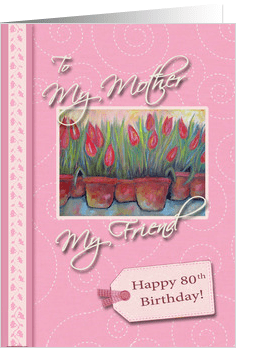
Happy 80th Birthday for Mom – Robin Chaffin
These are the words I’d jot down to describe this card: pink, tulips, tag, gingham, button, swirls, painting, vine. That’s also what I’d use in the keywords, among other things, so I’m killing two birds with one stone.
Now we can turn those random words into a description – for this card, in my Artist’s Notes, I’d say something like: “Celebrate your Mother’s 80th birthday with this pretty pink card with a delicate swirl pattern background, featuring a painting of potted tulips, and a scrapbook effect digital tag with gingham and button accent.”
A couple of things to keep in mind:
1) You have to be careful to avoid deceptive words like gold, glitter, lace, ribbon, etc. as shoppers may believe they’re getting a handmade card, or a card printed with metallic inks, etc. To prevent any misconceptions, use terms like digital, “look” – as in “silver look,” graphic – as in “graphically created glitter,” effect, and so on.
2) Whenever possible, include popular buzzwords in your description. In the example, I wrote “scrapbook effect” for a very good reason – scrapbooking (digital or otherwise) is very hot right now, and I can see that’s the effect Robin was going for in this card design. Just like keywords, it pays to do your research. Not sure how? Check out a previous Nuts & Bolts: Keywords for pointers.
Of course, your space is limited in the Artist’s Notes field, so don’t go completely berserk. If you find it helps, write your description first on a piece of paper or in Word, and tinker around with it until you’re satisfied you’ve ticked all the right boxes. Use GCU’s Uniqueness Tool, too. It’s a handy way to check your description against your other cards to be sure you aren’t getting repetitive.
And here comes a big no-no: Keep in mind this is a product description, not an opportunity to tell shoppers about you, the artist, or give any other irrelevant information. Sure, tell folks where you took that picture of the waterfall. That’s part of the description. But leave out the bit about how you were on a picnic that day, and you got stung by a bee, and took the picture as you were falling into the stream. It’s about the greeting card, not you.
It will take practice, but you’ll get the hang of it. In time, you may even find you’re having fun. Now get out there and start describing!
Share this:

Nuts and Bolts: Uniqueness & Artist’s Notes & SEO

Uniqueness & Artist’s Notes & SEO
First, let’s define SEO for those who’ve never heard of it−Search Engine Optimization. In other words, it’s making your product, in this case your greeting cards on GCU, attractive to search engines so they will add it to their indexes.
Now to break the subject of Uniqueness down as simply as possible:
Google is the most prominent search engine and the one you most want to get into.
Google rewards unique content−that is, content that is original, not copied from an existing source.
Google does not love content that simply repeats something that already exists.
So what does this mean for you?
All artists should be writing product descriptions on your cards. Don’t use the space for your personal copyright notices or to tell customers you will customize the card. If you want to include that information, fine. But WRITE A DESCRIPTION first.
This will be immensely valuable in getting your cards visible to potential shoppers. Who do you think sells most of the cards on GCU? That’s right. Artists who not only make marketable designs, but also include detailed descriptions of their cards in the Artist’s Notes field (and do their marketing, but that’s a subject for another day).
It’s easy to write a product description, but if you need help, just write as though you’re describing the card to someone who can’t see (in this case, the search engine, which relies on words rather than images). We’ve also got an article on How to Write Product Descriptions you can read for more information.
The new Uniqueness Test implemented by GCU is a handy tool that checks your card’s uniqueness against your other cards. Don’t worry about other artists, they’re not included in the test. Just you compared to yourself. This helps point out if you’re being a little lazy and repeating same/similar descriptions all the time, which gives you a heads-up that you should be a little more creative.
Naturally, if you create a whole collection of cards and just change a couple of words in each card’s description, you’re saving time, but losing Google love. Remember what I said about Google not liking same/similar content? If you have the creativity to rewrite each description in a way that the Uniqueness Test gives a green light to, great. If not, or if you think it’s too time consuming, you’ll have to decide if you’re willing to pay the price.
Please note this doesn’t affect site-wide searches on GCU itself, only outside search engines.
So if you haven’t been writing product descriptions, we suggest you start right now, otherwise more savvy artists are going to leave you in the dust while they enjoy search engine nirvana.
Share this:

Dash of Inspiration: Before and After
A Dash of Inspiration, A Cup of Creativity by Doreen
Before and After
As many of you are doing, I too have been busy giving my old cards a boost and in many cases that means a complete overhaul for the photograph itself. Since I’ve already shared in previous posts about the tools available and what I use, I’m sticking to some more before and after images in this post. The hope is to offer more inspiration for you to not only improve all those old, bland images, but also to encourage you to begin to see the difference between photographs that are greeting card worthy and those which are blandly, not.
In the American River example here, I used a variety of tools from Topaz Labs, Nik Software and Perfect Photo Suite 7 to create the final imagery. Always bringing the image back into Photoshop CS-5 for ultimate control over the strength of the modifications within various areas of the image. Notice too, that I cloned out some of the distracting dead branches on the right. The original image has muddy contrast, is unexciting and would likely be declined as unmarketable. The ‘after’ image has the WOW factor and therefore will draw potential customers to the cards I use my improved image on.

In the Autumn Lane image, once again the original would have no doubt been declined for poor lighting, lack of sharpness, and considering the lack of autumn color required in polished fall imagery, it may have been declined as non-competitive. However, using the same tools as I mentioned above, I was able to bring those rich hues out in the leaves, lighten the image to give it more punch, give the sky a deeper hue and sharpen it a bit creating a very inviting autumn image that may draw the customer to my card.

Lastly, ocean, beach and sunset scenes are a dime a dozen folks. If you don’t make them truly eye-catching or unique they can not … will not be competitive in the marketplace. Below, the original image lacks contrast and has muted tones which in this image are boring with no subject to make the image interesting. The original image is likely to be declined, if for no other reason than No Thank You, meaning it can not compete with the other cards in the category. Again, using the same tools, I PULLED the color and tonal values out the image. Using masks, I darkened the mountains and lightened the palm frond without touching the rest of the image. Now I have an image that with a bit more work will stand out in the marketplace.

Worth a review of the tools I’ve referred to in this post: Getting the Most out of Photographs
So, until next week … Learn … Create … Inspire!
Share this:

Critique Clinic – April 11-13, 2014
How does it work? For three days a week (Friday-Sunday midnight), I will open the clinic to any artist who wants an honest peer review and critique of a card which gets plenty of clicks but no sales, so something’s probably not quite right, or you’ve got a new design you want to test drive, or you’re unsure about the marketability of a card. Or perhaps you’re a newbie who isn’t sure if a card is up to a marketable standard. Anyone is welcome to participate. In fact, I encourage everyone to at least look at the cards in question and read the critique comments – you may learn something. The purpose of the clinic is to help artists improve the commercial appeal and marketability of their cards.
THE RULES
- ONE card per artist only.
- Card must be intended for sale at Greeting Card Universe.
- To submit a card for critique, post a link to the card at GCU in the comments section of this clinic post. Allowances will be made if you’ve had a card declined, or made a new design you’d like advice on before submission. Give us the link where we can see the card, such as your private gallery, Flickr, Tinypic, etc. If you do give a private gallery link, be sure your private module gallery is ON. Please do not post links to your Manage Cards section – do you really want strangers tinkering with your cards? And please don’t ask us to critique a card that’s pending review – we can’t see it until it’s approved.
- Any artist is free to comment and/or give a critique of a submitted card. HOWEVER, post-and-run comments like “great card” or “you suck” will not be tolerated, nor will abuse. Criticism should be constructive, not destructive. Play nice or you will be banned.
- I also won’t tolerate temper tantrums if you decide your “artistic integrity” is being stepped on because you asked for a critique, and someone told you the photo you’re using isn’t in focus. If you can’t take honest criticism, don’t submit. Once gets you a warning; twice and you’re banned from submitting in the future.
- Artists who critique may do so by giving their opinion, posting an example of another card, or pointing the submitter to a video, on-line article, or other helpful suggestion.
- Don’t forget that artists who are giving you tips and helpful advice are volunteering their time and trouble. Be nice. A link back to their store on your website or blog is appreciated (but not mandatory).
- You are free not to take any advice offered. There’s no guarantee any card will be a bestseller, so don’t come into the clinic with unrealistic expectations.
- Rules may change as we go along and we see how things turn out, okay?
So without any further ado, I declare this week’s Critique Clinic open!
Share this:

Tips and Tricks: Basic Marketing


One aspect of making money from designing and selling your greeting cards is marketing. Don’t run away. Come back. This isn’t a scary topic, nor is it a dirty one. If you’re aiming to be a professional artist or photographer and/or greeting card designer, you will have to market yourself and your products.
In our digital age, on-line marketing has become paramount. Here are some basic tips to help you on the way to marketing your designs, bringing them to the attention of the buying public, and making more sales.
All of these basic marketing methods are geared toward improving your card’s rank in search engines and thus, it’s visibility. The quicker your card is picked up in searches, the quicker you’ll start selling.
Artist’s Notes: The first step is creating a product description in the Artist’s Notes field. This article on How to Write Product Descriptions and this article on Using the Artist’s Notes for Product Descriptions will help you if you’ve never done it before or need to brush up on your writing skills. Do you have to do this? You should. If not, your designs are pretty invisible to search engines and therefore, to shoppers.
Facebook: If you don’t have a Facebook fan page specifically for your art or photography, make one. If you don’t know how, here are some instructions on creating a FB fan page. Once you’ve done that, you can start posting links to new card designs. Get “likes” by asking friends and family, and by posting a request to other artists on the GCU Forum’s Artist Chatter topic board. You can try the Facebook Fan Page thread. Keep in mind, the more “likes” you get on a fan page, the more Facebook will include your posts in your fans feeds. When posting, keep it interesting, not just a sales pitch. Use a conversational voice like you would in your personal FB. Whatever you do, don’t spam. Limit yourself to no more than one or two posts per day maximum. You should be posting at least once a week.
Twitter: There’s nothing wrong with having a separate Twitter account solely for your art or photography projects and products if that’s what you choose to do. Some people like to separate business and personal. Other’s don’t. That’s up to you. You’ll need to use a service like Bitly to shorten URLs in your tweets. Rather than make tweets like “buy my cards pleeeeeeeze kthxby” try to make a little post either about the design, about how you felt when you made it, something relevant to the design – in other words, try to make your tweets interesting rather than just a sales pitch. And again, do not spam. There’s no quicker way to lose followers. Limit yourself to 1 or 2 tweets per day maximum, but make sure you tweet every day. Silence is a mood killer on Twitter.
Pinterest: Some people love it, some people hate it, but Pinterest is one of the biggest growing marketing tools out there. These days, the link to your card travels with your pin, so when people re-pin, your card will always be find-able. If you don’t want to get involved in Pinterest, that’s your choice. For those who do, creating boards and pinning your card designs is easy, fun, and yes, it does eventually help with sales by making your designs more visible. If you want to gain followers, include other boards on topics that interest/inspire you.
Pinterest BONUS: It’s easy to change the URL of the link once you’ve pinned it. Grab your Sell This Card code text link, then head over to Pinterest and click on your pin. Notice the little pencil icon to the right of the URL. Click it to edit. Just remove the old URL and pop in your referral link. New customers who click on the link will earn you a commission!
Blogs: There are two ways of putting yourself out in the blogosphere – write your own blog or do guest posts on other people’s blogs. If you want to try your hand at blogging, our advice is not to just blog about your greeting cards. You won’t get much attention that way. Instead, write posts on topics you’re passionate about and include your greeting card designs as part of those posts. To make guest posts on other blogs, you’ll need to search out blogs relevant to your niche, start leaving good comments on their posts, and then ask the owner if you can do a guest post. Any artist can do a Design Spotlight or guest post on this Community blog at any time, even if you’ve done it in the past but want to highlight a new design – just drop me a note. You can also participate in Design Contests on this blog (I usually run a contest once a month). These are great opportunities for you to get a little promotion of new and old designs.
Web Pages: Lots of services out there like Squidoo, Weebly, Wix, etc., allow you to create specialty web pages on just about any topic. Create these individual web pages on topics relevant to your interests and/or niche card designs. Several GCU artists have had great success with this kind of promotion.
Forums: Suppose you like to hang out in a form for lovers of chihuahuas. You create some chihuahua based greeting card designs. What’s stopping you from promoting your new relevant designs to an audience tailor made for them? Some forums require you to ask before putting up commercial links – and if you aren’t sure, ask anyway as it’s only polite. Don’t just jump into a brand new forum where nobody knows you and start flogging your cards. You’ll be quickly banned. Instead, develop a relationship with people who share your passions. Then you’ll have that established relationship to help you when it’s time to do a little self promotion.
Comments: A lot of blogs and web pages offer guest books or comment boxes to their visitors. Find blogs or pages relevant to your passions and/or hobbies, or relevant to your card designs in some way. Leave comments on current posts. Make them good comments that are meaningful, not spam. Include your store URL as part of your signature, or links to promotional web pages of interest, which beings us to …
Signatures: Including your store URL or links to your promotional web pages, Facebook, Twitter, etc. in signatures you use for e-mail, Forum comments, blog comments, etc. is a very easy promotion method that helps spread the word about you and your products every time you participate in Internet activities.
Be Trendy: Keep an eye out for developing trends you can take advantage of with new card designs. Whether it’s this year’s most fashionable wedding schemes or popular fads in design, by incorporating trends into your cards AND bringing attention of that fact through your Artist’s Notes and other promotions, you stand a good chance of getting bumped up by search engines a lot faster. Search engines will give more weight to pages that speak to popular trends.
Bottom Line: Don’t go into this expecting instant results. You need to build yourself up with consistent effort. The work you do today will pay off a month, six months, or a year or two from now. But if you don’t start now, you won’t be able to enjoy the benefits later. Make your promotions relevant to the holiday, season, or niche that’s coming up.
Good luck!


