Nuts and Bolts: Bigstock Guidelines

BIGSTOCK GUIDELINES
As you know, Greeting Card Universe, in partnership with Bigstock, has offered artists a new opportunity to use stock pictures for greeting cards. If Approved, these cards are automatically entered into a special category, Collections > Off the Cuff Greetings. Your design may be permitted in other categories, too – see below.
Shoppers are already finding and purchasing those cards already made by artists during the open beta process, so well done, participants!
We’ve been previously restricted to just 10 cards per artist. Today, GCU is announcing that the limit is being lifted. Artists are now free to make as many cards as they like. Before you jump on the bandwagon, here are the GUIDELINES you must keep in mind per Mindy.
BTW, if you need to report a bug, please don’t do so here. Instead, make a post in the GCU Forum where it’s more likely to be seen by someone who can help.
Ideal and Encouraged Cards to Create
- Choose categories with few to zero cards that serve niche occasions.
- Card design MUST add value and be different than cards in the same category, not more of the same. Be clever, be creative, be original.
- Card design must be as good, if not better than, existing cards.
- Research existing cards in your chosen category before making your design. Don’t offer “more of the same.” Bigstock has millions of images. Go beyond page one. Think outside the box. Dig deep and search creatively.
- Also research the stock cards already created to take note of stock images that have already been used in the same way/occasion. If the image has been used, ensure your design is significantly different and ideally, for another occasion. See this example of three cards using the same image, each a little different than the others, and each for a different occasion.
- Some stock images may not be suitable without extra manipulation. If your chosen image doesn’t work, move on and find another image.
- All the usual Submission Guidelines apply. In addition, GCU can Decline cards for any reason.
- To speed up Review times, make good use of the Notes to Reviewers field. For example, make a note of the intended category, full bleed intent, created for a Wanted Cards post on the Forum, etc.
- Images cannot be Returned for Edits. If Declined by a Reviewer, you will need to recreate the card – making the necessary edits – and resubmit.
- Most stock card creations will not be in their functional categories, but rely on their metadata (descriptive title, keywords, Artist’s Notes) for shoppers to find them in a search. Exercise care.
- If you continue to have cards Declined due to repeated errors, GCU can revoke your use of the service. If repeated submissions are Declined based on lack of marketability, GCU can revoke your usage of the service.
Of Further Note
Bigstock is perfect for quick submissions for Wanted & Custom Requested cards.
Bigstock images may be taken down if necessary. Content contributors on Bigstock can choose to not participate in their Partner Program. GCU cards created using a stock image that has been removed from the service will be Declined and the artist will be notified of this action. Thank you for your understanding.
Cards can be declined for any reason – including no reason at all. The FAQs share: “Overall GCU Reserves the right to remove or decline any submissions for any reason: A card design can meet all the requirements and still lack impact, rendering it unmarketable in GCU’s market. The card needs to draw the eye, invoke feelings, and attract an interest in being purchased. Greeting Card Universe reserves the right to say No Thank You to any card, store, or artist which they feel are not a good fit for their market.”
Share this:

Design Spotlight: Donna Collins

Our Design Spotlight comes from Donna Collins, a seasoned GCU artist with a delightful style.
_________________________

This one was made especially for my best friend ” Roe.” We are the best of friends and I have known her since I was 18 years old. We have always had fun together, no matter what we did. We will always be best friends forever.
I love drawing cards that are full of fun and that make you smile, grin or even sigh. I love to paint red hair because there are so many shades of red. Daises are always my favorite to add in some of my illustrations, because they are such a friendly and happy flower. Life is so short and precious, so making someone smile with my cards is what I want to share and it’s call LOVE.
Share this:

Tips and Tricks: Wood Textures

Wood Textures
Using wood textures to create backgrounds and fun elements for greeting cards can make for an interesting effect, but only if done right. If you’d like to expand your designer’s toolbox with some fun wood textures, you’ll find some links below.
28 High Resolution Photoshop Wood Textures for Designers
Note: not all are okay for commercial use, so read all TOU to be sure.
Create a Realistic Wood Texture in Photoshop
Create a Wood Texture in Photoshop (video)
Creating a Wood Grain Effect From Scratch in Photoshop Elements (video)
Realistic Wood Texure in Gimp 2.8 (video)
Create Realistic Wood Textures in Illustrator (video)
If you have any other resources or tutorials 0 especially for Paint Shop Pro or Corel Draw – please share in the Comments. Have fun!
Share this:

Font Frenzy: Secret Typewriter

Secret Typewriter is a grunge style, typewriter font that has some gritty attitude. Though distressed, the font is still quite legible. Great for use in contemporary designs – see a sample below. Best of all, it’s FREE for commercial use from Font Squirrel. Have fun!

Share this:

Dash of Inspiration: Digital Painting, Part 1
A Dash of Inspiration, A Cup of Creativity by Doreen
Digital Painting, Part 1

Many artists find themselves wanting to move towards digital painting, even if only to add finishing touches to a scanned work of art. I stumbled on a “Painting in Photoshop with a Tablet” tutorial and it inspired me for a 2-part series on Digital Painting. I rarely paint in Photoshop since I also have Corel Painter 11 and it communicates beautifully with CS-5, I paint in Corel. Regardless of the program you choose, starting out with a tablet can be a frustrating learning curve. Here’s hoping these tutorials help you choose the right tablet for you and may even inspire those who didn’t think they would benefit to consider using one.
Digital Tablets! – How Much, Why, Who, etc.
Which Drawing Tablet To Buy in 2014
How To Use A Drawing Tablet for Digital Art
1 hour webinar recording, Wes Maggio from Wacom, an avid shooter and all around tablet guru shows you how a pen tablet can help you bring out the true potential in your images.
Wacom Tablet Basics – Adobe Photoshop
Next week, in Part 2 of Digital Painting, I’ll share some wonderful tutorials on using various digital programs to paint or even just to add finishing touches to your artwork using digital software.
Don’t want to leave you without any FREEBIES this week and as always be sure to read the TOU.
Large Polaroid brushes (image pack included):

A digital painting using Corel Painter and Wacom Intuous 3 tablet.
So, until next week … Learn … Create … Inspire!
Share this:

Critique Clinic – February 14-16, 2014

HAPPY VALENTINE’S DAY!
How does it work? For three days a week (Friday-Sunday midnight), I will open the clinic to any artist who wants an honest peer review and critique of a card which gets plenty of clicks but no sales, so something’s probably not quite right, or you’ve got a new design you want to test drive, or you’re unsure about the marketability of a card. Or perhaps you’re a newbie who isn’t sure if a card is up to a marketable standard. Anyone is welcome to participate. In fact, I encourage everyone to at least look at the cards in question and read the critique comments – you may learn something. The purpose of the clinic is to help artists improve the commercial appeal and marketability of their cards.
THE RULES
- ONE card per artist only.
- Card must be intended for sale at Greeting Card Universe.
- To submit a card for critique, post a link to the card at GCU in the comments section of this clinic post. Allowances will be made if you’ve had a card declined, or made a new design you’d like advice on before submission. Give us the link where we can see the card, such as your private gallery, Flickr, Tinypic, etc. If you do give a private gallery link, be sure your private module gallery is ON. Please do not post links to your Manage Cards section – do you really want strangers tinkering with your cards? And please don’t ask us to critique a card that’s pending review – we can’t see it until it’s approved.
- Any artist is free to comment and/or give a critique of a submitted card. HOWEVER, post-and-run comments like “great card” or “you suck” will not be tolerated, nor will abuse. Criticism should be constructive, not destructive. Play nice or you will be banned.
- I also won’t tolerate temper tantrums if you decide your “artistic integrity” is being stepped on because you asked for a critique, and someone told you the photo you’re using isn’t in focus. If you can’t take honest criticism, don’t submit. Once gets you a warning; twice and you’re banned from submitting in the future.
- Artists who critique may do so by giving their opinion, posting an example of another card, or pointing the submitter to a video, on-line article, or other helpful suggestion.
- Don’t forget that artists who are giving you tips and helpful advice are volunteering their time and trouble. Be nice. A link back to their store on your website or blog is appreciated (but not mandatory).
- You are free not to take any advice offered. There’s no guarantee any card will be a bestseller, so don’t come into the clinic with unrealistic expectations.
- Rules may change as we go along and we see how things turn out, okay?
So without any further ado, I declare this week’s Critique Clinic open!
Share this:

Tips and Tricks: Pairing Fonts
Pairing Fonts
Sometimes, whether for emphasis or more practical reasons, it’s necessary to use more than one font on the front of a greeting card design. Paring fonts can add interest and help perk up a design. Before you begin choosing which fonts you want to use, here are a few tips you’ll want to keep in mind.
#1 Rule of Thumb: Use no more than three different fonts. Sticking to two will almost always get you where you want to go. There are occasional exceptions to this rule. If you’re going to break the rules, be careful and be smart—do it in a pleasing way that makes sense with the overall composition and intention of your design. Below, you’ll find examples.

The artist (Sandra Rose Designs) has used a more formal script font for emphasis and paired it with a much plainer font for the majority of the text, making the card easier to read and adding interest to the overall design.

As you see, this one’s an example of an exception to the #1 Rule of Thumb, but it works because while presented as a whole, each section is separated and could stand on its own, and the font parings don’t jar each other.
Think Contrast and Complement, Not Conflict: Font parings need to look good together or the effect you’re aiming font isn’t going to happen. You want the fonts to be contrasting enough to provide interest without causing conflict or disharmony. Think of the text as another design element. You can also try mixing serif/sans serif fonts. Think cursive with print, fat with skinny, and big with small. Here’s another example of contrast and complement.

In this card by Penny Cork, we have a playful and sweet script font paired with a much plainer serif font for contrast and ease of reading. The text as a whole works well with the overall tone of the card and the occasion/recipient.
It’s Not Always About Two Different Fonts: By using fonts in the same family and choosing different weights, styles or sizes, you can also create visual interest on a card—like using italic for one line or word in a larger size and the rest of the text in a smaller regular style of the same font. Or ALL CAPS and bold paired with italic or regular. See the example below.

The same font is used, but emphasis is given on certain words by using different sizes and weights.
Consider the Kerning: Choose fonts that have similar kerning—that is, the space between the letters. You can manually adjust kerning if necessary. Always keep in mind that “good enough” isn’t good enough. The human eye can detect slight differences, which can turn a great composition into an unsaleable waste of time. Example given below.

There’s no hugekerning disparity in the fonts chosen by Simply Put by Robin, but although each font is different from the rest, as a whole the design works.
Here are some resources that may assist you in your search for fonts that pair well together.
Pinterest Font Combos
Even if the fonts you see paired in these examples aren’t available for commercial use, with a little digging you can usually find an acceptable equivalent.
Dash of Inspiration: Typography – Font Combinations
Doreen explains the Submission Guidelines and gives excellent examples of what’s acceptable and what isn’t. A must read!
Best Practices of Combining Typefaces
While not aimed at greeting cards, it’s still a valuable crash course in the how-to of combining fonts that gives an understanding of the basics.
Share this:

Design Spotlight: Paris Bottman
Our Design Spotlight falls on Paris Bottman, a new artist who joined GCU in January 2014, whose art is wonderful and whimsical!
_________________________

“Love is Like Dancing” is one of my favorite cards. I have always enjoyed putting animals in a human situation, finding the humor in a glance, gesture, or posture that people can relate to. I found art at an early age, and I’ve been drawing ever since. I’m self taught and I’ve relied on trial and error as a teacher.
Share this:

Tips and Tricks: How to Save a Declined Card
How to Save a Declined Card
Sometimes as artists, we have a certain vision for a particular card design. Unfortunately, that vision isn’t always suitable for GCU. We’ve all had cards Declined that didn’t follow the Submission Guidelines or had an error we overlooked.
The Reviewers give reasons for the decline and it’s up to us to decide if the design can be salvaged or if we need to start from scratch. The key to this decision is paying attention to the notes given by the Reviewer which state the reason for the decline.
Here’s a recent example. This card design was submitted by Frankz Paw Printz and subsequently Declined as unmarketable. As you can see, the background can be seen through the dog silhouette.
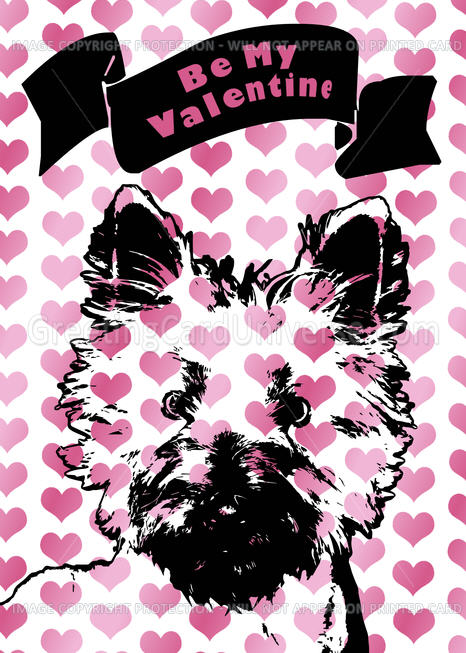
The artist didn’t give up. She took the Reviewer’s note in hand and retooled the design. Much better! Her new submission was Approved.

So a Decline isn’t necessarily the end of the world. Instead of feeling insulted or angry, or giving up on a design, taking Reviewer’s notes and/or suggestions can point you toward success if you’re willing to listen.
Share this:

Dash of Inspiration: Photoshop Elements (PSE) Hints and Tips
A Dash of Inspiration, A Cup of Creativity by Doreen
Photoshop Elements (PSE) Hints and Tips
There are many out there that use various versions of PSE and we’ve had a request for tips and tricks for Photoshop Elements 11. This version, as I understand it, is so different from previous versions that if you’ve upgraded to PSE11, you may be about ready to throw it out the window! Today, I spent some time looking for some great hints and tips for Photoshop Elements, and for version 11 in particular.
For those of you new to card creation and looking for a photo-editor, Photoshop Elements is a great place to start. I began my digital journey in 1995 using Micrografx Picture Publisher, before Photoshop Elements existed. In 2001, I changed over to the first version of PSE and by version 5 had upgraded to CS-2, then couple of years ago CS-5. I consider those years of learning Photoshop Elements critical to my overall learning curve … why?
- Photoshop Elements and full versions of Photoshop (up to CS-5 anyway) use the same ‘language’, making Elements a great starting point for new Photoshop users.
- PSE is generally under $100, so when compared to full Photoshop Versions which run $600+, it’s a great deal.
- Commercial Use Presets, such as; Brushes, Patterns, Shapes, etc. for Photoshop, more often than not work in most versions of PSE as well. There are always occasions where the version the preset was created in can not be opened by some versions of Photoshop and PSE, but more often than not these presets are compatible with the later versions both.
- The only real difference between PSE and full versions of PS are the bells and whistles. So, you can pretty much accomplish anything you need to do to create awesome card fronts with PSE.
- Being a PSE registered users, gets you significant discounts on upgrades to full versions of Photoshop.
Since it was requested, we’ll start out with some good places to get Hints and Tips for PSE11, the ‘problem child’ of the PSE Family.
O’Reily Answers has some Tips and Hints to getting comfortable with PSE11
Learn Photoshop Elements 11 from Adobe! Where better to learn from the experts?
References to keep close which will help you edit images in Photoshop Elements 11 quickly and easily.
Anytime I need to learn ‘how to’ in Photoshop, I head to YouTube. I love the convenience of being able to pause and take a couple of the tutorial steps into my owns hands before moving on.
Here is a list of some PSE11 video tutorials which may help:
General Photoshop Elements Hints and Tips
50 of the experts favorite time-saving tricks to help you speed through everyday tasks. Download and print this great PDF to have at your work station.
Free Photoshop Elements Site – with a Learning Center full of great info.
Tips and tricks for Photoshop Elements – This blog concentrates on different techniques used for editing and organizing pictures in Adobe Photoshop Elements. If you look at the ‘labels/keywords’ section of this blog, you’ll see she covers versions PSE8 and up.
Same as above, just type in which version of Photoshop Elements you are working with and check out all the great tutorials available to you.
Don’t want to leave you without any FREEBIES this week, so here is a FREE Commercial Use font and Dingbat font, both nice for those chalkboard designs which are so popular right now.
And … Happy Valentine’s Day to all of you!
Heart Patterns – Valentine’s Day from Succo Design
So, until next week … Learn … Create … Inspire!


