Critique Clinic – March 6-9, 2014

Note: Yes, we’re a day early! The clinic will be open for 4 days through the weekend to make up for the other week when urgent notices took priority.
How does it work? For three days a week (Friday-Sunday midnight), I will open the clinic to any artist who wants an honest peer review and critique of a card which gets plenty of clicks but no sales, so something’s probably not quite right, or you’ve got a new design you want to test drive, or you’re unsure about the marketability of a card. Or perhaps you’re a newbie who isn’t sure if a card is up to a marketable standard. Anyone is welcome to participate. In fact, I encourage everyone to at least look at the cards in question and read the critique comments – you may learn something. The purpose of the clinic is to help artists improve the commercial appeal and marketability of their cards.
THE RULES
- ONE card per artist only.
- Card must be intended for sale at Greeting Card Universe.
- To submit a card for critique, post a link to the card at GCU in the comments section of this clinic post. Allowances will be made if you’ve had a card declined, or made a new design you’d like advice on before submission. Give us the link where we can see the card, such as your private gallery, Flickr, Tinypic, etc. If you do give a private gallery link, be sure your private module gallery is ON. Please do not post links to your Manage Cards section – do you really want strangers tinkering with your cards? And please don’t ask us to critique a card that’s pending review – we can’t see it until it’s approved.
- Any artist is free to comment and/or give a critique of a submitted card. HOWEVER, post-and-run comments like “great card” or “you suck” will not be tolerated, nor will abuse. Criticism should be constructive, not destructive. Play nice or you will be banned.
- I also won’t tolerate temper tantrums if you decide your “artistic integrity” is being stepped on because you asked for a critique, and someone told you the photo you’re using isn’t in focus. If you can’t take honest criticism, don’t submit. Once gets you a warning; twice and you’re banned from submitting in the future.
- Artists who critique may do so by giving their opinion, posting an example of another card, or pointing the submitter to a video, on-line article, or other helpful suggestion.
- Don’t forget that artists who are giving you tips and helpful advice are volunteering their time and trouble. Be nice. A link back to their store on your website or blog is appreciated (but not mandatory).
- You are free not to take any advice offered. There’s no guarantee any card will be a bestseller, so don’t come into the clinic with unrealistic expectations.
- Rules may change as we go along and we see how things turn out, okay?
So without any further ado, I declare this week’s Critique Clinic open!
Share this:

Rainbow Connection: Fresh for Spring

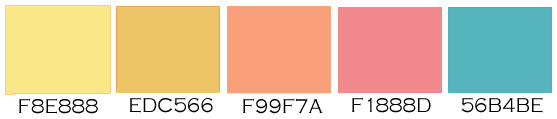
Spring is on the way! Let’s blow off the dust, shake out the cobwebs, and try this very fresh goldenrod and turquoise color palette. The light, bright colors will add freshness to many designs. Have fun!
Share this:

Font Frenzy: KG All of Me

We’ve talked about Kimberly Geswein before—she’s a very talented font designer who generously allows commercial use for (usually) $5 per font. KG All of Me is one of her newest fonts and it’s on sale right now for $4. This one’s great for those popular blackboard designs. Have fun!

Share this:

Dash of Inspiration: Free CU Dingbat Fonts
A Dash of Inspiration, A Cup of Creativity by Doreen
Free CU Dingbat Fonts

As we all know (or should know) Dingbat Fonts are a wealth of fun and useful imagery for our greeting card designs. So here are some fun ones to grab – all are FREE for Commercial Use. For those who need to learn more about using Dingbat Fonts, please read this: Who are You Calling a Dingbat?
10 Best Decorative Embellishment Fonts
Manfred Klein › SilhouettA – full of nice people silhouettes from kids to family groups.
Gyrl Friday › Little City 2000 – wonderful buildings and cityscape.
Alan Carr › Sports and Hobbies
Sassy Graphics › Folk Art Dividers
GemFonts › Americanic – perfect bits and pieces to help create for Patriotic holidays.
Let me know if you liked these and if you’d like more, I’ll post more in a future post!
So, until next week … Learn … Create … Inspire!

Share this:

Critique Clinic – February 28-March 2, 2014
How does it work? For three days a week (Friday-Sunday midnight), I will open the clinic to any artist who wants an honest peer review and critique of a card which gets plenty of clicks but no sales, so something’s probably not quite right, or you’ve got a new design you want to test drive, or you’re unsure about the marketability of a card. Or perhaps you’re a newbie who isn’t sure if a card is up to a marketable standard. Anyone is welcome to participate. In fact, I encourage everyone to at least look at the cards in question and read the critique comments – you may learn something. The purpose of the clinic is to help artists improve the commercial appeal and marketability of their cards.
THE RULES
- ONE card per artist only.
- Card must be intended for sale at Greeting Card Universe.
- To submit a card for critique, post a link to the card at GCU in the comments section of this clinic post. Allowances will be made if you’ve had a card declined, or made a new design you’d like advice on before submission. Give us the link where we can see the card, such as your private gallery, Flickr, Tinypic, etc. If you do give a private gallery link, be sure your private module gallery is ON. Please do not post links to your Manage Cards section – do you really want strangers tinkering with your cards? And please don’t ask us to critique a card that’s pending review – we can’t see it until it’s approved.
- Any artist is free to comment and/or give a critique of a submitted card. HOWEVER, post-and-run comments like “great card” or “you suck” will not be tolerated, nor will abuse. Criticism should be constructive, not destructive. Play nice or you will be banned.
- I also won’t tolerate temper tantrums if you decide your “artistic integrity” is being stepped on because you asked for a critique, and someone told you the photo you’re using isn’t in focus. If you can’t take honest criticism, don’t submit. Once gets you a warning; twice and you’re banned from submitting in the future.
- Artists who critique may do so by giving their opinion, posting an example of another card, or pointing the submitter to a video, on-line article, or other helpful suggestion.
- Don’t forget that artists who are giving you tips and helpful advice are volunteering their time and trouble. Be nice. A link back to their store on your website or blog is appreciated (but not mandatory).
- You are free not to take any advice offered. There’s no guarantee any card will be a bestseller, so don’t come into the clinic with unrealistic expectations.
- Rules may change as we go along and we see how things turn out, okay?
So without any further ado, I declare this week’s Critique Clinic open!
Share this:

Design Spotlight: Betsy Bush

Our Design Spotlight shines today on Betsy Bush of Dragonfire Graphics, another experienced GCU artist who rarely fails to deliver the goods.
_________________________

I chose this design to feature because it actually is a blending of images I have incorporated into other cards. I had the clock idea pop into my head one day so I hit the drawing board to make it a reality. It was so fun to go back into my files to find images related to babies and to see where I had been and how I have improved over these past 2 1/2 years of greeting card design fun!
This design also gave me the opportunity to use my new found knowledge on how to make a flair button for each of the icons I made. I love color and this design definitely lent itself to the use of tons of fun colors. I also took the time to create many other versions of this card (announcements, custom name announcements,welcome baby for one, twins and triplets!). All versions were also done in gender specific background colors as well.
Here’s to a New Year of many greeting card sales for all of us!
Share this:

Rainbow Connection: Color Palate Source

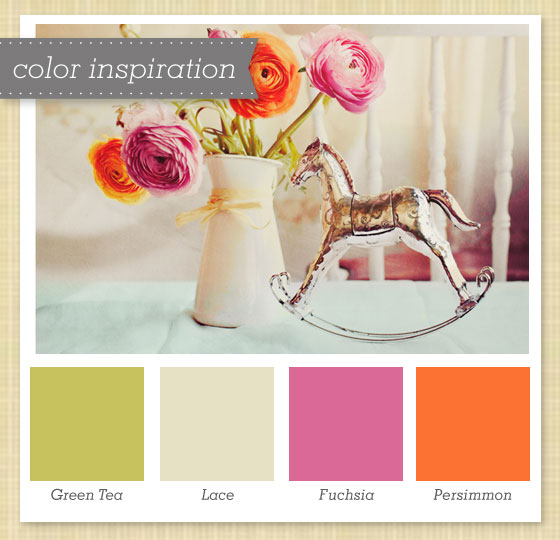
From the Sarah Hearts design blog comes a fresh and vibrant collection of color palates. I really like some of these and I know you will too. Spring is almost upon us—time to add some new color in your card designs. Check out the example below and have fun!
©sarahhearts.com
Share this:

News: Adult Content Guidelines Update

The guidelines have changed a bit when it comes to adult content (nudity, drug use, other grown up stuff) on GCU. Here’s Mindy with an update.
____________________
See an example of a card embracing the new guidelines here:
http://www.greetingcarduniverse.com/holiday-cards/valentines-day-cards/humor/What-Happened-To-Leaf-Adam-Eve-Pot-Humor-Valentines-Day-Card-1090682?gcu=41261014753
Somewhat recently GCU has incorporated an adult content filter on the site. Shoppers can now filter the cards they are viewing based on adult content.
This filter can be seen near the “most popular” and “newest” page sorts as “show adult cards” or “hide adult cards”. If no adult cards exist within the current page of cards being displayed then this sort/filter option will not appear.
With this feature GCU has loosened up the belt so to speak on the Adult Content Guidelines. Here is the updated guideline per the Artist FAQ #33.
GCU will consider adult content submissions. GCU will be very selective when reviewing images or creative content that is determined to be / exhibit: sexually explicit, nudity, violence, drug use, discrimination and profanity. By nature this is a subjective and discretionary determination, GCU may decline any submission it feels is not a good fit for GCU’s market. GCU will NOT consider creative works considered to be pornographic.
The most significant change? Previously frontal nudity was not allow but now it will be considered. Photographic works will likely be under heavier scrutiny than other medium. Often the “real deal” is more graphic that an illustration or cartoon for example.
Rest assure, there will be some “adult” content that shoppers are looking for that GCU simply has NO intention of ever offering. There is sure to be content that not all of our artists agree with or advocate, however GCU’s goal is to offer a tasteful range of content while allowing shoppers to control what they see.
Share this:

Dash of Inspiration: Digital Tablet, Digital Painting, Part 2
A Dash of Inspiration, A Cup of Creativity by Doreen
Digital Tablet, Digital Painting, Part 2
Last week I offered some great tutorials on choosing, setting up and working with a digital tablet. Today, in part two, I’m giving some great tutorials on learning to digitally paint with a variety of tools. For those artists who paint on very large canvas, learning to paint using a digital canvas can be a perfect way to create smaller greeting card designs and expand your card designs, not to mention your imagination!
Digital Painting Tips – Color Blending for beginners
Best Digital Painting Software Review
PHOTOSHOP
Digital Painting in Photoshop CS6/CS5 Series For Beginners
Turning Scanned Pencil Sketches into Digital Paintings
ILLUSTRATOR
Ultimate Inking and Coloring Tutorial for Adobe Illustrator
Tablet Techniques For Illustrator
COREL PAINTER
Illustration Workspace for Corel® Painter™ 12
Don’t want to leave you without any FREEBIES this week and as always be sure to read the TOU.
So, until next week … Learn … Create … Inspire!

A digital painting using Corel Painter 11 and Wacom Intuous 5 tablet.
Share this:

Critique Clinic – February 23, 2014
How does it work? For three days a week (Friday-Sunday midnight), I will open the clinic to any artist who wants an honest peer review and critique of a card which gets plenty of clicks but no sales, so something’s probably not quite right, or you’ve got a new design you want to test drive, or you’re unsure about the marketability of a card. Or perhaps you’re a newbie who isn’t sure if a card is up to a marketable standard. Anyone is welcome to participate. In fact, I encourage everyone to at least look at the cards in question and read the critique comments – you may learn something. The purpose of the clinic is to help artists improve the commercial appeal and marketability of their cards.
THE RULES
- ONE card per artist only.
- Card must be intended for sale at Greeting Card Universe.
- To submit a card for critique, post a link to the card at GCU in the comments section of this clinic post. Allowances will be made if you’ve had a card declined, or made a new design you’d like advice on before submission. Give us the link where we can see the card, such as your private gallery, Flickr, Tinypic, etc. If you do give a private gallery link, be sure your private module gallery is ON. Please do not post links to your Manage Cards section – do you really want strangers tinkering with your cards? And please don’t ask us to critique a card that’s pending review – we can’t see it until it’s approved.
- Any artist is free to comment and/or give a critique of a submitted card. HOWEVER, post-and-run comments like “great card” or “you suck” will not be tolerated, nor will abuse. Criticism should be constructive, not destructive. Play nice or you will be banned.
- I also won’t tolerate temper tantrums if you decide your “artistic integrity” is being stepped on because you asked for a critique, and someone told you the photo you’re using isn’t in focus. If you can’t take honest criticism, don’t submit. Once gets you a warning; twice and you’re banned from submitting in the future.
- Artists who critique may do so by giving their opinion, posting an example of another card, or pointing the submitter to a video, on-line article, or other helpful suggestion.
- Don’t forget that artists who are giving you tips and helpful advice are volunteering their time and trouble. Be nice. A link back to their store on your website or blog is appreciated (but not mandatory).
- You are free not to take any advice offered. There’s no guarantee any card will be a bestseller, so don’t come into the clinic with unrealistic expectations.
- Rules may change as we go along and we see how things turn out, okay?
So without any further ado, I declare this week’s Critique Clinic open!


