Dash of Inspiration: Choosing Categories
A Dash of Inspiration, A Cup of Creativity by Doreen
Choosing Categories

I think one of the most difficult areas to master when submitting cards at GCU is Categories; at least it was for me and I still second guess myself from time to time. The best advice regarding category choices that I received when I began my journey at GCU was from Corrie. She said; “A card can only be categorized by what it is, NOT what it could be”. This is a common mistake we make, stuffing cards into categories because it COULD be a good fit. Here are some things I’ve learned along the way about working with categories:
Design for the Category
It’s always easier to get a card approved for a given category if you design for the category, rather than make a design and then try to find categories to stuff it into.
Modify Images for Each Category
There is no doubt that sometimes we are inspired to just create rather than design for a specific category. I’ve found that when this happens, I just create then I go back and use the categories which COULD work for the image as my guideline to make a unique fit for that category. Add elements unique to the category, change colors and message to suit each category. Here’s an example. I lost sleep one night with this ‘from the pack’ idea for a Christmas card where I wanted to create an image with a pack of dogs. Once I had created my pack of dogs, I started working with elements and colors to suit each category I felt fit the ‘from the pack’ theme would work. Here is that series so you have a visual.


Two categories are allowed
BUT not necessary and not always appropriate. For example, this card has two possibilities as a ‘non-personalized’, ‘generic relationship’ card:
Holidays > Christmas Cards > Animals / Pets > Dogs AND Holidays > Christmas Cards > Humor
OR
Holidays > Christmas Cards > General Christmas AND Collections > Animals / Pets Cards > Dogs

Though this card COULD BE for the Veterinarian, pet sitter or pet groomer – it CAN’T be approved for those categories because it does not speak directly to those people. Though it COULD BE for the From the Pet category, again, it does not speak to the pet parent directly.
When in Doubt
When you are not sure of a perfect fit for two categories, then do one of two things. Either make two cards, one specifically for each category OR choose the 2nd category you are unsure of and in your Notes to the Reviewer let them know you were not 100% sure of your category choice and you’d appreciate their help.
Blank Cards
Blank cards can not be added to Occasion Categories just because they are a nice image. There must be something specific and directly related in the art/text on the card front. If there is not, these cards must go into the Collections categories.
There is a lot of great info out there, so I’m not going to go into more detail. I just wanted to inspire everyone who is still struggling, and all the newbies a place where we’ve pulled together all the great tips on learning how to categorize your cards. So go explore and hopefully you’ll have that ‘light bulb’ moment as I did many years ago!
GCU Wiki: This page has a fair amount of detailed into about card categories. This offers very detailed rules/guidelines you should be frequently reviewing when you have doubts.
GCU University: There is a great video on Categorization:
Nuts and Bolts: Categories from May, 2011
Share this:

Critique Clinic – December 7-9, 2012

How does it work? For three days a week (Friday-Sunday midnight), I will open the clinic to any artist who wants an honest peer review and critique of a card which gets plenty of clicks but no sales, so something’s probably not quite right, or you’ve got a new design you want to test drive, or you’re unsure about the marketability of a card. Or perhaps you’re a newbie who isn’t sure if a recently submitted card is up to a marketable standard. Anyone is welcome to participate. In fact, I encourage everyone to at least look at the cards in question and read the critique comments – you may learn something. The purpose of the clinic is to help artists improve the commercial appeal and marketability of their cards.
THE RULES
- ONE card per artist only.
- Card must be for sale at Greeting Card Universe.
- We will take an unlimited number of artists, including those who have submitted recently, HOWEVER I reserve the right to close a clinic for the day if the submissions become overwhelming. If the clinic has been closed, and you submit a card, your comment will be deleted.
- To submit a card for critique, post a link to the card at GCU in the comments section of this clinic post. Allowances will be made if you’ve had a card declined, or made a new design you’d like advice on. Give us the link where we can see the card, such as your private gallery, Flickr, Tinypic, etc.
- Any artist is free to comment and/or give a critique of a submitted card. HOWEVER, post-and-run comments like “great card” or “you suck” will not be tolerated, nor will abuse. Criticism should be constructive, not destructive. Play nice or you will be banned.
- I also won’t tolerate temper tantrums if you decide your “artistic integrity” is being stepped on because you asked for a critique, and someone told you the photo you’re using isn’t in focus. If you can’t take honest criticism, don’t submit. Once gets you a warning; twice and you’re banned from submitting in the future.
- Artists who critique may do so by giving their opinion, posting an example of another card, or pointing the submitter to a video, on-line article, or other helpful suggestion.
- Don’t forget that artists who are giving you tips and helpful advice are volunteering their time and trouble. Be nice. A link back to their store on your website or blog is appreciated (but not mandatory).
- You are free not to take any advice offered. There’s no guarantee any card will be a bestseller, so don’t come into the clinic with unrealistic expectations.
- Rules may change as we go along and we see how things turn out, okay?
So without any further ado, I declare this week’s Critique Clinic open!
Share this:

Font Frenzy: 12 Fonts of Christmas

It’s the Twelve Fonts of Christmas! I’ve chosen these fonts because they all work for Christmas and other holiday cards, and they’re all okay for commercial use.
It’s a bit late for this season, but there’s always next year. And when you’re designing cards for next year, why not give one of these new fonts a try? Some are free, some cost money, but I’ve tried to choose affordable ones to suit your budget. I’ve indicated cost in each description, and below is a sample of the font. Have fun!
______________________________
Kandy Kane is a fun display font suitable for the holidays or any occasion when you’re making a fresh, modern statement. The font is very readable, and you could set it up to have a candy cane look. Cost: $10

______________________________
Christmas Tuscan has an old fashioned appeal reminiscent of 19th century advertising. I could see this also working for a vintage themed wedding or other card with vintage graphics. Cost: $3.99

______________________________
Janda Christmas Doodles is a Kimberly Geshwein font, and we all know she’s a great font designer. This is a dingbat font with cute little doodles in a Christmas theme. Below is just a sample. Very sweet. Cost: $5

______________________________
LDJ Christmas Troll is a hand lettered font with a bit of irregularity, a bit of curl, and a lot of appeal in playful, informal or child friendly designs. Cost: $3

______________________________
Janda Sparkle and Shine is another of Kim Geshwein’s fonts. Caution should be used with this display font so it doesn’t end up being either unreadable or overwhelming a design. But savvy designers can show off this font to its best advantage. I’d use this for less formal designs. Bold version also available. Cost: $5

______________________________
Harabarahand reminds me of handwriting with a fountain pen. The bold, slashing letters work great with contemporary holiday designs. Cost: FREE

______________________________
Lover’s Quarrel is another modern type font that has some lovely handwriting style to it. Suitable for more formal designs or even casual contemporary. Cost: FREE

______________________________
Thirsty Shadow is a font you can play with – since the font is designed with its own shadow, you can create some neat effects including a white-on-white for writing in the “snow.” Bold version (a heavier weight) is free. Cost: $5

______________________________
Father Frost is fun! This cute, retro looking font with its sweet, stylized curls is perfect for holiday designs for kids or families, for example. Despite being decorative, it’s very readable. Cost: $15

______________________________
Faux Snow is a dingbat font with .. . snowflakes! An essential part of any Christmas card designer’s toolbox, snowflakes are useful and so very pretty. This font has quite a collection. Below is a sample. Cost: FREE

______________________________
English is the kind of stylish font a lot of people associate with the holidays. It’s a clean, easy to read script font that will probably become one of your go-to fonts when you’re designing. Cost: FREE

______________________________
Somebody That I Used to Know is another Kim Geshwein font. She’s fabulous. This taller, thin, hand drawn look is extremely hot right now. Though I wouldn’t use it on formal designs, it works great for informal. Cost: $5

Share this:

Design Contest: O Tannenbaum – Time to Vote!

The time has come to vote in our Design Contest: O Tannenbaum! Choose your favorite Christmas card and cast your vote – one per person, please. Artists, if you have a design nominated, don’t forget to spread the word on Facebook, Twitter, etc. as every vote counts! Voting will continue until December 11. On December 12, I’ll announce the winner.
Good luck!
Here Are the Nominees
1.  2.
2.  3.
3.
4.  5.
5.  6.
6. 
7.  8.
8.  9.
9. 
Share this:

Nuts & Bolts: Custom Request Message Examples

To continue our theme about Custom Requests, I thought it would be helpful if I made letter templates available to those who may not have much customer service experience. These letters will help you communicate more effectively with shoppers when they make requests.
On Doreen’s post yesterday about Custom Requests, she shared a message she has set up in her Custom Request module. Be sure to read her post as it has a lot of excellent information in it. I’ll reproduce her module message below to keep all these resources in one place for ease of use.
I’m also including ways to tell shoppers “no thanks” so I think this will be useful to many artists. You’ll find the templates below. Feel free to tweak to suit yourself, and please don’t forget to fill in the blanks with the appropriate information. If there are message examples you’d like to see here, please let me know and I’ll add them.
Setting Custom Request Module
When a shopper wants to contact you, the Custom Request module message is the first message they see. A good first impression is important. The message should be changed if you are unavailable to do timely work for some reason.
Custom Request Module – Message to Shoppers
Thank you for your interest in my custom cards. I will get back to you within 24 hours except during weekends and holidays when it may take a little longer. PLEASE NOTE: I may be getting in touch with you via my personal email – johndoe@xyz.com – so check your spam folder if you haven’t heard from me in 24 hours. Regards, Your Name
Custom Request Module – On Vacation/Unavailable
Thank you for your interest in my custom cards. I am currently on vacation and not accepting custom requests at this time. I will return on __________. Regards, Your Name
OR
Thank you for your interest in my custom cards. I am unable to accept custom requests at this time, but will be available for requests after __________. Regards, Your Name
(NOTE: You can also turn off the Custom Request module when you go on vacation, go into the hospital, or are otherwise temporarily unable to accept custom requests. I recommend doing this to avoid any confusion).
Custom Requests – Accepting/Rejecting Request
When communicating with a shopper and accepting their request, it’s important to repeat the details back to them. This way, you avoid doing the work only to have the shopper tell you that isn’t what they wanted. Miscommunication and misunderstandings lead to wasted time and effort (and frustration). Always use the shopper’s name to create rapport, and never, ever be impolite. Good customer service is important.
Accepting Request
Hello, __________, I’m happy to make the changes you requested to card PID# __________. Just to be certain I understand your needs, you’d like me to __________. If this is correct, please get back in touch with me to verify and I’ll begin working on your card right away. Thanks and have a great day. Regards, Your Name
Accepting Request/New Card
(NOTE: Sometimes, the changes a customer wants to make on a card are so extensive, it becomes a new design. This message is used if that is the case and you still want to do the work, but it will take longer to complete.)
I’m very sorry, __________, however your request to __________ on card PID# __________ constitutes a brand new design. Creating your special, one of a kind card will take __________ to complete. If this is acceptable, please let me know and I’ll begin work right away. Regards, Your Name
Notification of Completed Card
(Be sure you give the customer a link they can simply click and go straight to the card to purchase.)
Hello, __________. I wanted to let you know that your custom card is ready and you can find it here: __________. If you have any questions, please get in touch with me. Thank you again for choosing my cards on Greeting Card Universe. Should you need custom cards in the future, I’m always happy to help. Regards, Your Name
Customer Wants Further Changes to Completed Card – Accept
Hello, __________. I received your request to make additional changes to card PID#__________. I just want to verify that I understand your needs. You want me to __________. If this is correct, please get back in touch with me and I’ll make the changes as soon as possible. Thanks and have a great day. Regards, Your Name
Customer Wants Further Changes to Completed Card – Reject
Hello, __________. I received your request for additional changes to card PID# __________, however I’m not able to make any further alterations to your special design. My apologies for the inconvenience. Since the card I created no longer fits your needs, perhaps another artist’s card would better suit. Again, my apologies, and have a great day. Sincerest Regards, Your Name
Rejecting Request/No Thanks
I’m very sorry, __________, but unfortunately, at this time I’m unable to accept your request to make changes to card PID# __________. Perhaps another artist’s card would better suit your needs. Again, my apologies, and have a great day. Sincerest Regards, Your Name
Rejecting Request/Minimum Card Order
I’m very sorry, __________, however at this time, I can only fulfill custom requests on orders of _________ or more cards, so perhaps another artist’s card may better suit your needs. If you intend to order the minimum amount, please let me know and I’ll be happy to make your special design. Thanks and have a great day. Regards, Your Name
Rejecting Request for Inside Verse Change
Hello, __________. While I welcome custom requests, you can easily change the inside verse of any card on Greeting Card Universe. During the card purchasing process, simply use the Personalize Inside button or click the pencil icon, and follow the steps. If you have further questions about ordering cards, please contact Customer Service at 877-347-6784 (M-F 8am to 6pm PST). Thanks and gave a great day. Regards, Your Name
Accepting Request for Inside Verse Change
Hello, __________. While I welcome custom requests, you can easily change the inside verse of any card on Greeting Card Universe. During the card purchasing process, simply use the Personalize Inside button or click the pencil icon, and follow the steps. If you’re unable to make the changes yourself, I’ll be happy to do it for you. You want the message on the inside to read: __________. If this is correct, please verify by getting back in touch with me. I’ll do the work within __________ and contact you when your custom card is ready. Thanks and have a great day. Regards, Your Name
Share this:

Dash of Inspiration: More on Custom Requests
A Dash of Inspiration, A Cup of Creativity by Doreen
More on Custom Requests
Corrie gave some great tips on her Nuts and Bolts: Handling Custom Requests last week, I thought I would expand a bit on that and offer some examples and tips from my own experience.
Customer Requests – Yes or No?
First thing you need to decide is whether you wish to accept customer requests. There are a few things to consider here. I know not all of you can respond quickly. I think one of the reasons I have a good turn-around for custom requests is because being a designer is how I make my living, so from the time I get a request to the time the card is available in my Private Gallery is usually a couple of hours; so I’ve kept the customer’s attention and therefore make the sale.
- Do you keep your original card files (not the jpg/png versions you upload) organized so they are easy to find and saved in layers so that changes are quick? If you have to spend more than 10-minutes getting to the original file and making a quick change, then custom requests may not be for you.
- How long would it take you on average from the time you get the response to the time you can create the changes? In other words, if you work full-time and can only work on GCU cards on the weekends, it may not be worth your time to accept Custom Requests.
- How many as a minimum order is acceptable to you? I have mine set for 5, for a year I had it set to 25 and here’s the thing; customers don’t pay any attention to that number. So, if you say YES in your global preferences, understand that you will get requests for 1 card and be prepared to handle the request professionally whether you accept of decline the request.
Setting up for Custom Requests
Set up for this module can be found here: Manage Store >> Image and Cards >> Global Preferences
Set the minimum order quantity.
Add a message to the module. Use this message area to leave a professional message to communicate to the customer. Here is what I have in my message:
“Thank you for your interest in my custom cards. I will get back to you within 24 hours (except during weekends and holidays, when it may take a little longer). PLEASE NOTE: I may be getting in touch with you via my personal email – ?????.com – so be sure to check your spam folder if you haven’t heard back from me within 24 hours. Regards; Doreen Erhardt”
If you will be away on vacation for example; use this area to change your message to reflect that you will be gone from … to …, you can also turn this module off while you are away.
Why Accept Custom Requests?
For me it’s all about customer service. I’m a customer of many stores and I know that sometimes the reason I will return to a particular store is not only because of the good quality, but also because I was respected as a customer. Questions I asked were quickly and completely answered, requests I made were responded to with a willingness to please, and I found those I communicated with knowledgeable, pleasant and professional. These customer service qualities not only give me a reason to offer a positive rating to the store and product, but will also have me sharing my good experience with friends and family; thus offering a great network of potential new customers for that store.
If you open yourself up to Custom Requests, there is no doubt you will get the occasional request that you spent time on with the customer never coming through. If you simply can’t live with that, then ‘just say no’, but I think you’ll find that IF you respond within a few hours to the request, IF you make that simple change for only 1 card, and IF you get the customer their custom card within 24-hours of their request; you are not only likely to make that sale, but you are likely to have that customer return to your store the next time they need a card.
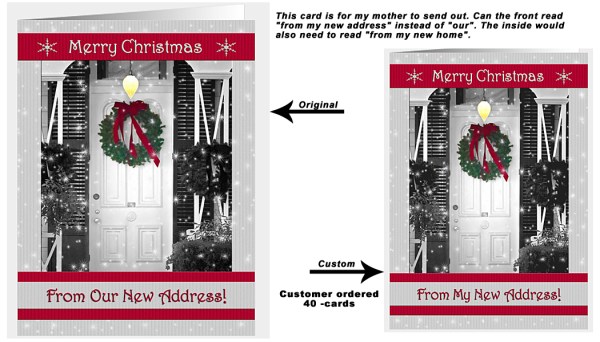
I have a woman who I asked me well over a year ago to put her friend’s name and age on a card. It was quick and easy for me to do, and it made her day. Since that first card, she returns to my store several times a year. Sometimes she just pops in to say hello and that she didn’t need customizing, but wanted me to know she found just what she was looking for; other times she doesn’t hesitate to request a quick change. My good Customer Service skills have given me a long-time customer who probably tells her friends and family who then come to GCU for their cards.
I will also note that when I get a request from a customer that wants major changes, I communicate back and forth with them first as Corrie suggests, even then 50% of the time the customer doesn’t come through with the purchase, but these little changes which are quick and easy are almost always a quick sale!
So you decide if these are worth your time, who knows how many ‘customers for life’ you might attract in the long way!
Here is last week’s post if you missed it: Nuts & Bolts: Handling Custom Requests.

Share this:

Critique Clinic – December 1-2, 2012
How does it work? For three days a week (Friday-Sunday midnight), I will open the clinic to any artist who wants an honest peer review and critique of a card which gets plenty of clicks but no sales, so something’s probably not quite right, or you’ve got a new design you want to test drive, or you’re unsure about the marketability of a card. Or perhaps you’re a newbie who isn’t sure if a recently submitted card is up to a marketable standard. Anyone is welcome to participate. In fact, I encourage everyone to at least look at the cards in question and read the critique comments – you may learn something. The purpose of the clinic is to help artists improve the commercial appeal and marketability of their cards.
THE RULES
- ONE card per artist only.
- Card must be for sale at Greeting Card Universe.
- We will take an unlimited number of artists, including those who have submitted recently, HOWEVER I reserve the right to close a clinic for the day if the submissions become overwhelming. If the clinic has been closed, and you submit a card, your comment will be deleted.
- To submit a card for critique, post a link to the card at GCU in the comments section of this clinic post. Allowances will be made if you’ve had a card declined, or made a new design you’d like advice on. Give us the link where we can see the card, such as your private gallery, Flickr, Tinypic, etc.
- Any artist is free to comment and/or give a critique of a submitted card. HOWEVER, post-and-run comments like “great card” or “you suck” will not be tolerated, nor will abuse. Criticism should be constructive, not destructive. Play nice or you will be banned.
- I also won’t tolerate temper tantrums if you decide your “artistic integrity” is being stepped on because you asked for a critique, and someone told you the photo you’re using isn’t in focus. If you can’t take honest criticism, don’t submit. Once gets you a warning; twice and you’re banned from submitting in the future.
- Artists who critique may do so by giving their opinion, posting an example of another card, or pointing the submitter to a video, on-line article, or other helpful suggestion.
- Don’t forget that artists who are giving you tips and helpful advice are volunteering their time and trouble. Be nice. A link back to their store on your website or blog is appreciated (but not mandatory).
- You are free not to take any advice offered. There’s no guarantee any card will be a bestseller, so don’t come into the clinic with unrealistic expectations.
- Rules may change as we go along and we see how things turn out, okay?
So without any further ado, I declare this week’s Critique Clinic open!
Share this:

Inspiration Station: Persian New Year

In 2013, Persian New Year (Nowruz or Norooz, or Iranian New Year) falls on March 20, so those artists working ahead will find that now’s a good time to be creating designs for this Islamic religious holiday. Don’t be afraid to expand your creativity to include non-Christian holidays. You never know when a nice bulk sale may come your way!
A few things to keep in mind when designing for Nowruz:
- OKAY to depict nature like flowers, trees, plants, vines, vegetables, fruits, etc. Since Nowruz falls on the first day of spring, keep that season in mind. For example, a pot of (wheat) grass is a traditional symbol.
- OKAY to use repeating geometric patterns.
- OKAY to use goldfish (a traditional symbol).
- OKAY to use painted eggs (another traditional symbol). Just remember Nowruz is not Easter.
- OKAY to use calligraphy (Farsi or other) provided you trust the source if you don’t understand the writing yourself. The last thing you want to do is offend anyone.
- NOT OKAY to depict Allah or Mohammed.
- NOT OKAY to depict realistic human figures or animals.
Here are some places to go for inspiration before you begin creating Nowruz cards. Have fun!
Nowruz Eggs
The results of a Google search for this term yield some very pretty results.
Nowruz on Pinterest
A collection of boards full of photos and other goodies to fire your imagination.
Spring Color Palettes
Lovely and fresh, just the thing to spruce up your designs and get your juices flowing.
Small Collection of Nowruz Photos
Just what it says – most of the photos seem to show the traditional “Haft Sin” table. Take a look.
Noupe – Calligraphy and Handwriting Showcase
Get enthused by these beautiful examples.
Tip: With cards like this, I like to put in my Artist’s Notes that the customer can create a personal message in Farsi, Urdu, Arabic, or other language as a .jpg and upload it to the inside of the card. I do this because the fonts used by GCU don’t support Arabic-style script.

Share this:

Design Contest: O Tannenbaum

Announcing our new Design Contest: O Tannenbaum! Think trees … specifically, think Christmas trees. To enter, submit your holiday design featuring an evergreen tree or decorated Christmas tree (I’m not picky) on or before December 4, 2012 by leaving a comment on this post with the link to your card on GCU.
Voting will open on December 5, 2012. You could win a $10 Amazon.com gift certificate! Just the thing for holiday shopping, either to go toward a coveted item or buying a stocking stuffer.
In the last Design Contest, the extra bonus votes earned by our winner made a difference – in fact, that was our closest race to the #1 spot yet – so if you want to snag yourself some bonus votes, here’s how you do it:
BONUS VOTES
- Nominate another artist’s card, get 10 extra votes
- Add 5 Christmas cards on GCU to a Pinterest pin board, get 5 extra votes
- Make a blog post about a Christmas card on GCU, get 5 extra votes
- Make a Squidoo (Weebly, Wix, etc) lens about Christmas trees featuring GCU cards, get 5 extra votes
Good luck to our nominees!
Share this:

Nuts & Bolts: Handling Custom Requests
Many artists receive requests from shoppers who’d like a custom designed card or to to have an existing card personalized. Custom requests can be exhilarating, challenging, fun … but also occasionally frustrating or confusing. To make it easier on yourself, when handling custom requests, keep these tips in mind:
- Be sure your Private Gallery module is ON. To do that, when you’re logged in to GCU, go to Manage Store > Store Layout & Content. Check the Private Gallery box. Don’t forget to SAVE your changes.
- Avoid lengthy review times by checking Make Available in Private Gallery Only and Waive Review during the card creation process. Your custom design will be ready much faster. NOTE: This option makes you responsible for returned cards due to artist error, so check, double check, and check again! Another option is to Fast Track the review, which also speeds up approval. You can do this because a customer is waiting for the design.
- Reply quickly to requests. Don’t leave a customer dangling for days.
- I find it helpful to repeat their request to the customer in my first contact e-mail to help make sure there are no misunderstandings before I do the work. Communicate, communicate, communicate. And be certain both you and the customer understand what’s going to happen before you put your heart and soul into a personalized design. There’s nothing worse than spending time and sweat on a design, only to have the customer tell you that’s not what they wanted!
- Remember, customers CANNOT find a custom request card by PID# when it’s in your Private Gallery. It’s so important to give the customer a direct link to the card if possible. That way they’ll have no trouble finding it – and buying it! Don’t give a bad link, such as to the card’s Large View or your Manage Cards section (I’ve actually had artists give me those links, and they’re useless to a shopper). Example of Good Link | Example of Bad Link
- Once you’ve notified the customer their card is ready, if you haven’t heard from them in a couple of days, send a reminder and give them a little nudge. I usually use something like, “I just wanted to make sure you received my previous e-mail about your customized card design, which can be found here …”
- If you are unable or unwilling to customize a design, don’t ignore the customer. That makes you look bad, and it makes your fellow artists and GCU as a whole look bad, too. There’s nothing wrong with saying, “no.” Just do it courteously.
With these tips in hand, you should find fulfilling customer requests somewhat less stress inducing. Have fun!


