Critique Clinic – November 15-17, 2013

How does it work? For three days a week (Friday-Sunday midnight), I will open the clinic to any artist who wants an honest peer review and critique of a card which gets plenty of clicks but no sales, so something’s probably not quite right, or you’ve got a new design you want to test drive, or you’re unsure about the marketability of a card. Or perhaps you’re a newbie who isn’t sure if a card is up to a marketable standard. Anyone is welcome to participate. In fact, I encourage everyone to at least look at the cards in question and read the critique comments – you may learn something. The purpose of the clinic is to help artists improve the commercial appeal and marketability of their cards.
THE RULES
- ONE card per artist only.
- Card must be intended for sale at Greeting Card Universe.
- To submit a card for critique, post a link to the card at GCU in the comments section of this clinic post. Allowances will be made if you’ve had a card declined, or made a new design you’d like advice on before submission. Give us the link where we can see the card, such as your private gallery, Flickr, Tinypic, etc. If you do give a private gallery link, be sure your private module gallery is ON. Please do not post links to your Manage Cards section – do you really want strangers tinkering with your cards? And please don’t ask us to critique a card that’s pending review – we can’t see it until it’s approved.
- Any artist is free to comment and/or give a critique of a submitted card. HOWEVER, post-and-run comments like “great card” or “you suck” will not be tolerated, nor will abuse. Criticism should be constructive, not destructive. Play nice or you will be banned.
- I also won’t tolerate temper tantrums if you decide your “artistic integrity” is being stepped on because you asked for a critique, and someone told you the photo you’re using isn’t in focus. If you can’t take honest criticism, don’t submit. Once gets you a warning; twice and you’re banned from submitting in the future.
- Artists who critique may do so by giving their opinion, posting an example of another card, or pointing the submitter to a video, on-line article, or other helpful suggestion.
- Don’t forget that artists who are giving you tips and helpful advice are volunteering their time and trouble. Be nice. A link back to their store on your website or blog is appreciated (but not mandatory).
- You are free not to take any advice offered. There’s no guarantee any card will be a bestseller, so don’t come into the clinic with unrealistic expectations.
- Rules may change as we go along and we see how things turn out, okay?
So without any further ado, I declare this week’s Critique Clinic open!
Share this:

Contest Results!

The results are in for our Design Contest: Be Thankful.

Sandra Hess is our winner with the most votes!
And in our random drawing, Annie Lim has won!
Congratulations to both our winners. Sandra and Annie, contact me via the Contact Corrie link on the right side of this page, let me know which prize you prefer – 5 free card credits or a $10 Amazon.com gift certificate – and I’ll take care of that for you.
Thanks to everyone who participated!
Share this:

Tips and Tricks: Keyboard Shortcuts for Diacritical Marks

Keyboard Shortcuts for Diacritical Marks
As we’ve shared before, to check and see if the inside text of a card in a non-English language will print properly, enter your text, save, and use Large View to see how the card will be printed. If you don’t see the diacritical marks you need, choose another font.
Artists who aren’t used to using non-English languages may also be unfamiliar with the ways to get diacritical marks to appear within a font supporting them. You have a few choices.
First, create your text with diacritical marks in a document (like Word), then cut and paste to the inside of the card. You’ll need to check how to create diacritical marks in your chosen program.
Second, if you have Windows, you can switch to the United States International Keyboard layout here. For Mac users, check here. This step is only recommended for artists who use foreign characters a lot – as in the majority of the time – otherwise it’s probably not the best choice for you.
Third, Windows users can take advantage of keyboard shortcuts or ALT numeric codes to produce most diacritical marks. READ the instructions carefully for best results. Mac users, you’ll need Option codes to do the same thing.
Fourth, when creating your card, open another tab in your browser and go to CopyPasteCharacter.com – a website that has listed a huge variety of symbols including letters with diacritical marks that you can simply cut and paste into your inside text. If you see any blank boxes, these are most likely symbols such as Cyrillic, Japanese, Chinese, etc. and you don’t have the necessary font to see it correctly.
Lastly, never ever rely on Google translate or other on-line translation service. It’s always better to get your non-English phrases from a reputable source. If you’re unsure, ask in the Forum. Our artist community is truly global and helpful when it comes to making sure something’s right.
Share this:

Rainbow Connection: Blackboard/Chalkboard Colors

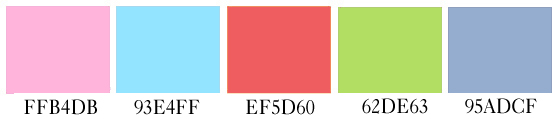
It’s great to see some artists stretching their creative talents to using popular blackboard/chalkboard backgrounds and themes in their greeting card designs. To help you out if you’d like to try colors other than simply white, here are five basic colors of chalk – the same kind used on blackboards (as opposed to artist’s chalk, which comes in every color of the rainbow).
Have fun!
Share this:

Dash of Inspiration: The Designer’s Wish List
A Dash of Inspiration, A Cup of Creativity by Doreen
The Designer’s Wish List

Just for fun, I thought I’d offer a list of goodies the artist/designer might want to add to their list for Santa this year!
Flexible surge protector – So much of the office equipment in our design studios plug in with power adapters which usually take up two or more of the ‘plug in’ spots on a surge protector. This cool new surge protector is the perfect solution!
Cyber Clean – This is a wonderful stocking stuffer! Clean keyboards with no muss or fuss … definitely on my wish list 🙂
Macro Photographer Ring Lights – Affordable way to get better wrap around lighting, allowing for an increase in DOF for those macro subjects. Just choose one for your camera/lens.
31 Days to Greeting Card Marketing Mastery – I can’t personally recommend this book because I haven’t read it, but I’ve read similar books and found them helpful. Also comes in a Kindle addition and it might spark some ideas in the artist who wants to improve their marketing skills.
Kate Harper’s 7 Mistakes Greeting Card Writers Make
Grammar Girl Series – if grammar is not your strong suit and you keep getting cards returned for correction, one or all of these books can make a great reference library for you! I LOVE her books!
Photoshop WOW book series – It’s nearly impossible to learn how to use any version of Photoshop to it’s fullest without attending in-depth classes. The next best thing is through tutorials and my WOW book for CS-5. I can guarantee it’s money well spent!
Digital Painting Techniques – I don’t have this exact book, but I have books on the same subject and they are great inspiration to improve and learn how to make realistic paintings using your digital toolbox.
Of course don’t forget to ask for gift certificates from all your favorite scrap and typography houses!
You may also want to add any or all of the plugins/software mentioned last week.

I hope I’ve inspired all of you to add something wonderful to your holiday wish list that will inspire you to explore outside the box!
So, until next week … Learn … Create … Inspire!
Share this:

Critique Clinic – November 8-10, 2013
How does it work? For three days a week (Friday-Sunday midnight), I will open the clinic to any artist who wants an honest peer review and critique of a card which gets plenty of clicks but no sales, so something’s probably not quite right, or you’ve got a new design you want to test drive, or you’re unsure about the marketability of a card. Or perhaps you’re a newbie who isn’t sure if a card is up to a marketable standard. Anyone is welcome to participate. In fact, I encourage everyone to at least look at the cards in question and read the critique comments – you may learn something. The purpose of the clinic is to help artists improve the commercial appeal and marketability of their cards.
THE RULES
- ONE card per artist only.
- Card must be intended for sale at Greeting Card Universe.
- To submit a card for critique, post a link to the card at GCU in the comments section of this clinic post. Allowances will be made if you’ve had a card declined, or made a new design you’d like advice on before submission. Give us the link where we can see the card, such as your private gallery, Flickr, Tinypic, etc. If you do give a private gallery link, be sure your private module gallery is ON. Please do not post links to your Manage Cards section – do you really want strangers tinkering with your cards? And please don’t ask us to critique a card that’s pending review – we can’t see it until it’s approved.
- Any artist is free to comment and/or give a critique of a submitted card. HOWEVER, post-and-run comments like “great card” or “you suck” will not be tolerated, nor will abuse. Criticism should be constructive, not destructive. Play nice or you will be banned.
- I also won’t tolerate temper tantrums if you decide your “artistic integrity” is being stepped on because you asked for a critique, and someone told you the photo you’re using isn’t in focus. If you can’t take honest criticism, don’t submit. Once gets you a warning; twice and you’re banned from submitting in the future.
- Artists who critique may do so by giving their opinion, posting an example of another card, or pointing the submitter to a video, on-line article, or other helpful suggestion.
- Don’t forget that artists who are giving you tips and helpful advice are volunteering their time and trouble. Be nice. A link back to their store on your website or blog is appreciated (but not mandatory).
- You are free not to take any advice offered. There’s no guarantee any card will be a bestseller, so don’t come into the clinic with unrealistic expectations.
- Rules may change as we go along and we see how things turn out, okay?
So without any further ado, I declare this week’s Critique Clinic open!
Share this:

VOTE For Your Favorite Thanksgiving Card

Submissions have been made in our Design Contest: Be Thankful! Here are the cards. Please vote for your favorite (one vote per person, please). Voting deadline is November 13, 2013. On the 14th, I will announce the winner.
Artists, every vote counts. Get your Facebook, Twitter, and other social media friends and family on-board! The artist who achieves the most votes wins. There will also be a random drawing of all entrants for an additional prize.
Good luck!
_________________________
1.  2.
2.  3.
3. 
4.  5.
5.  6.
6. 
7. 
Share this:

Tips and Tricks: Non-English Inside Text
Non-English Inside Text
As you know, GCU offers a number of fonts for the inside text of cards.
- Arial
- Avante Garde
- BernhardtFashion BT
- Bible ScrT
- Comic Sans
- Curlz
- Edwardian
- Effloresce
- Felt Tip Roman
- Freehand 591
- Helvetica Neue CN
- Jokerman
- Marydale
- Optima
- Papyrus
- Snell Roundhand
- Times New Roman
When creating non-English cards – like a Wedding Congratulations card in French or Spanish, for example – you will often need to use diacritical marks such as these: É, Ç, Ñ, Ö.
Not all of GCU’s font selection supports non-English languages, meaning not every font contains the necessary diacritical marks. Please note that the fonts don’t support languages like Chinese, Arabic, Urdu, Japanese, Korean, etc.
How can you find out if your card will print correctly?
When you’re creating your card … after you enter the inside text, choose your font, and hit SAVE, click for Large View. In the Large View of the card’s inside, you will see exactly how the card will be printed. If any of your symbols are missing, it’s time to choose a different font.
Remember – if you want to make cards in a language you don’t speak, use a reputable source, get a second opinion (often Forum members can help), and be sure of your text before you make a mistake.
Share this:

Tips and Tricks: French Phrases
Best Wishes, Congratulations, & Holiday Greetings in French
Unless you’re a native speaker of a language, it can be very difficult to figure out what to say on a greeting card. If you just grab something off the Internet or, heavens forbid, rely on Google Translate (usually hilariously inaccurate), you can get into trouble.
We’ve found a list of generic French phrases for best wishes, congratulations for weddings and graduations (for example), and holidays, etc. that may be useful if you want to try your hand at a non-English greeting card. The phrases include the necessary diacritical marks, so be sure to use a font supporting them. Diacritical marks cannot be left out.
So have fun beefing up your card collection!

Share this:

Dash of Inspiration: Getting the Most out of Photographs
A Dash of Inspiration, A Cup of Creativity by Doreen
Getting the Most Out of Photographs
When the digital camera era hit the streets most professional photographers made the switch to digital format, thus putting a demand on the software experts to design digital ‘darkroom’ tools specifically for photographers.
The obvious choice is Photoshop and there is no doubt that CS-5 is a critical tool I could not do without, especially when combined Camera Raw; but there are more tools of the trade out there which can help you get the most out of your photographs.
The problem many of us have is that we can not always control the time of day and/or the lighting we are photographing in. That being said, it’s important to have digital tool sets which allows you to correct for poor lighting conditions and shooting at the wrong time of day which make non-destructive changes to your digital photographs.
It’s just as critical that you as a photographer can look at your images and know when they just don’t have enough punch, mood and connection to the viewer, therefore knowing when your image becomes one to work with rather than one which stands alone on a greeting card. A few tips …
- Always shoot in RAW format to capture the maximum colors, tonal values and detail. Bring your images from the camera into a program like Lightroom or Camera Raw which allows you to make non-destructive editing adjustments.
- To crop and size your photographs for the commercial market, always use quality software such as Photoshop and make sure you completely understand non-quality-degrading digital sizing techniques.
- Photographs for the greeting card market must evoke an emotion and/or make a connection with the viewer.
- Be careful to choose software which will handle high-resolution input and output. Free is often great, but will not always allow you to get high-quality results.
- In most cases, the best enhancements come from using a variety of tools and being proficient in masking so that you can add or remove an enhancement to only one part of the image.
- Keep in mind that these tools are not intended to ‘cover up’ poor quality photographs (those with lost detail in highlights & shadows, those lacking DOF and/or sharp focus or those with poor composition). Use these tools to take a technically okay photograph and make it something spectacular.
Digital Tools for the Photographer
My favorites below and these might be good additions to your list for Santa!:
- Camera Raw (for Canon EOS-7D)
- Photoshop CS-5
- Nik Software (full suite)
- Topaz Labs (full suite)
Other options to consider, though I can offer no opinion having not used this options:
GIMP – free and will do much of the basic editing that Photoshop will does.
Picasa photo editing software
Neat Image Plug-in to reduce noise
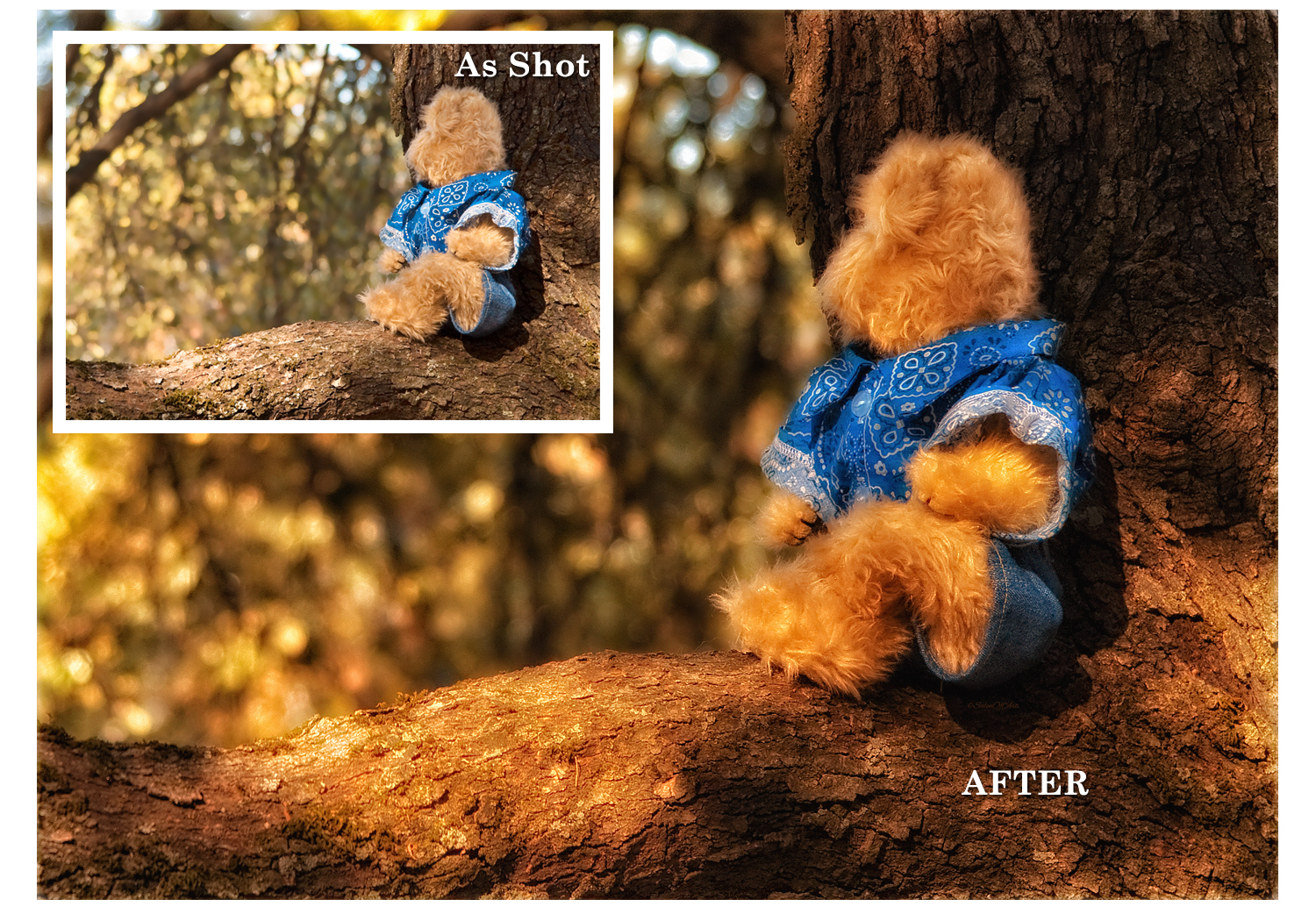
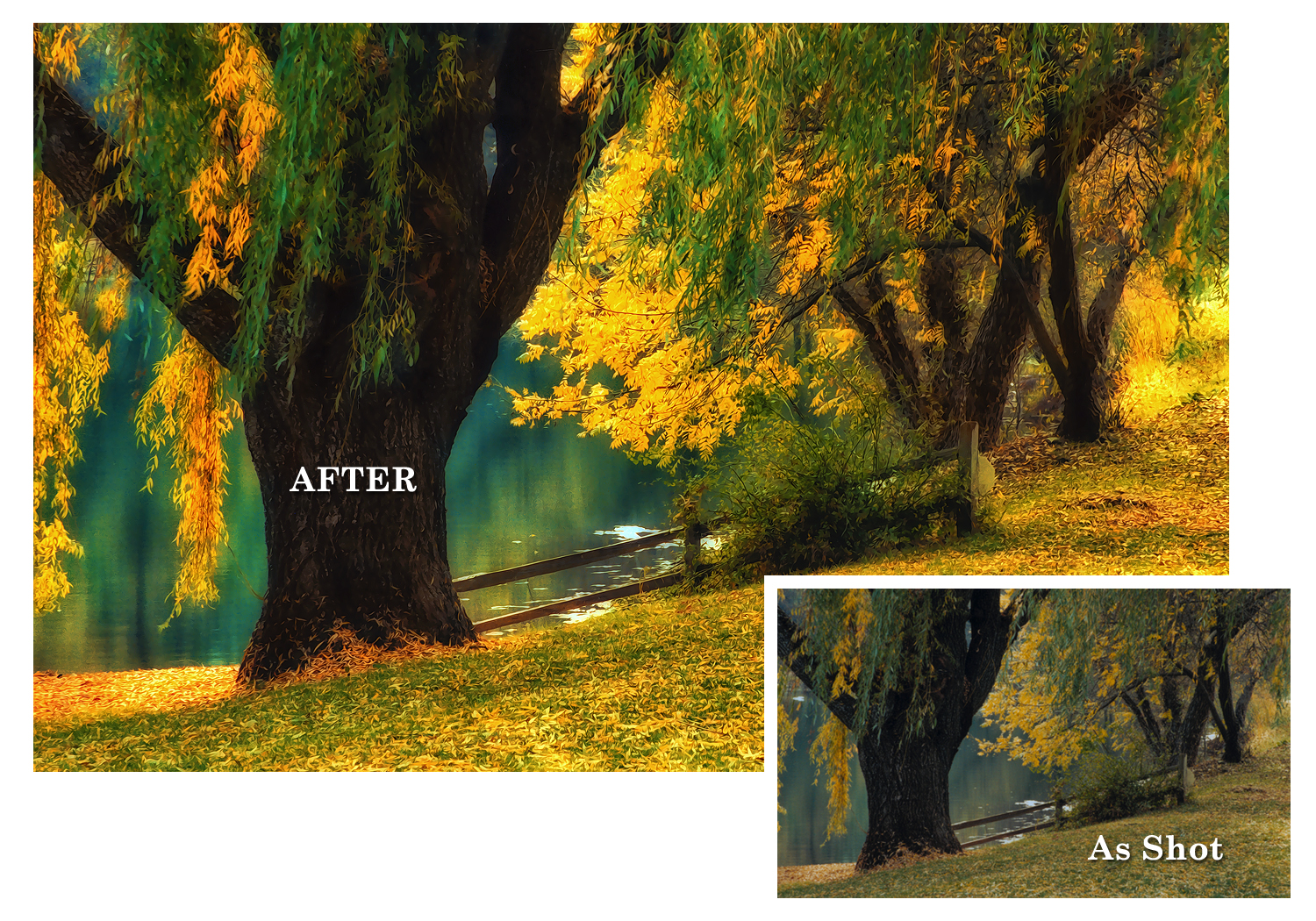
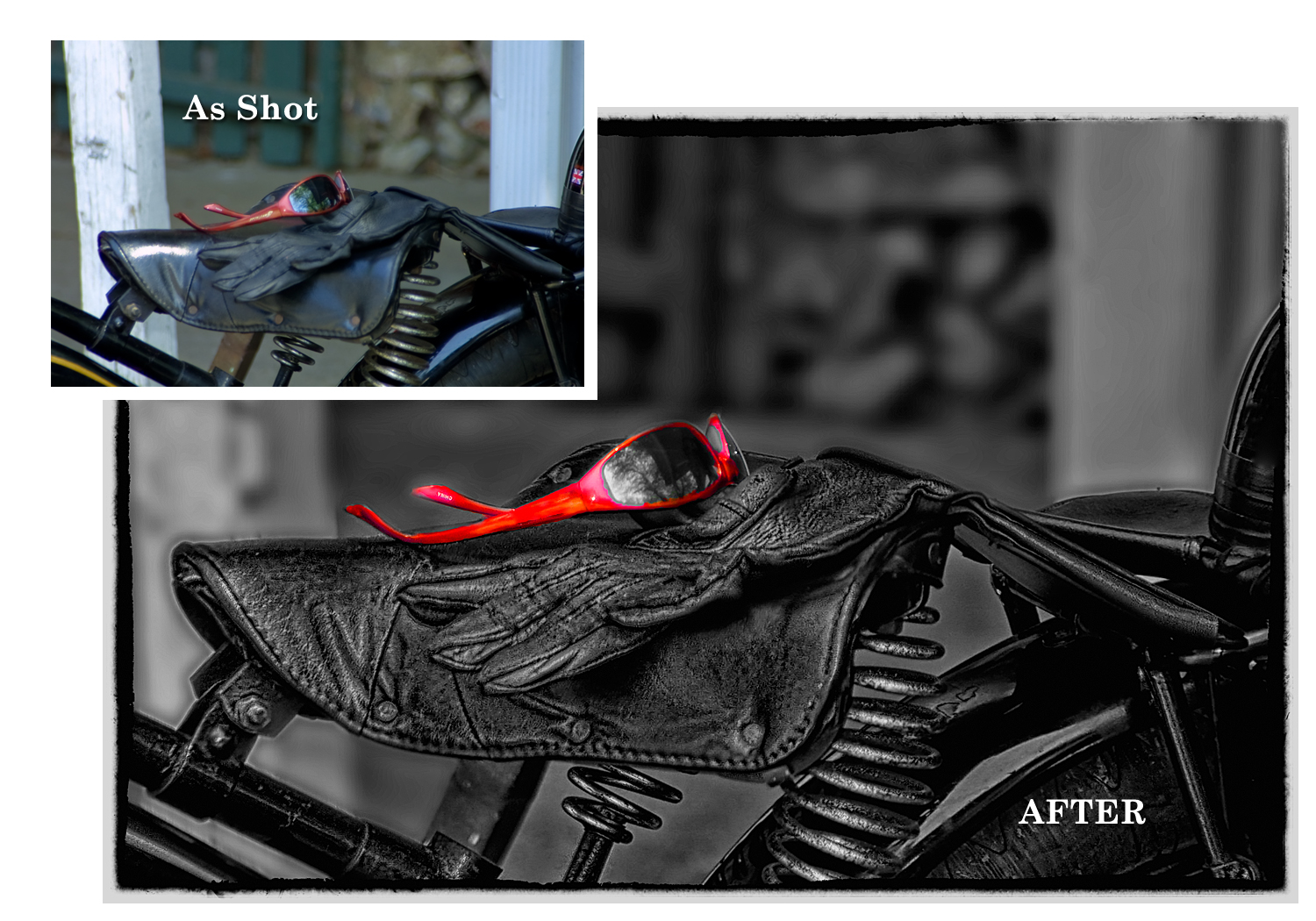
Here are some examples of my own photographs with the ‘As Shot’ and the ‘After Processing’
“Getting My Bearings” – The untouched photo of the teddy bear in the upper left has no real technical faults, however as a marketable image it lacks the dynamic impact to support the emotional connection I wished to convey when I originally set the shot up. By adding a soft dreamy effect, increasing the saturation, tonal values and pulling out detail in the bark and fur of the bear I was able to create an image with that all important “WOW” factor.
“Pond Willows” – This was one of those unexpected photo shoots. I had to go to a Christmas Tree farm as a volunteer act for our local wildlife rehabilitation organization. Though I had my camera with me, the day was dark and gloomy and unfortunately not one of those great dramatic weather days. I had no idea the farm had this lovely pond and I’m a huge fan of willow trees so I had to take the shot. Of course as expected, the photograph was unexciting and drab, therefore sat in my files for years. A couple years ago I pulled it out and ran it through a number of my favorite tools mentioned above and it’s been a well-loved image by customers all over the world.
“Gloves & Glasses”
This last example of mine was a snapshot I grabbed while on a quick break during an all-day motorcycle ride through the mountains. I loved the composition and vintage feel of the scene I saw at that moment, but knew the photograph would be nothing more than a horrible grab-shot. I worked with all the tools above in Photoshop to transform this ugly snapshot into a highly-textured, hand-tinted piece that motorcycle enthusiasts just love.
I hope I’ve inspired all you photographers out there to not only see beyond what comes out of the camera, but to make sure your ‘tool box’ has what you need to add professionalism to your photographic submissions.
So, until next week … Learn … Create … Inspire!


