Font Frenzy: Only You on Sale!

It’s time for the trendy Only You, a font family featuring the thin, decorative lettering that’s become quite popular, even on wedding related cards. You can see a sample below. The font comes in light, light italic, bold, and bold italic, and also in two other display variations PLUS four more fonts including some very cute frames and ornaments.
Right now, you can purchase Only You for $4.90 per font OR $9.90 for all 10 fonts! It makes a great addition to your collection and I foresee many uses a clever designer can make. Have fun!

Share this:

Design Contest: The Office

So Administrative Professionals Day is on April 24th, so we thought we’d have a little Design Contest: The Office to showcase those wonderful designs of yours.
Any Admin Professionals Day card may be submitted. One per artist, please. You have until March 26 to nominate your card. On March 27, I will post all entries and open the voting.
As usual, there are some Bonus Votes up for grabs. Why? Because I want artists who aren’t used to doing self-promotion to dabble their toes in the waters and give it a try – they’ll benefit from the experience and may start marketing their cards to improve their sales. And artists who are experienced marketers can also benefit by giving their card a wider audience through their established channels. So if you want to earn Bonus Votes, they’re there to get if you put in the effort. If you prefer not to, that’s your choice. So without further ado…
Bonus Votes
+5 Bonus Votes if you make a blog post, Squidoo lens, or other promotional webpage about Admin Professionals Day including links to 5 relevant greeting cards on GCU
+5 Bonus Votes if you pin 5 Admin Professionals Day cards from GCU to Pinterest
+5 Bonus Votes if you also nominate another artist’s Admin Professionals Day card
Good luck to everyone!
Share this:

GCU News: Design of the Month Contest + New Fast Track

DESIGN OF THE DAY CONTEST
Those artists who have won Design of the Day in March should have received an e-mail notifying them of this event. For the rest of us, here’s the scoop:
Greeting Card Universe is hosting a contest on Facebook to find the Design of the Month. All Design of the Day winners are now automatically entered in the contest. Anyone may vote for their favorite card. The artist who receives the most votes by April 7, 2013 will win a fabulous prize – an iPad Mini!
To view entries and vote, you must be a fan of GCU’s Facebook page to see the entries and vote. To become a fan, “Like” their FB page. \it’s that simple.
Check out the details of the contest.
Vote for your favorite card on the Voting Page.
Share this information with your FB friends, family, and supporters – get links by clicking on your card on the Voting Page. Share with Twitter followers and e-mail, too. Every vote counts, and if you want to win an iPad Mini, you should get out there and start spreading the word with enthusiasm.
GCU will be promoting the contest to their FB fan base and their customers. If there’s lots of activity and the contest is popular, we’ll likely see a repeat every month. So get promoting!
And even artists who aren’t nominated now should promote the contest to their fans and followers, too – next month, it could be you who needs the help. I also encourage all artists, whether they have a “horse” in this race or not, to vote. Let’s show GCU how much we want the opportunity to win a grand prize every month!
____________________
FAST TRACK PRE-APPROVAL
No less exciting is a new development which we believe will excite many artists.
Those who make series of cards (like age specific, relationship specific, etc.) have long suffered the horrible experience of uploading 100+ cards, only to have each and every one of them Returned for Edits or Declines. Ouch!
GCU has heard you, folks. From now on, you can submit ONE card in a series and Fast Track it. Be sure to state in the Notes to Reviewer why you’re Fast Tracking the card (ie, sample of a proposed series of like images, please review and let me know if I can proceed). By doing this, you save yourself and the review team loads of time and effort.
If the sample is Returned for Edits, make your changes and resubmit as usual. If it’s declined, go back to the drawing board. But if it’s approved, feel free to submit the rest of the series INCLUDING a Note to Reviewers staring something like, “Part of image collection based on approved concept PID# 123456.” Be absolutely certain to include the PID# of the approved sample, otherwise you’re back to square one.
Isn’t this great! Hopefully, if all artists follow the new procedure, we can start whittling down the approval times.
Share this:

Dash of Inspiration: Send the Right Message
A Dash of Inspiration, A Cup of Creativity by Doreen
Send the Right Message

Today I thought I’d offer some inspiration for sending the right message with your card designs. We’ve certainly talked about the importance of the image speaking to you and matching not only your added message, but also be a good fit for the category.
To be successful, this is such a critical element in greeting card design. Though there certainly is some percentage of people who lean more toward blank cards so they can add their own heartfelt message, it is a minute percent of the average greeting card buyer.
Most customers come to a place like GCU, because they want to find that perfect card that says exactly what they want to express with the perfect imagery to accompany it. With that said; writing card verses does not come naturally to all greeting card artists. That’s why most of the greeting card publishers license artwork OR verse, but rarely a design which has both. Publishers match verse from hired writers to images from designers. At GCU, we do it all ourselves.
If writing a verse for your imagery does not come natural to you, think about your options:
- Is there a friend or family member that loves to write? Perhaps you could become a team, there are a few successful teams on GCU that have merged their talent to create cards.
- Are there writing courses at your local community college? Taking a class or two might spark a talent you didn’t know you had. Or take a class online. Do your research and find something free/affordable that challenges you to learn more.
Greeting Card Writing Online Course Taught by Karen Moore
Sandra Miller-Louden’s Greeting Card Courses Online
Buy a book on writing verses, you never know what a little knowledge can spark in your imagination!
How To Write Poetry – Your Step-By-Step Guide To Writing Poems
What Can I Say?: How To Write Greetings And Verse For Every Occasion
What you Don’t want to do …
- Don’t say say the same thing on the front that you say on the inside, such as; Happy Birthday on the front of your card and nothing but Happy Birthday on the inside of your card. This is boring and not marketable.
- Don’t copy verses off the internet unless you can offer a link to the reviewers which state the verse is in the public domain.
- Don’t use famous quotes WITHOUT putting the author of the quote in/on the card under your quoted verse.
- Don’t use verses from songs unless you can offer a link to the reviewers which state the verse is in the public domain.
- Don’t use Scripture from any source other than the King James version as it is in Public Domain.
So, here’s hoping you’ve been inspired to create great card verses! Till next week!

Share this:

Critique Clinic – March 15-17, 2013

How does it work? For three days a week (Friday-Sunday midnight), I will open the clinic to any artist who wants an honest peer review and critique of a card which gets plenty of clicks but no sales, so something’s probably not quite right, or you’ve got a new design you want to test drive, or you’re unsure about the marketability of a card. Or perhaps you’re a newbie who isn’t sure if a card is up to a marketable standard. Anyone is welcome to participate. In fact, I encourage everyone to at least look at the cards in question and read the critique comments – you may learn something. The purpose of the clinic is to help artists improve the commercial appeal and marketability of their cards.
THE RULES
- ONE card per artist only.
- Card must be intended for sale at Greeting Card Universe.
- To submit a card for critique, post a link to the card at GCU in the comments section of this clinic post. Allowances will be made if you’ve had a card declined, or made a new design you’d like advice on before submission. Give us the link where we can see the card, such as your private gallery, Flickr, Tinypic, etc. If you do give a private gallery link, be sure your private module gallery is ON. Please do not post links to your Manage Cards section – do you really want strangers tinkering with your cards? And please don’t ask us to critique a card that’s pending review – we can’t see it until it’s approved.
- Any artist is free to comment and/or give a critique of a submitted card. HOWEVER, post-and-run comments like “great card” or “you suck” will not be tolerated, nor will abuse. Criticism should be constructive, not destructive. Play nice or you will be banned.
- I also won’t tolerate temper tantrums if you decide your “artistic integrity” is being stepped on because you asked for a critique, and someone told you the photo you’re using isn’t in focus. If you can’t take honest criticism, don’t submit. Once gets you a warning; twice and you’re banned from submitting in the future.
- Artists who critique may do so by giving their opinion, posting an example of another card, or pointing the submitter to a video, on-line article, or other helpful suggestion.
- Don’t forget that artists who are giving you tips and helpful advice are volunteering their time and trouble. Be nice. A link back to their store on your website or blog is appreciated (but not mandatory).
- You are free not to take any advice offered. There’s no guarantee any card will be a bestseller, so don’t come into the clinic with unrealistic expectations.
- Rules may change as we go along and we see how things turn out, okay?
So without any further ado, I declare this week’s Critique Clinic open!
Share this:

Tips and Tricks: Fast Track vs. Waive Review


Fast Track vs. Waive Review
Today, we’re talking about your options when it comes to card submissions.
The first option is the regular submission route, in which you upload your design(s) and wait for the cards to be Approved, Declined, put On Hold, or Returned for Edits by the GCU’s Review Team.
The second option is Fast Track, an expedited review which may be used only when:
- You have created a custom design for a shopper
- You are fulfilling a request in the Cards Wanted topic on the Forum
- You are submitting one card of a series for pre-approval
The Fast Track option may NOT be used when:
- You’re submitting holiday cards right before the holiday and are afraid you’ll miss it
- You’re impatient with review times and just want your cards in your store now
Be aware that Fast Track doesn’t mean your cards won’t be reviewed. Cards may still be placed On Hold if the reviewer has a question or needs a second opinion. It’s not a totally free pass. And when you Fast Track a card, be sure to include the reason why in your Notes to Reviewer to avoid delays.
The third option is Waive Review, which places a card directly in your Private Gallery without review. While this option can be used if you have a very urgent request from a shopper, be aware that:
- You are financially responsible for any of these cards returned by a customer because of artist error
- Card is available in your Private Gallery only – it will not be seen in on-site searches or found in category searches
- You will need your Private Gallery module ON in your store to access the card
Abuse of either Fast Track or Waive Review may result in all your submitted designs being put On Hold and your use of Fast Track being suspended.
And there you have it! For the most part, you won’t use Fast Track or Waive Review often, and you’ll just need to be patient while waiting for card approvals from the Review Team.
You can expedite normal review times by taking responsibility for your card designs and making sure they are error-free, within the margins, have good spelling and grammar, and obey the guidelines in the Wiki. You’ll also help yourself by not submitting cards right before a holiday. Savvy artists design 3-6 months or more before a holiday if they want to see sales.
Good luck!
Share this:

Design Spotlight: Doreen Erhardt

Today, our Design Spotlight falls on Doreen Erhardt, a very successful photographer and artist who’s doing some exciting things in card design!
_________________________

Thank you Corrie for inviting me back for today’s Design Spotlight. I chose one of my recent designs so sales are yet to be seen, but I do love this card.
For me, inspiration can come from the moment I set eyes on an image and it speaks to me or from something I read, or even hear. In fact I carry around a digital voice recorder so that I can capture those ideas that jump into my mind for only a split second when I see a billboard or hear something funny on the radio. My mind is full 24/7 with ideas of creations yet to be made … LOL!
Something that tends to run through all of my card designs is matching imagery and verse. I love to play off the image, tying the visual aspects of the card to the verse and category. If the words to play off the image don’t come to me, then I put the card aside and it may be months before I have that light-bulb moment to finish the card.
In addition to visiting my cards at Salon of Art Greetings
You can find me on Facebook and on my Salon of Art website.
Share this:

Rainbow Connection: Inspirational Colors



Pinterest is an excellent source of color inspiration. You’ll find lots and lots of yummy palettes to try in your new designs. Here are a few links to get you started on your journey and jump start your creativity!
Inspirational Color Palettes
The name says it all – a very large board with plenty of pins featuring luscious colors. You’ll get giddy just browsing.
Color Palettes
Another board bursting with examples. You’ll surely find inspiration here.
Color Palettes II
Lots of bright, sunny colors here, some trendy palettes too.
Color Palette Boards
A big collection of boards about color palettes, each with their own examples. Potentially hundreds of palettes here.
So now you have a terrific playground of new colors to try – have fun!
Share this:

Dash of Inspiration: The Visible Horizon
A Dash of Inspiration, A Cup of Creativity by Doreen
The Visible Horizon
Today’s topic was a request from the GCU community. So what do the reviewers mean when they refer to a crooked horizon?
First let’s talk about the horizon line in visual art. If you’ve ever taken a beginner’s drawing class, one of the first things you’ll be taught when learning how to draw is to first establish your Horizon Line by drawing a faint horizontal line on the paper.
In photography, the subject of today’s discussion, the same theory applies when framing through the viewfinder. A Straight Horizon is one of the first things taught in a beginning photography class.
Looking at a photograph with a tilted horizon causes havoc in our brain due to conflicting input between the inner ear and the brain. So our brain wants to tilt our head to straighten the horizon, yet our inner ear keeps sending out input that we are already level. Customers are not drawn to crooked horizons, so it’s no wonder GCU is declining them as unmarketable.
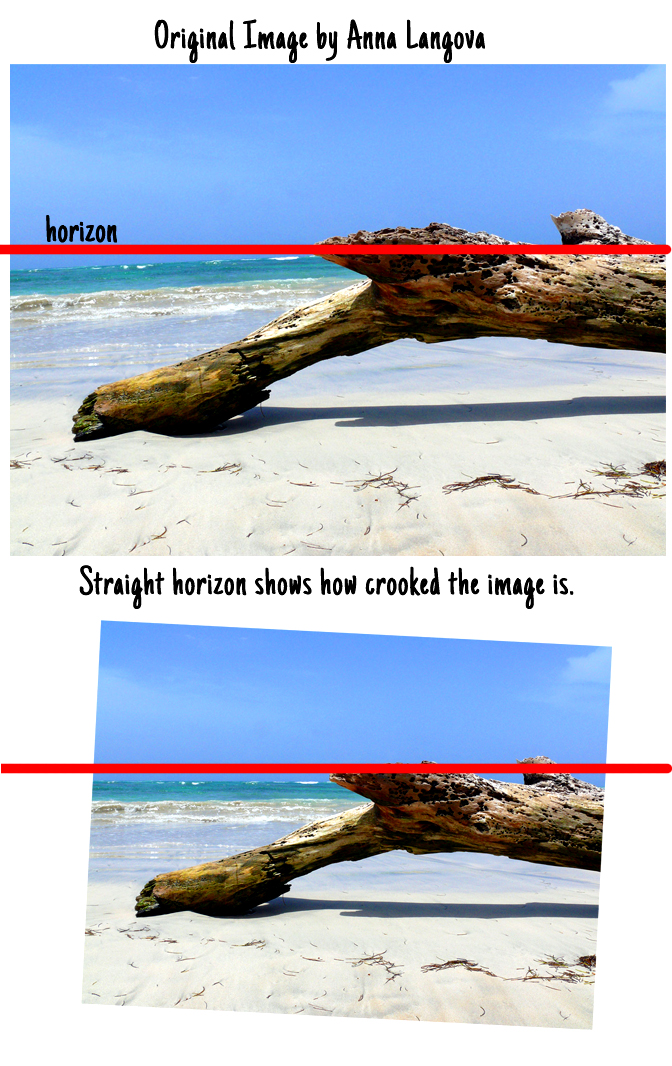
No matter how gorgeous a photograph is, if the horizon is crooked, the photo is useless. There is no stock agency and no publishing company that will accept a photograph with a horizon line that is falling out of the image … and neither will GCU.

Photo courtesy of Lauren – The crooked horizon in this image deems it unmarketable.
In landscape and scenic photography, the horizon line comes into play any time there is water meeting land, water meeting sky, sky meeting land, land meeting mountains, you get the idea. It doesn’t matter how slight the horizon is off, if it’s not straight it’s not acceptable. The amateur photographer may say, “but the subject is straight and I couldn’t get both the subject and the horizon straight.” Then take the photo for your scrapbook, but don’t attempt to get the photograph accepted as a marketable image. If you can’t relocate your position and perspective to get a straight horizon, don’t bother taking the photograph.
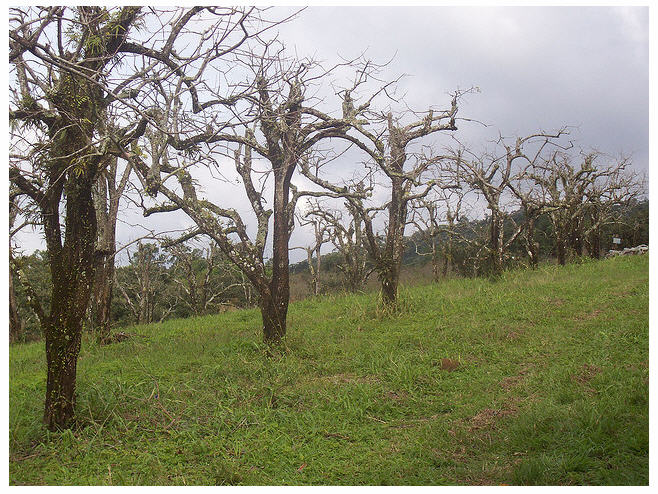
Photo courtesy of Hudson Tavares – Just because the trees are straight, does not make this crooked horizon photograph marketable.
First let’s talk about how to ensure a straight horizon line while photographing, then I’ll give some links below on how to correct the crooked horizon in post-processing.
Tips for Shooting Straight Horizons:
Use a tripod with a built in level such as the Bogen tripods. I invested in a Bogen (they’re expensive, but timeless) about 30 years ago. It has both vertical and horizontal levels. My husband laughs at me, because I’ll have my tripod legs in such crooked and precarious positions in order to get those levels straight. He’ll say; “you’ are no where near level” and of course I’ll respond with “the levels beg to differ with you”.
Many of the new digital SLR’s have a grid in the viewing area. Line up the grid with your horizon. Some cameras even come with a Virtual Horizon built in tool you can bring up.
You can also purchase, for less than $10, a flash-shoe mounted level that will mount on the top of your camera and help you line up your horizon with much better accuracy. Alternatively, some cameras have a built-in electronic spirit level that gives similar information in the viewfinder or on the top LCD.
Post-Processing Horizon Correction
There are many ways to correct a slanted horizon line, choosing that which works best really depends on the type of image and severity of the issue. If you are shooting in a large, hi-res format (therefore room for severe cropping), then manually tweaking the image until the horizon is straight and then cropping often works well.
Fixing Tilted Horizon Photoshop
Using the Lens Correction Tool in Photoshop
Straightening Photos in Lightroom
Let me also touch on Architectural perspective. Unless you have become an expert and have either a 4×5 or 8×10 view camera with an adjustable bellows or a a 35 mm format camera with a high-end tilt/shift (perspective control) lens, I would not consider photographing buildings for use as images to sell. This is a very specialized field and the pros use very expensive equipment that allow them to get the correct perspective by tilting the lens without causing distortions.
For those who missed it, here is the link to “A Matter of Perspective”
So, here’s hoping you now understand not only how to take a photograph with a straight horizon, but also how to correct the images you have. Till next week!
Share this:

Critique Clinic – March 8-10, 2013
How does it work? For three days a week (Friday-Sunday midnight), I will open the clinic to any artist who wants an honest peer review and critique of a card which gets plenty of clicks but no sales, so something’s probably not quite right, or you’ve got a new design you want to test drive, or you’re unsure about the marketability of a card. Or perhaps you’re a newbie who isn’t sure if a card is up to a marketable standard. Anyone is welcome to participate. In fact, I encourage everyone to at least look at the cards in question and read the critique comments – you may learn something. The purpose of the clinic is to help artists improve the commercial appeal and marketability of their cards.
THE RULES
- ONE card per artist only.
- Card must be intended for sale at Greeting Card Universe.
- To submit a card for critique, post a link to the card at GCU in the comments section of this clinic post. Allowances will be made if you’ve had a card declined, or made a new design you’d like advice on before submission. Give us the link where we can see the card, such as your private gallery, Flickr, Tinypic, etc. If you do give a private gallery link, be sure your private module gallery is ON. Please do not post links to your Manage Cards section – do you really want strangers tinkering with your cards? And please don’t ask us to critique a card that’s pending review – we can’t see it until it’s approved.
- Any artist is free to comment and/or give a critique of a submitted card. HOWEVER, post-and-run comments like “great card” or “you suck” will not be tolerated, nor will abuse. Criticism should be constructive, not destructive. Play nice or you will be banned.
- I also won’t tolerate temper tantrums if you decide your “artistic integrity” is being stepped on because you asked for a critique, and someone told you the photo you’re using isn’t in focus. If you can’t take honest criticism, don’t submit. Once gets you a warning; twice and you’re banned from submitting in the future.
- Artists who critique may do so by giving their opinion, posting an example of another card, or pointing the submitter to a video, on-line article, or other helpful suggestion.
- Don’t forget that artists who are giving you tips and helpful advice are volunteering their time and trouble. Be nice. A link back to their store on your website or blog is appreciated (but not mandatory).
- You are free not to take any advice offered. There’s no guarantee any card will be a bestseller, so don’t come into the clinic with unrealistic expectations.
- Rules may change as we go along and we see how things turn out, okay?
So without any further ado, I declare this week’s Critique Clinic open!


