Dash of Inspiration: Happy Halloween
A Dash of Inspiration, A Cup of Creativity by Doreen
Happy Halloween

Thought I’d keep this week’s Dash of Inspiration short, since so many are preparing either for the storm on the east coast tied up with Halloween. I’ll just offer some fun Halloween visuals and an article I wrote back in 2009 “Tricks for Halloween Photos” and wish you all a happy and safe Halloween. To all who are in the path of the storm, our thoughts are with you; that you, your loved ones and your home all make it through safely.
Here are a couple Pinterest Halloween Boards:
Halloween Inspiration One
Halloween Inspiration Two
Creep Factor: A Collection of Dark and Spooky Photography by Noupe.com
Awesome Halloween Artwork at Fine Art America
Here is an article I wrote in 2009 about taking great Halloween Photos
May you all be safe and we’ll see you next week!

Artist Ken Lau is brand new to GCU (he joined October 2012) and this is his first card!
Share this:

Critique Clinic – October 26-28, 2012

How does it work? For three days a week (Friday-Sunday midnight), I will open the clinic to any artist who wants an honest peer review and critique of a card which gets plenty of clicks but no sales, so something’s probably not quite right, or you’ve got a new design you want to test drive, or you’re unsure about the marketability of a card. Or perhaps you’re a newbie who isn’t sure if a recently submitted card is up to a marketable standard. Anyone is welcome to participate. In fact, I encourage everyone to at least look at the cards in question and read the critique comments – you may learn something. The purpose of the clinic is to help artists improve the commercial appeal and marketability of their cards.
THE RULES
- ONE card per artist only.
- Card must be for sale at Greeting Card Universe.
- We will take an unlimited number of artists, including those who have submitted recently, HOWEVER I reserve the right to close a clinic for the day if the submissions become overwhelming. If the clinic has been closed, and you submit a card, your comment will be deleted.
- To submit a card for critique, post a link to the card at GCU in the comments section of this clinic post. Allowances will be made if you’ve had a card declined, or made a new design you’d like advice on. Give us the link where we can see the card, such as your private gallery, Flickr, Tinypic, etc.
- Any artist is free to comment and/or give a critique of a submitted card. HOWEVER, post-and-run comments like “great card” or “you suck” will not be tolerated, nor will abuse. Criticism should be constructive, not destructive. Play nice or you will be banned.
- I also won’t tolerate temper tantrums if you decide your “artistic integrity” is being stepped on because you asked for a critique, and someone told you the photo you’re using isn’t in focus. If you can’t take honest criticism, don’t submit. Once gets you a warning; twice and you’re banned from submitting in the future.
- Artists who critique may do so by giving their opinion, posting an example of another card, or pointing the submitter to a video, on-line article, or other helpful suggestion.
- Don’t forget that artists who are giving you tips and helpful advice are volunteering their time and trouble. Be nice. A link back to their store on your website or blog is appreciated (but not mandatory).
- You are free not to take any advice offered. There’s no guarantee any card will be a bestseller, so don’t come into the clinic with unrealistic expectations.
- Rules may change as we go along and we see how things turn out, okay?
So without any further ado, I declare this week’s Critique Clinic open!
Share this:

Design Contest: Turkey Time!


Thanksgiving (the U.S. holiday) is headed our way, so before we go comatose from turkey and stuffing overload, let’s have a Design Contest: Turkey Time!
Here’s how it works – nominate your Thanksgiving card by leaving a link in a comment on this post by November 1, 2012. Only cards on GCU are eligible. On November 2, I will list the entries and open the voting, which will continue until November 9. The artist who receives the most votes will win a $10 Amazon.com gift certificate!
BONUS VOTES
Nominate another artist’s Thanksgiving card and you’ll receive 8 extra votes!
Create a Thanksgiving pinboard on Pinterest that includes at least 5 cards from GCU and you’ll receive 5 extra votes!
Make a blog post or Thanksgiving themed page on Squidoo, Weebly, or Wix (or another free webpage site) that includes at least 3 GCU cards and you’ll receive 10 extra votes!
Be sure to leave links in the comments section of this post to earn your extra votes.
Now show us your best work, and good luck to all our participating artists!
Share this:

Rainbow Connection: Blackberries and Lemons

Fall is upon us. Are the leaves turning colors in your part of the world?
At this time of the year, we think about russets and browns, golds and olive greens. Well, today I’m giving you a new palette in the shades of blackberry and lemon – a delicious combination for weddings (a trendy palette in Martha Stewart Weddings, in fact) but I can also see the palette used for feminine designs – birthdays, anniversaries, thank you notes, congratulations, all for her. Deepen the hues a touch and include the gentlemen, too.
Have fun!
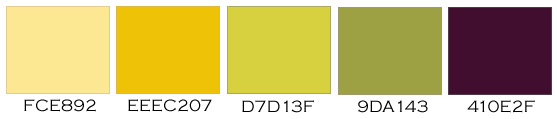
As always, these are RGB colors. I’ve given you the hex numbers to make it easy to use these colors in your favorite graphics editing program, or you can simply save the palettes to your own hard drive.
Share this:

Design Spotlight: John Crowther

Today’s Design Spotlight shines on John Crowther, whose splendid niche lacrosse cards tickle your funny bone!
_________________________

I’m an artist and illustrator, but this series of cards is inspired by my activities as a coach. I like to joke that people shouldn’t hold it against me that I see humor in a sport where kids hit each other with sticks.
This particular card is a huge favorite when displayed at lacrosse events, but one team mom, a psychoanalyst, told me she disliked it because she knew too many mothers like this. I pointed out to her that if we cartoonists were limited to behavior we approved of, there wouldn’t be cartoons.
My so called “fine art” and portrait work can be seen at J. Crowther Art, and I post a cartoon daily at my blog, The Fool’s Journey.
Share this:

Dash of Inspiration: Custom Front Card Tips
A Dash of Inspiration, A Cup of Creativity by Doreen
Custom Front Card Tips
I’ve created hundreds of Custom Front cards for GCU and as ALL design software, GCU’s personalization software has it’s own little quirks that you can learn to work around. So I thought I’d offer a few tips:
The Font choices are what they are: Spend some time working with these choices to be able to create cards which have both a professional appearance, a style that fits the theme of your design and gives the look you are seeking. As Corrie has mentioned many times, you need to be careful combining fonts on the same card, but it certainly is possible if you follow the basic rules (See the previous posts on this blog for more ‘font guidelines’).
Always keep the customer in mind:
- Make sure you use names which are ‘longer than average’ to ensure that your text box will most likely fit 99 out of 100 names the customer adds. For example one thaat I use is Madelaine Rosemary Montgomery
- Always chose a Name Placeholder which has at least one ‘j’ or ‘y’ (for example) to define the descender line* therefore making sure the text box will fit all letters the customer enters.
- Carefully align custom text, both the text box within the horizontal and vertical parameters of the card, but also choose the alignment within the text box. If you add text which should align right or left to look professional, then choose that alignment within the text box so that when customers add their text, it will auto-align and keep the design the way it’s intended.
- When entering a year – you are much better off using a year far into the future than using the current year. Once the current year passes, many customers don’t know they can make an old year current, therefore they may ignore your card and choose another. Secondly you don’t have to update your cards to bring them current. I tend to use the year 2020. This seems to immediately register to the customer that this is a customizable field and I don’t’ have to update them each year.
Fickle Text Boxes: Some design software allow you to overlap text boxes, GCU’s does not … so work within it, not against it. Get to know the fonts, some tend to rise to the top of the text box, some to the bottom and some snuggle right in like Garamond Pro. The amount of space in-between your text boxes is affected by how the font sits within the box, so choose wisely and work with it until you get the desired effect.
If you see that your text when in the Preview Mode has jumped spaces, it’s because you have not given the text enough room within your text box. Increase the width and/or height of your text box slightly giving the text room to breathe and you’ll find it previewing correctly.
ALWAYS use the Preview Tool before the final save. One reason is, it seems that another quirk of the tool is that if you do not preview before saving, your thumbnail in Manage Cards will often be blank. The other of course is to verify that the ‘final’ design will look right.
When all else fails: Sometimes the look I’m after, or the customization I envision requires a ‘seamless’ appearance that just can’t be achieved by combining the text I add as part of my uploaded image and that which I want the customer to be able to change. When this happens, I upload a version with no text on it and add all of the text using the custom tool. This is a great alternative and makes for seamless blending.
About the Fonts offered in the Custom Front tool:
Common Fonts: A few of the fonts used in GCU’s tool are commonly added to the font package which comes with your computer, so check and if you have them. If so, consider choosing them when creating a card front you wish to customize. If you don’t have them, you certainly can purchase them.
Adobe Garamond Pro: Listed as Garamond in most font packages
Gill Sans – Purchase here
Brush Script MT – Purchase here
Bottom line is professional designers pay for the tools of their trade just like any other business person, so if you want the fonts on your card fronts to match the those available in the tool, then purchase those you really like.
*Descender Line: The lowest line that a character’s descender extends to, like the bottom stem of the lowercase ‘j’ and ‘y.’ A line marking the lowest point of the descenders within a font.
ENJOY!

This is an example of looking seamless by using the Brush Script font in lines which do not have baby’s name and using the custom tool to add the two lines of text which are customized.

This card was a blank upload so all text is done in using the custom tool.

This is an example of finding a font that I had which is so similar to Amazone that it blends well enough to fool the eye when not in a continuous line.
Share this:

Critique Clinic – October 19-21, 2012
How does it work? For three days a week (Friday-Sunday midnight), I will open the clinic to any artist who wants an honest peer review and critique of a card which gets plenty of clicks but no sales, so something’s probably not quite right, or you’ve got a new design you want to test drive, or you’re unsure about the marketability of a card. Or perhaps you’re a newbie who isn’t sure if a recently submitted card is up to a marketable standard. Anyone is welcome to participate. In fact, I encourage everyone to at least look at the cards in question and read the critique comments – you may learn something. The purpose of the clinic is to help artists improve the commercial appeal and marketability of their cards.
THE RULES
- ONE card per artist only.
- Card must be for sale at Greeting Card Universe.
- We will take an unlimited number of artists, including those who have submitted recently, HOWEVER I reserve the right to close a clinic for the day if the submissions become overwhelming. If the clinic has been closed, and you submit a card, your comment will be deleted.
- To submit a card for critique, post a link to the card at GCU in the comments section of this clinic post. Allowances will be made if you’ve had a card declined, or made a new design you’d like advice on. Give us the link where we can see the card, such as your private gallery, Flickr, Tinypic, etc.
- Any artist is free to comment and/or give a critique of a submitted card. HOWEVER, post-and-run comments like “great card” or “you suck” will not be tolerated, nor will abuse. Criticism should be constructive, not destructive. Play nice or you will be banned.
- I also won’t tolerate temper tantrums if you decide your “artistic integrity” is being stepped on because you asked for a critique, and someone told you the photo you’re using isn’t in focus. If you can’t take honest criticism, don’t submit. Once gets you a warning; twice and you’re banned from submitting in the future.
- Artists who critique may do so by giving their opinion, posting an example of another card, or pointing the submitter to a video, on-line article, or other helpful suggestion.
- Don’t forget that artists who are giving you tips and helpful advice are volunteering their time and trouble. Be nice. A link back to their store on your website or blog is appreciated (but not mandatory).
- You are free not to take any advice offered. There’s no guarantee any card will be a bestseller, so don’t come into the clinic with unrealistic expectations.
- Rules may change as we go along and we see how things turn out, okay?
So without any further ado, I declare this week’s Critique Clinic open!
Share this:

Inspiration Station: 2013 Non-Traditional Holidays

As many artists are aware, in the U.S., we tend to have non-traditional “holidays” and observances for many different occasions some of which are pretty zany, such as “National Fresh Squeezed Juice Week” or “Fruitcake Toss Day.” Granted, many of these special holidays aren’t really card giving occasions, but there are opportunities here for clever artists to do some easy marketing and increase their sales potential.
If you have a blog, do a post about a wacky holiday and tie it in to your cards. Such as, “National Hugging Day” you could promote “Thinking of You” or “Missing You” cards. During “Family Reunion Month” promote family reunion, picnic, pool party, and other party invitations. You get the idea. Don’t forget to share on social media sites, too.
Write a Squidoo lenx, a Weebly or Wix page (or use another free service) using one of these non-traditional holidays, and add relevant greeting cards and links. Informative content will get indexed by search engines lickety-split. Relevant content is the key, but you should have no trouble tying your article with appropriate card designs.
Here are a few places you can go for inspiration and information. Have fun!
Holidays 2012-2013
A very comprehensive site if you’re looking for non-traditional holidays. Each month listed will give you the monthly observances (such as Breast Cancer Awareness Month), weekly, and daily. Not a lot of information beyond the dates, but certainly an excellent jumping off point.
Jewish Holidays Calendar 2012-2013
The Jewish faith uses a lunar calendar to calculate holy days, which means the dates change every year. While these are traditional religious holidays, I list this resource for artists who’d like to create cards beyond the usual.
Squidoo.com Weebly.com Wix.com
Create free webpages on the subject of your choice. A little knowledge of HTML will help. Be sure to use the “Sell This Card” code from GCU when you’re creating links.
Top 20 Ways to Share a Great Blog Post
Have you written a great post? Want to promote it? This article from Mashable is full of tips.
Share this:

Font Frenzy: Skyhaven Fonts

Skyhaven Fonts has some interesting offerings – mostly informal handwriting fonts and display fonts. Eleven pages of fonts at DaFont, so there’s something for everyone in this collection.
Their commercial use policy is simple – if you want to download a font from DaFont, use the “donate to author” button (located under the “download” button) and pay whatever you want. It’s that easy. I’d suggest $5-$10 per font in keeping with what I’ve seen other font designers charging.
Here’s an example of one of their fun fonts. I didn’t see any fonts that would be suitable for more formal card designs, but many of the hand written fonts are cute and would work beautifully for fun, informal designs.

Share this:

Dash of Inspiration: Totally Retro
A Dash of Inspiration, A Cup of Creativity by Doreen
Totally Retro
Definition from Reference.com:
“Retro is a term used to describe, denote or classify culturally outdated or aged trends, modes, or fashions, from the overall postmodern past, but have since that time become functionally or superficially the norm once again. The use of “retro” style iconography and imagery interjected into American postmodern art, advertising, mass media, etc. has occurred from around the time of the U.S. industrial revolution to present day.”
I found the Polaroid Generator Action (link below) for Photoshop this past weekend and started playing with it. It’s very realistic and well done. So in the tradition of ‘pay it forward’, I’m offering the link to all of you and thought I might inspire you to create some fun retro-style cards. I also gathered some useful tools below to turn photos into black and white or sepia toned versions; some great vintage effects tutorials and some Retro Brush resources for those of you who just have to have more! Be sure to read the Terms of Use for each carefully before using any of them in your designs so you can give credit where credit is due!
ENJOY!
Polaroid Generator III by RawImage at deviantART
Black and White Sepia Action by EekMary at deviantART
White and black ps actions by Cat-woman-amy—stock at deviantART
Photoshop tutorial: Apply authentic-looking vintage effects to photos by Graham Boyd
Paint Shop Pro Tutorial: 70’s Retro Look by steves-digicam
500+ Free Photoshop Retro Brushes by Naldz Graphics


