Blog Carnival V: THE BIG C
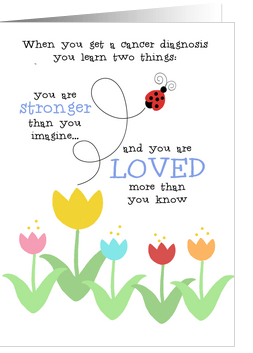 Most of us have been touched by cancer in one way or another. Through our experiences, we’ve learned about hope, strength, courage and love. Here are the entries in our special Blog Carnival: THE BIG C in honor of National Breast Cancer Awareness Month. Please visit the participants, and leave a comment to let them know how much you appreciate each and every one.
Participants, please share this list on your blogs.
Candace Hardy is the winner of our contest – congratulations, Candace!
_________________________
Pets and Wildlife Cancer
“One area of cancer research we do not often hear about, cancer in pets and wildlife, which is also on the rise…”
Blessing Art Cards, Sharon Fernleaf
Breast Cancer Awareness and Pink Ribbon Cards & Gifts
“Believe in the power of the pink ribbon…”
TANITU, Creative Paradise
Breast Cancer Awareness Month
“I cannot remember a time when when there wasn’t a dear friend or family member battling cancer…”
Cards from the Heart, Lisa Charlton
October is National Breast Cancer Awareness Month
“My mother had breast cancer as well as lung cancer…”
Eliz Designs, Elizabeth Eells
Ways to be Supportive, Helpful and Encouraging for Cancer Patients
“This post is in honor of our friends, colleagues and family members who are currently battling this dreadful disease…”
Heart to Art, Sri Devi
Breast Cancer Awareness
“There are several things you should look for when doing a self exam…”
Sheryl Kasper Card Store, Sheryl Kasper
Barbara’s Story
“Since October is Breast Cancer Awareness Month and Barbara has battled breast cancer since 1997, what better time to tell Barbara’s story?”
Rycky Creations, Robin Chaffin
Breast Cancer Awareness Month
“Most advanced breast cancer cases are found in women over age 50…”
Janet Lee Designs, Janet Palaggi
Cancer Bummer
“I was diagnosed with cancer about 12 years ago.”
I Love Cuttables, Cindy Johns
October, Breast Cancer Awareness Month
“Cancer is cruel, cancer makes no exceptions…”
At Sparky’s, Antoinette Van Kleef
Canine & Feline Cancer
“I’ve seen much too much cancer in the lives of my beloved pets over the years…”
Salon of Art, Doreen Erhardt
A Sobering Subject
“I think, today, how cancer has impacted my life…”
Warm Traditions, Candace J. Hardy
Share this:

Design Spotlight: Sandra Rose Designs

Today, during our special tribute to National Breast Cancer Awareness month, we’ve got the Design Spotlight on Sandra Hess of Sandra Rose Designs – beautiful card, beautiful sentiment. Thank you, Sandra!
_________________________
 My mother was diagnosed with breast cancer about 20 years ago, before this type of cancer was illuminated so much, and supported by society. I think that anyone who suffers either physical or emotional pain has the opportunity to grow stronger as a result. My mother underwent a double radical mastectomy. The support, love and encouagement helped her over this difficult time, and I saw a beautiful strength and zest for life arise.
I made this card to help and support others going through a difficult time. The butterfly image can remind them of the depth of the beauty and strength they can experience. Cards aee important and gentle reminders that we are not alone in our pain.
Share this:

Design Spotlight: Tammy Moody

Continuing our honoring of National Breast Cancer Awareness Month, we’re shining our Design Spotlight on artist Tammy Moody, and her poignant story as well as her sweet greeting card for cancer patients. Thanks, Tammy, for sharing your experiences.
P.S. Don’t forget, tomorrow’s the deadline for our Blog Carnival: THE BIG C. Get your submission in!
_________________________
 The card was actually the product of one of three different sketches I put together for a breast cancer fundraiser our DAWG Group (Designing Artists Women’s Group)- an Ebay art group- was having at the time.
We put together a handmade, quilted wall hanging, and auctioned it off on Ebay to raise funds for the Susan G. Koman Foundation. I pieced the wall hanging together myself, and put it up for auction. About two dozen women artists helped with the project.
Anyhow, while the design was not the final design I chose to use, I put my sketch in Photoshop, and made a digital creation, and used it for several cards. I wanted the card to appeal to many people, so I went with a girl next door approach – so she would look like someone we might all have a girl-talk with.
Everyplace I go I hear about someone new who has cancer. If a family doesn’t have a person with cancer, it is surprising in today’s world. In my own personal world, I have an Aunt who had breast cancer twice – she is a true survivor.
When my Mom was diagnosed with lung cancer, my Aunt called me on the phone at home, and had a long girl-talk with me. She was the person who told me, “cancer is just a word, honey, and don’t let your Mom give up because she can beat this thing if she tries.”
My Mom ended up having a lung removed in 2008. She took four chemo treatments to make sure all of the cells were gone, and she is still surviving today. My Aunt’s words of wisdom gave us all hope, which was very important at the time. She was like a guardian angel helping us through a very troublesome and difficult time, and she was not well herself. I never realized how strong my Aunt was until then- she was definitely an inspiration to us all.
My Dad did not have the same turn out, however. He fought a five year battle with colon and abdominal cancer, and we lost him in February of this year.
Eventually, I will add more cards on the subject. I have not been in much of a creative mood after losing my Dad, but am jotting ideas down and sketching. It has been an emotional and heartbreaking year. But I will eventually get back into the swing of things.
I can say that any inspiration GCU artists can give or create on the subject will be more meaningful than they could ever imagine to the person on the receiving end. These cards are inspiration, they are touching, they give hope so people can endure. The cancer cards may not take away the cancer, but their thoughtful sentiment help us all make it through. I am hoping GCU will do boxed sets of these kinds of cards for people to buy because they are still relatively new, and so many people would benefit from them.
I would like to have a GCU fundraiser someday, and have artists donate a design and sell cards to raise funds again for the Susan G. Koman Foundation because it is a very worthwhile and rewarding experience. And it is just one more way GCU artists can use their talents and skills to help touch lives and change the world.
Share this:

Dash of Inspiration – October 10, 2011
Note: Don’t forget about our Blog Carnival V: the Big C – October is National Breast Cancer Awareness Month. Get all the details in this post. Deadline is October 12th, so get your submission in!
_________________________
A Dash of Inspiration, A Cup of Creativity by Doreen
Creative Blocks

Most creative people experience creative block once in awhile and though some push through it with ease, others dwell on the lack of creativity so much, they further barricade their imagination behind invisible walls making it even more difficult to let those creative juices flow again.
We all handle it differently, and different things trigger these lapses of imagination causing severe frustration. For me, the only time it happens is when I have major distractions in my life – you see I’m a Capricorn and we’re worriers, so if there is something in my life to worry about, you can bet that’s where my energy will focus.
What always works for me to break out of this mind-set is to learn how to create using tools that are foreign to me. I find that the focus of trying to learn a new creative process is so strong that my mind moves forward, and soon I’m having so much fun that the ideas are flowing faster than I can create them!
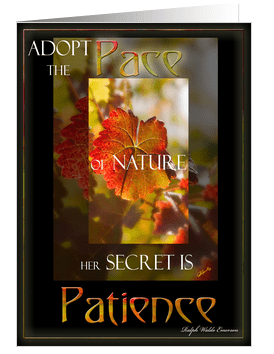
So this week I bring you two interesting articles about overcoming creative block, and a few fun techniques and/or tools to go play with! Remember how much fun it was to just go outside and play? Do that once in awhile in your world of creation, and you will not only overcome artist block, but you’ll grow as an artist and improve your offerings!
5 Surprising Causes of Creative Block and How to Overcome Them
25 strategies for Overcoming Creative Block directly from Creative People
25 FREE Download Design Programs from CreativeNerds
Halloween Photo Tricks for Photographers
Go prepare to take some wonderful greeting card photographs for next year’s cards!
Demonstrations & Tutorials on Different Painting Techniques, Methods and Skills
Well . . . what are you still doing here? Go play in the sandbox!
Share this:

Critique Clinic – October 7-9, 2011

How does it work? For three days a week (Friday-Sunday midnight), I will open the clinic to any artist who wants an honest peer review and critique of a card which gets plenty of clicks but no sales, so something’s probably not quite right, or you’ve got a new design you want to test drive, or you’re unsure about the marketability of a card. Or perhaps you’re a newbie who isn’t sure if a recently submitted card is up to a marketable standard. Anyone is welcome to participate. In fact, I encourage everyone to at least look at the cards in question and read the critique comments – you may learn something. The purpose of the clinic is to help artists improve the commercial appeal and marketability of their cards.
THE RULES
- ONE card per artist only.
- Card must be for sale at Greeting Card Universe.
- We will take an unlimited number of artists, including those who have submitted recently, HOWEVER I reserve the right to close a clinic for the day if the submissions become overwhelming. If the clinic has been closed, and you submit a card, your comment will be deleted.
- To submit a card for critique, post a link to the card at GCU in the comments section of this clinic post.
- Any artist is free to comment and/or give a critique of a submitted card. HOWEVER, post-and-run comments like “great card” or “you suck” will not be tolerated, nor will abuse. Criticism should be constructive, not destructive. Play nice or you will be banned.
- I also won’t tolerate temper tantrums if you decide your “artistic integrity” is being stepped on because you asked for a critique, and someone told you the photo you’re using isn’t in focus. If you can’t take honest criticism, don’t submit. Once gets you a warning; twice and you’re banned from submitting in the future.
- Artists who critique may do so by giving their opinion, posting an example of another card, or pointing the submitter to a video, on-line article, or other helpful suggestion.
- Don’t forget that artists who are giving you tips and helpful advice are volunteering their time and trouble. Be nice. A link back to their store on your website or blog is appreciated (but not mandatory).
- You are free not to take any advice offered. There’s no guarantee any card will be a bestseller, so don’t come into the clinic with unrealistic expectations.
- Rules may change as we go along and we see how things turn out, okay?
So without any further ado, I declare this week’s Critique Clinic open!
Share this:

GCU Community Newsletter #18 – October 6, 2011

Rain, rain, go away, come again some other day…
We’ve been busy since the last newsletter, so let’s not waste any time!
Doreen Erhardt’s column, A Dash of Inspiration – a Cup of Creativity gave us fantastic resources for Chinese New Year and the upcoming Holidays like Valentine’s Day. We had a wonderful interview with artist Ross Peterson; we began our Blog Carnival V: THE BIG C in honor of National Breast Cancer Awareness Month; and our Design Spotlight shone on me, Corrie Kuipers, and Nan Wright with greeting cards for cancer patients,which we’ll be continuing throughout the month. We also chose a winner (Pam J Arts) for our first Design Contest.
Until next time, don’t forget to pass the love around!

_________________________
INSIDE VERSE: THE THREE P’s
I’ve noticed some of the new artists joining GCU aren’t including inside verse in their cards, and thought it was time for a refresher.
Yes, we’ve had this debate before – in the U.S., consumers seem to prefer greeting cards with inside verse. In the UK, according to some UK artists, blank cards seem to be preferred. Since GCU has a 3x use policy, it’s not a problem to include both versions of a card. Today we’re focusing on greeting card verse.
There are three types of inside verse, the three P’s: punchline, prose and poetry.
I think punchline is pretty self explanatory – you set up the joke on the front of the card, and you deliver the punchline on the inside. Here’s a good example, if I do say so myself…
 The inside verse reads: So eat a whole cake, and a whole gallon of ice cream, and have yourself a happy birthday! (Corrie Kuipers)
Do not attempt to make a joke in a greeting card that isn’t immediately funny, and easily understandable. If at first hearing the concept doesn’t get a chuckle, you’ve gone wrong. Show the concept to several people and ask for an honest opinion. Include a child if possible, especially if the intended recipient is a kid, too. Of course, sense of humor can vary from one person to another, but even the most sober minded person can tell you if they think someone else would find it funny.
Prose means a message in ordinary writing. Here’s a good example:
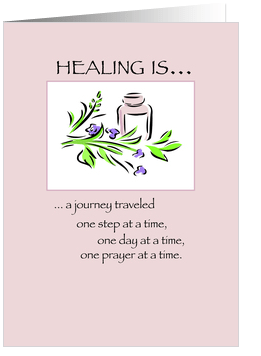 The inside verse reads: May your breast cancer journey bring you completely cancer free and healthy in mind, body and spirit. I am here for you. (Sandra Rose Designs)
Don’t be too long winded. Make your point succinctly. Be sure your prose matches the purpose and tone of your card, and be equally certain the intended audience will not be offended, baffled or bored. Again, solicit opinions.
Finally, there’s poetry. Here’s a good example:
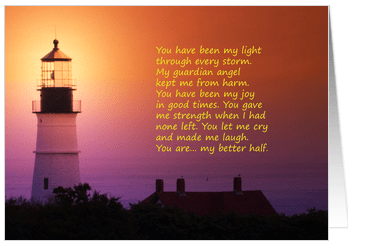
The inside verse reads: And… you are a great father to our children. Thank you for all of it, and Happy Father’s Day, my darling husband. (Card Art From the Heart)
This is going to be a matter of personal preference, both for artists and shoppers. Some artists use rhymed, metered poetry (and you’ll see this sometimes at Hallmark or American Greetings, but other greeting card companies don’t want rhymes) but if you go that route, you need to be careful. A forced rhyme, or a rhyme that’s awkwardly constructed is not appealing. Such as, “I’m sending you my love today, with which you may be warm all day.” Read your poem aloud. Does it sound good? Does it flow naturally? The example I just gave would sound better rephrased like “Sending love your way to keep you warm all day.”
In general, keep your inside verse relevant. Try to tie it into the design on the front of the card. There’s nothing more nonsensical than a photograph of a duck with ‘Happy Birthday’ on the front, and an inside text that reads, “hope you have a great day.” You’re limiting your potential audience to people who like ducks so much, they’re willing to pay money for your photo. On the other hand, if you tie the verse to the photo, you’re expanding your audience to include people who have a sense of humor, such as “hope you don’t go completely quackers!”
And don’t forget to include a good description of the card in your Artist’s Notes! I’m already seeing the benefit. Are you?
_________________________
 BLOG CARNIVAL V: THE BIG C
The deadline is approaching!
October 12th ends our current Blog Carnival: THE BIG C. Since it’s National Breast Cancer Awareness Month, we’re making blog posts or Squidoo lenses on the subject of cancer. We’ve had some touching entries already. If you want to join us, read this post for all the details. I’d like to see as many artists as possible participating to help raise awareness of this disease that has touched so many lives.
_________________________
 The Critique Clinic is open every Friday, Saturday and Sunday to all GCU artists seeking peer review, advice and tips. Any artist may submit or leave a critique. All artists are encouraged to check the comment threads – you’ll learn something that may help you with your own marketability. Not sure if your inside verse is funny, makes sense, or is good enough? Not sure if your new design works? We’ll help you with that, too.
There is a GCU artists’ group on Facebook. We encourage you to join, post cards for your fellow artists to admire, share news, and have fun!
The Salon of Art Facebook fan page (by Doreen Erhardt) is a great place to go to find links to all kinds of helpful resources like tutorials, brushes, news about competitions and contests, marketing tips and a lot more. Check it out!
GCU Artist Cindy Johns is keeping a blog archive of the Design of the Day. The link to the Archive is on the right side of the page. Check it out!
DID YOU KNOW you can “like” this newsletter or any post on the GCU Community blog, or include them in your social bookmarks? Or Google +1 them! Just click the title of the post, which takes you to the permanent link page. At the bottom of the page you’ll see buttons for social sites like Facebook, Reddit, StumbleUpon, etc.
_________________________
The next Newsletter will be published on September 1, 2011
Share this:

Design Spotlight: Nan Wright

In honor of National Breast Cancer Awareness Month, I’m putting the Design Spotlight on Nan Wright of Nan’s Card Shop, and her wonderfully humorous card for cancer patients. Thanks, Nan!
P.S. – Don’t forget that Blog Carnival V: THE BIG C is still taking submissions. I want to see more artists raising awareness of cancer, a terrible disease that affects so many of our family and friends!
_________________________
 The painting I did was an inspiration from Maya Angelou’s poem: “Every woman should have a set of screw drivers, a power drill and a black lace bra!”
When you reach my age, you experience many friends who contract this beastly disease… whether breast or some other type. My sister died of colon cancer and I have lost many friends. On the other hand, I have many friends who are winning the battle.
The message on the inside of this particular card has no author (anonymous), but it says it how it really is and should be. It has given strength and hope to many of my friends who have wanted to ‘just give up the battle against this “beast.”
Share this:

Design Spotlight: Corrie Kuipers

Hope y’all don’t mind – in honor of National Breast Cancer Awareness Month, I thought I’d turn the Design Spotlight on CorrieWeb. Here we go!
(P.S. – On her Hope for Cancer blog today, Rycky Creations is hosting an interview with GCU artist Barbara Schreiber about her battle with breast cancer. Don’t forget to stop by and read this incredible story.
_________________________
 Cancer sucks.
I’m very aware that cancer runs in my family: my grandmother, my mother, my father, and my brother all died of cancer.
When I was six years old (1967), I watched my grandmother die a slow, agonizing death from breast cancer. In those days, cancer was a death sentence. Treatment was brutal – mastectomy and radiation, but not as refined as these days. Had doctors detected her cancer earlier… but in those days, by the time they found her cancer, it had already spread. She died at the age of 67. Today, she’d have had a better chance at survival.
My father, a heavy smoker, was diagnosed with bladder cancer at age 61 (in the 1980s). His cancer was so aggressive, his bladder was removed, and even a heavy dose of radiation couldn’t kill it all. It spread to his colon. He ended up with two colostomy bags, but no remission. He died at age 63. I felt so helpless watching his pain every day, knowing I could do nothing to help him. In this country, he got to take Tylenol – no other pain relief was available.
In 2003, after the holidays, my mother began complaining about having vague pains, a general “not good” feeling. The doctor did some tests. They found something on her pancreas, but it wasn’t clear. More tests at a different hospital said she had an enlarged vein on her pancreas with a weakness that leaked blood, but nothing serious. She wasn’t told she had a cancerous tumor on her pancreas. She received pain killers, they sent her home, and she kept living her life as normal until the morning my sister went over to her apartment, and found her collapsed, unconscious. She was taken to hospital, but nothing could be done. An operation revealed her body was riddled with cancer. She died that night.
My brother Flip got cancer for the second time in 2008. He had previously had cancer in his kidney about five years after my father died. Then, we all urged him to go. and have himself checked out since he didn’t feel good. and had lost a dramatic amount of weight. It turned out to be a tumor in his kidney. They removed the kidney, but no other treatment was necessary since the cancer hadn’t spread.
He continued regular check-ups, and remained healthy until 2008, when one of his check-ups revealed small tumors in his lymph nodes and other places like his intestines, liver, etc. He ultimately died of liver cancer at age 63 after aggressive chemotherapy, and all the modern treatments available. With Flip, I could clearly chart his progress, and witnessed the strange, often devastating effects of chemo on his body.
My niece is currently battling breast cancer. I hope she succeeds. For now, it looks good.
Cancer runs like a red thread through the history of my family, popping up every decade or so to take someone beloved away from us. The cause of finding a cure is very close to me.
When my partner Nene suggested we create greeting cards to support cancer patients, I was all for it.
I wish everyone fighting cancer lots of strength, lots of hope, my warmest wishes, and plenty of encouragement.
Share this:

Dash of Inspiration – October 3, 2011
Note: Don’t forget about our newest Blog Carnival V: the Big C – October is National Breast Cancer Awareness Month. Get all the details in this post.
_________________________
A Dash of Inspiration, A Cup of Creativity by Doreen
Have a Heart!
Along with the Holiday Season, one of the largest selling greeting card occasions is Valentine’s Day, and this day of love is what we should be focusing our design efforts on for the month of October. So I pulled together some goodies for Photoshop, PSP, Elements & GIMP users so there is a little treat for just about everyone to help inspire new designs for the upcoming season of love!
It’s always fun and inspiring for me to find out something I didn’t know (or didn’t remember) about an occasion of which I’ve not only celebrated for many years, but have created designs for year after year. It’s a good way to trigger ideas with a new perspective. This Valentine’s Day Around the World site has lots of fun details which might get your creativity pumping!
Roses are one of most endeared icons of love, especially on Valentine’s Day. For the photographer, also one of the most photographed flowers in the world. The challenge for the photographer is to find a way to capture and represent the beauty of roses that will stand apart rest. Enjoy these Beautiful Examples of Rose Photography.
Roses & Chocolate, Cupid & Hearts – these are things we think of on this special occasion. Here are some goodies for your artist toolbox . . . I hope you enjoy them!
Photoshop Users:
12 Hi-Res Valentine’s Brushes by Anton J. Rozairo at deviantART
GIMP Users:
Love Potion Brush Set by MarmiteMamie at deviantART
Paint Shop Pro Users:
Arranged with Love Brushes by Pange at deviantART
Photoshop Elements 2+ Users:
Hearts II Photoshop Brushes by RedHeadStock at deviantART
Font:
Quill – Free – Commercial Use Script Font
Happy creating!

Share this:

Critique Clinic – September 30-October 2, 2011
How does it work? For three days a week (Friday-Sunday midnight), I will open the clinic to any artist who wants an honest peer review and critique of a card which gets plenty of clicks but no sales, so something’s probably not quite right, or you’ve got a new design you want to test drive, or you’re unsure about the marketability of a card. Or perhaps you’re a newbie who isn’t sure if a recently submitted card is up to a marketable standard. Anyone is welcome to participate. In fact, I encourage everyone to at least look at the cards in question and read the critique comments – you may learn something. The purpose of the clinic is to help artists improve the commercial appeal and marketability of their cards.
THE RULES
- ONE card per artist only.
- Card must be for sale at Greeting Card Universe.
- We will take an unlimited number of artists, including those who have submitted recently, HOWEVER I reserve the right to close a clinic for the day if the submissions become overwhelming. If the clinic has been closed, and you submit a card, your comment will be deleted.
- To submit a card for critique, post a link to the card at GCU in the comments section of this clinic post.
- Any artist is free to comment and/or give a critique of a submitted card. HOWEVER, post-and-run comments like “great card” or “you suck” will not be tolerated, nor will abuse. Criticism should be constructive, not destructive. Play nice or you will be banned.
- I also won’t tolerate temper tantrums if you decide your “artistic integrity” is being stepped on because you asked for a critique, and someone told you the photo you’re using isn’t in focus. If you can’t take honest criticism, don’t submit. Once gets you a warning; twice and you’re banned from submitting in the future.
- Artists who critique may do so by giving their opinion, posting an example of another card, or pointing the submitter to a video, on-line article, or other helpful suggestion.
- Don’t forget that artists who are giving you tips and helpful advice are volunteering their time and trouble. Be nice. A link back to their store on your website or blog is appreciated (but not mandatory).
- You are free not to take any advice offered. There’s no guarantee any card will be a bestseller, so don’t come into the clinic with unrealistic expectations.
- Rules may change as we go along and we see how things turn out, okay?
So without any further ado, I declare this week’s Critique Clinic open!


