Nuts and Bolts: Design of the Day

I’ll bet at least some of you are wondering, “How the heck do I win the Design of the Day award?” Well, I figured you might be, so I asked, and here’s the scoop.
The exact step-by-step process of how a card is chosen to win the Design of the Day remains a mystery (in much the same way as reviewers’ real identities are protected). However, there are some eligibility guidelines.
- For technical reasons, at this time only portrait (5×7) cards are eligible (I totally understand this one – I measured the available space, and a landscape card wouldn’t fit).
- Only those cards recently approved and in the New Cards section are eligible.
- Eligible cards are top notch in their design with excellent composition, high marketability, and commercial appeal. Whether photography or illustration based, an eligible card must show a high degree of professionalism in all areas, and both design and verse should be relevant to the chosen category.
- To reflect the fact that Greeting Card Universe’s success is due to its selection of highly unique greeting cards for every imaginable occasion and purposes, only cards designed for a specific purpose and containing a relevant inside verse are eligible. “Blank note cards” and all occasion cards are not considered.
- An effort is made not to choose the same artist twice in the same month.
How do you know if you’ve won the Design of the Day? You’ll receive a notification via your GCU store through the Contact This Artist link (and every one of you should have that module ON in your store for obvious reasons). I saw the other day that Team GCU has also recently started adding a five star review to winning cards, so watch for that as well.
What can you do to promote the Design of the Day? If you’ve won, you’ve got bragging rights, so go for it! Especially spread the word on your social media sites like Facebook and Twitter, and/or on your blog and/or website.
And here’s an idea: I’ve yet to see some clever, clever artist take advantage of the Sell This Card tool, and make a blog or webpage specifically to profit from the Design of the Day. Daily post or weekly round-up, you could clean up.
Now here’s a special hint: Not too long in the future, artists who are chosen for the Design of the Day may win more than bragging rights. I hear the whole community can get involved. Shhhh! You didn’t hear it from me!
Share this:

Rainbow Connection: Hanukkah

Hanukkah, Chanukkah, Hanukah, Chanukah… no matter how you spell it, in the Jewish calendar, the Festival of Lights is a very important 8-day holiday. Symbols of Hanukkah include the dreidel, the menorah (a nine-armed hannukiyah), and a dove symbolizing peace, and the primary colors of Hanukkah are blue, white, and gold. Here’s a beautiful Hanukkah palette for you to use while you’re designing (and don’t forget about Photo Cards!). Pair these colors with white, and you’re ready to celebrate. Enjoy!

Warm Apricot – FFB552

Dresden Blue – 2B8FCD

Directoire Blue – 1B6EA4

Majolica Blue – 12415F
Share this:

News: September 12, 2011

Another week, another Monday…
For some artists, Greeting Card Universe will not load. GCU Admin is aware of the problem and working to fix it, although it may be out of their control. For this reason, we won’t have a Dash of Inspiration for you from Doreen today.
There’s a thread running on the GCU Artists’ Facebook group if you’re looking for information. Also check out the GCU Forum, specifically this thread. Please don’t post about problems here. It’s not that I don’t care, but Admin may not see it. You’re better off sticking with the Forum or FB (which is monitored by Shaun).
Ah, well. I guess you could use the time to design more cards. Or write a blog post or Squidoo lens and join our latest Blog Carnival. You could win a prize worth $25.
Hoping for better things tomorrow!
Share this:

Critique Clinic – September 9-11, 2011

How does it work? For three days a week (Friday-Sunday midnight), I will open the clinic to any artist who wants an honest peer review and critique of a card which gets plenty of clicks but no sales, so something’s probably not quite right, or you’ve got a new design you want to test drive, or you’re unsure about the marketability of a card. Or perhaps you’re a newbie who isn’t sure if a recently submitted card is up to a marketable standard. Anyone is welcome to participate. In fact, I encourage everyone to at least look at the cards in question and read the critique comments – you may learn something. The purpose of the clinic is to help artists improve the commercial appeal and marketability of their cards.
THE RULES
- ONE card per artist only.
- Card must be for sale at Greeting Card Universe.
- We will take an unlimited number of artists, including those who have submitted recently, HOWEVER I reserve the right to close a clinic for the day if the submissions become overwhelming. If the clinic has been closed, and you submit a card, your comment will be deleted.
- To submit a card for critique, post a link to the card’s details page at GCU in the comments section of this clinic post.
- Any artist is free to comment and/or give a critique of a submitted card. HOWEVER, post-and-run comments like “great card” or “you suck” will not be tolerated, nor will abuse. Criticism should be constructive, not destructive. Play nice or you will be banned.
- I also won’t tolerate temper tantrums if you decide your “artistic integrity” is being stepped on because you asked for a critique, and someone told you the photo you’re using isn’t in focus. If you can’t take honest criticism, don’t submit. Once gets you a warning; twice and you’re banned from submitting in the future.
- Artists who critique may do so by giving their opinion, posting an example of another card, or pointing the submitter to a video, on-line article, or other helpful suggestion.
- Don’t forget that artists who are giving you tips and helpful advice are volunteering their time and trouble. Be nice. A link back to their store on your website or blog is appreciated (but not mandatory).
- You are free not to take any advice offered. There’s no guarantee any card will be a bestseller, so don’t come into the clinic with unrealistic expectations.
- Rules may change as we go along and we see how things turn out, okay?
So without any further ado, I declare this week’s Critique Clinic open!
Share this:

Nuts and Bolts: Photo Cards

So GCU has finally gone live with Photo Cards that can be personalized by customers – hallelujah! We’ve all been waiting for this day with eager anticipation, and many artists have already begun to fill up those Photo Card categories.
In past Community Newsletters, I’ve given you Designer’s Tips for Creating Photo Cards and Top Five Tips for Designing Photo Cards. Mindy (GCU Administrator) gave some important Guidelines in the Forum. Today, we’re going to talk about how to design Photo Cards that will grab shoppers’ attention, and how to fix a so-so card to turn it into selling gold.
All of the “Before” card examples were actually acceptable by GCU’s standards – yep, I checked. However, from a commercial standpoint, they weren’t so great. With some tweaking, however, the bar was raised, as was the appeal. I expect card designs like the “After” examples will do well.
Le’s get into it, shall we? Take a look at this first example:
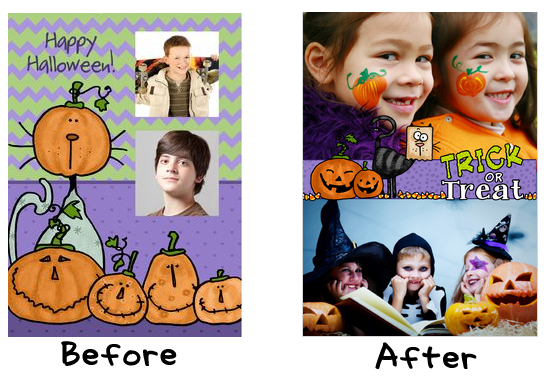
In the Before image, you’ll see the design itself is okay…if it was just a normal Halloween card. As a Halloween Photo Card, it doesn’t really work. Why? Because it looks like exactly what it is: an existing card with a couple of tiny photos shoehorned on it. And it looks unfinished because the photo boxes don’t have a border around them. The emphasis has been placed on the design elements rather than the shopper’s photographs. In the After image, you see the emphasis has been shifted so the photos take center place with design elements interacting slightly with the photos – a very cutting edge composition. Will it be successful? Well, we sold one shortly after the Photo Cards went public, so I’d say “yes!”
Moving on to example number two…
 In the Before image, again the emphasis has been put on the design element – in this case, the skeleton – with the photo area negligible, apparently almost an afterthought. You can see where I was going with the idea, but the execution was lacking. Now look at the “After” image. Although the actual photo area isn’t that much bigger than before, by giving it a somewhat irregular frame that picks up the color on the new front of card text, and allowing the skeleton to interact with the photo, the composition is very much improved. Now the visual joke works so much better!
And the last example…
 The idea of having a giant black, hairy, scary spider menacing the person in the photo is pretty good, however in the “Before” image, it doesn’t have a lot of impact. The photo area is too small, and there’s no border to define the area and give it a crisp edge. In the “After” image, I haven’t changed the photo area’s position, but I’ve enlarged it and made it into a circle, and given it a defining border. Voila! The idea in this new translation suits much better, and I’ve allowed the spider to interact more with the photo to give it even more oomph.
So there you have it – three Before and After greeting card examples of Photo Card design mistakes and how to fix them. I tend to learn best with visual information, so I hope this article will help point you towards making successful designs.
Share this:

Artist Interview: Denise Beverly

Today we’re interviewing Denise Beverly of DB Visual Arts, who joined GCU in 2007. Thanks, Denise!
_________________________
Denise, what drew you to join GCU?
 After joining several microstock sites I began to question how my images were being used. I had always loved greeting cards, and could spend an inordinate amount of time just looking at different ones. I began to look for a way to make my own greeting cards with my own images, especially Scripture cards, and happened upon GCU.
Tell us who you are, where you are, and what you do.
I am a stay at home mom of one son. My husband is a Pharmacist. They are both quite geeky and handy to have around for computer issues. We live in the beautiful mountains of East Tennessee/ Southwest Virginia. I spend too much time on the computer wandering around the internet and designing.

What’s your favorite greeting card on GCU that you’ve created?
My favorite card so far, I believe, is the Christmas Pregnancy announcement. This card has been quite popular and I have updated it for the 4th year. I think about the parents-to-be sending it out and surprising family and friends with the news. My favorite themes are the Scripture cards and the Victorian Ladies collection.
Where else can we find you on-line?
What I do when I should be doing housework:’
DB Visual Arts – photography and digital art
Morning Glory Memories – vintage, retro, Victorian and Deco cards and gifts, all properly licensed
Encourage One Another – Scripture and inspirational cards and gift items
The Image Preservationist – Cards, postage, vintage images, all properly licensed
All about the Wedding – wedding cards and accessories
Facebook page for my online stores
And the microstock agencies Dreamstime, Bigstock and Shutterstock.
What would people be surprised to learn about you?
I know my way around tools of all kinds and I am not afraid to use them. I have replaced and repaired everything from the water pump on my car to installing a dishwasher in my kitchen. I thoroughly love working with my hands, for example refinishing furniture. My computer table is my great-grandfathers library table I refinished 25 years ago.
How did you become an artist?
It has been a lifelong desire, nearly destroyed by an art teacher who told me I didn’t have one whit of talent. I have a deep need to create and feel suffocated when I am not able to do something every day. My dad gave me a love for photography and was my biggest supporter.
What or who inspires you?
I am inspired by everything from the tiniest insect to the night sky, the wonder of God’s creation, and family and friends who believe in me.
What motivates you to design greeting cards?
My spiritual gift is exhortation or encouragement. I see cards as a way to reach out and encourage people I will never meet. Parakaleo is a Greek word that means to come along side and comfort, encourage or cheer. that is what I hope my cards can do.
What’s the most indispensable item you use to create your work?
Computer
What tools do you use to create your work?
Camera and Photoshop most often and I am learning to use my Wacom tablet.
What do you do to promote your greeting cards on GCU?
Facebook, twitter, blog, word of mouth, emails, I have tried Squidoo but have not enjoyed that process very much. though I know it is quite effective for those who do. I have to admit to being lazy when it comes to promotion. However, I did just make my 2000th sale on GCU.
Is there a tip about GCU or promoting your GCU designs you’d like to share with other artists?
As Scripture says, do not grow weary in well doing. Hang in there, just keep submitting and learn from other artists, what works and what doesn’t.
Name three other GCU artists whose work inspires you or that you admire.
There are so many, but, I still follow my first “buddies”. Liz Van Steenburgh of Starstock Greetings , Teri Francis of Squirrel Hugger and Ernestine Grindal , of Ernestine’s’ Easel. I love the clean styles of Floating Lemons-Mariana Musa
Is there something you’re really proud of having done?
One afternoon I picked up a handful of my cards and headed to a store downtown. I knew the owner but had not seen him for years. He said he could not use the cards but knew who might, and took me to see the owners of another store down the street. Nervously I explained what I did and wondered if they would be interested in carrying my cards. I now have a line of cards, postcards, porcelain ornaments, and other souvenir items. Unfortunately that store has closed recently, but, 6 different store owners expressed an interest and I will begin this month in a new location in the downtown area.
If you weren’t an artist, what would you be?
I am an information hound and love to research and ferret out information. So I would probably be a person who found things that other people wanted but could not find. I am not sure what you would call it. I love matching people up with things they love.
_________________________
NOTE from Corrie: Don’t forget our Blog Carnival III: HIGH SPIRITED – it’s all about the spook, baby! Participate and you could win a prize worth $25!
Share this:

Dash of Inspiration – September 6, 2011
A Dash of Inspiration…A Cup of Creativity by Doreen
Tools and Resources for Grammar and More!

Grammar, spelling and writing in general have always come fairly easy for me; however that doesn’t mean I don’t question myself from time to time, after all grammar school was a long time ago! There are lots of tools out there that I use to check and recheck before submitting cards. The answers to nearly every question are out there and this week I thought I’d pass along some of these great resources available to you. Utilizing these tools does not mean you aren’t good at grammar and spelling, it just means you admit to yourself that many of us pick up bad habits over the years and can use a refresher course.
Let’s face it, the more effort you put into creating text without errors in grammar and spelling, the less work the reviewers have and the faster they can get our cards approved and up for sale! So, here’s to inspiring you to use the tools available to triple check your own cards and get it right the first time!
How and When to Use a Semicolon
10 Words You Need to Stop Misspelling
Five Common (too common) Grammatical Errors
Grammar Girl Quick and Dirty Tips
The Grammar Book (online endless resource)
24 Things You May be Saying Wrong
Lastly, I leave you with my favorite tool of all which I have as a shortcut on my desktop. The Thesaurus is a great tool for determining related keywords and improving your verses. I also love the fact that with this simple link, I have access to a Dictionary and Encyclopedia.

Share this:

Critique Clinic – September 2-4, 2011
How does it work? For three days a week (Friday-Sunday midnight), I will open the clinic to any artist who wants an honest peer review and critique of a card which gets plenty of clicks but no sales, so something’s probably not quite right, or you’ve got a new design you want to test drive, or you’re unsure about the marketability of a card. Or perhaps you’re a newbie who isn’t sure if a recently submitted card is up to a marketable standard. Anyone is welcome to participate. In fact, I encourage everyone to at least look at the cards in question and read the critique comments – you may learn something. The purpose of the clinic is to help artists improve the commercial appeal and marketability of their cards.
THE RULES
- ONE card per artist only.
- Card must be for sale at Greeting Card Universe.
- We will take an unlimited number of artists, including those who have submitted recently, HOWEVER I reserve the right to close a clinic for the day if the submissions become overwhelming. If the clinic has been closed, and you submit a card, your comment will be deleted.
- To submit a card for critique, post a link to the card’s details page at GCU in the comments section of this clinic post.
- Any artist is free to comment and/or give a critique of a submitted card. HOWEVER, post-and-run comments like “great card” or “you suck” will not be tolerated, nor will abuse. Criticism should be constructive, not destructive. Play nice or you will be banned.
- I also won’t tolerate temper tantrums if you decide your “artistic integrity” is being stepped on because you asked for a critique, and someone told you the photo you’re using isn’t in focus. If you can’t take honest criticism, don’t submit. Once gets you a warning; twice and you’re banned from submitting in the future.
- Artists who critique may do so by giving their opinion, posting an example of another card, or pointing the submitter to a video, on-line article, or other helpful suggestion.
- Don’t forget that artists who are giving you tips and helpful advice are volunteering their time and trouble. Be nice. A link back to their store on your website or blog is appreciated (but not mandatory).
- You are free not to take any advice offered. There’s no guarantee any card will be a bestseller, so don’t come into the clinic with unrealistic expectations.
- Rules may change as we go along and we see how things turn out, okay?
So without any further ado, I declare this week’s Critique Clinic open!
Share this:

GCU Community Newsletter #16 – September 1, 2011

It’s really getting to be autumn around here… just a hint of a nip in the air, and you can tell Nature is getting tired. I was happy to discover that we didn’t have the usual inundation of mosquitoes this summer, and now we never will!
Last week, Doreen Erhardt’s A Dash of Inspiration – a Cup of Creativity brought us links to some inspiring paintings; Jane Dykstra was in the Design Spotlight; and our boo-tee-ful Blog Carnival III: High Spirited continues. The Critique Clinic continues every weekend as usual.
Until next time, don’t forget to pass the love around!

_________________________
 Little Orphan Category
What’s an “orphan” category, you ask? It’s a category at Greeting Card Universe that contains few or no greeting cards. It’s a category that’s neglected. Unloved. Begging for attention.
And you should give those poor little orphan categories your attention. Know why? Because adopting an orphan category can lead to some very nice sales for you because you’ll have hardly any competition.
Here’s how it breaks down: in a popular category like, say, Birthday – General, you’re competing with thousands and thousands of other artists, some of them pretty heavy hitters whose cards are well established.
Looking more closely, I begin to identify orphan sub-categories in Birthday. For example, Expecting/Pregnant has only 1 card in it. For Co-Worker/Colleague, just 6 cards. You get the idea. I may be able to take advantage of my fellow artists’ lack of attention by designing cards to fit those neglected sub-categories.
It gets better, because sometimes you can find a whole CATEGORY that contains very few cards, and adopt that as your own. I did that not too long ago, and I’ve already sold a few hundred cards – and no, I’m not telling you which one 😉
Most of us design generic cards suitable for a multitude of recipients, but in addition to that, if you want to see your artist commissions go up every quarter, you should be designing cards for specific specialty categories and sub-categories…and you should also be adopting those poor, lonely orphans while you’re at it.
Sometime during the month of September, I’d like you to go through the Category list, identify, and adopt an orphan category. Make more than one card ’cause you want to OWN that category before the other artists find out how clever you are. Then you’ll be well on your way to success (and more sales)!
_________________________
 BLOG CARNIVAL III: HIGH SPIRITED
Just a reminder that it’s time for a Blog Carnival, and this time with Halloween next month, we’re blogging about ghosts! That’s right, time to tell us about a ghostly encounter you had, your favorite ghost story, a haunted house film you like, a haunted attraction you visited, the history of Ouija boards, seances and mediums, or anything to do with spooky spirits!
Just make a new blog post or Squidoo lens (or Hub page, Weebly page, or a page added to your website, I’m flexible) on the topic of ghosts. Use your imagination! And you must include links to 3 scary cards at GCU to be eligible. Once again, I’m offering a prize worth $25 – Amazon, Starbucks, or card credits, winner’s choice! AND all participants will receive a spook-tacular Community star!
You have until September 19, 2011 to leave a comment here with the URL of your blog post. On September 19, I’ll make a master list of posts, and announce the results of our random drawing for the prize winner.
So get out there, folks, and conjure up a blog post that’s to die for!
_________________________
 The Critique Clinic is open every Friday, Saturday and Sunday to all GCU artists seeking peer review, advice and tips. Any artist may submit or leave a critique. All artists are encouraged to check the comment threads – you’ll learn something that may help you with your own marketability.
There is a GCU artists’ group on Facebook? We encourage you to join, post cards for your fellow artists to admire, share news, and have fun!
The Salon of Art Facebook fan page (by Doreen Erhardt) is a great place to go to find links to all kinds of helpful resources like tutorials, brushes, news about competitions and contests, marketing tips and a lot more. Check it out!

Hidden Gems: Pets Halloween - artist Laura J. Holman
If you have a question about one of your cards being “held” for review, or if your card has been declined due to the new Marketability Standards, write to cardreview@greetingcarduniverse.com and include the PID# of the card in question.
DID YOU KNOW you can “like” this newsletter or any post on the GCU Community blog, or include them in your social bookmarks? Or Google +1 them! Just click the title of the post, which takes you to the permanent link page. At the bottom of the page you’ll see buttons for social sites like Facebook, Reddit, StumbleUpon, etc.
_________________________
The next Newsletter will be published on September 8, 2011
Share this:

Design Spotlight: Jane Dykstra

 This is one of my favorite cards because I made the blanket, hat and booties for our newest granddaughter this past March and I thought they all together would make a great card. I have only sold 5 but it has gotten a lot of clicks and because when I see it, I know my granddaughter has worn these things that I made especially for her. I started crocheting again after 35 years of not even picking it up. I learned when I was 13 and played with it until I was 15, and haven’t made anything until now when I made these for our little Claire.


 GCU Community