Critique Clinic – October 25-26, 2014

How does it work? For three days a week (Friday-Sunday midnight), I will open the clinic to any artist who wants an honest peer review and critique of a card which gets plenty of clicks but no sales, so something’s probably not quite right, or you’ve got a new design you want to test drive, or you’re unsure about the marketability of a card. Or perhaps you’re a newbie who isn’t sure if a card is up to a marketable standard. Anyone is welcome to participate. In fact, I encourage everyone to at least look at the cards in question and read the critique comments – you may learn something. The purpose of the clinic is to help artists improve the commercial appeal and marketability of their cards.
THE RULES
- ONE card per artist only.
- Card must be intended for sale at Greeting Card Universe.
- To submit a card for critique, post a link to the card at GCU in the comments section of this clinic post. Allowances will be made if you’ve had a card declined, or made a new design you’d like advice on before submission. Give us the link where we can see the card, such as your private gallery, Flickr, Tinypic, etc. If you do give a private gallery link, be sure your private module gallery is ON. Please do not post links to your Manage Cards section – do you really want strangers tinkering with your cards? And please don’t ask us to critique a card that’s pending review – we can’t see it until it’s approved.
- Any artist is free to comment and/or give a critique of a submitted card. HOWEVER, post-and-run comments like “great card” or “you suck” will not be tolerated, nor will abuse. Criticism should be constructive, not destructive. Play nice or you will be banned.
- I also won’t tolerate temper tantrums if you decide your “artistic integrity” is being stepped on because you asked for a critique, and someone told you the photo you’re using isn’t in focus. If you can’t take honest criticism, don’t submit. Once gets you a warning; twice and you’re banned from submitting in the future.
- Artists who critique may do so by giving their opinion, posting an example of another card, or pointing the submitter to a video, on-line article, or other helpful suggestion.
- Don’t forget that artists who are giving you tips and helpful advice are volunteering their time and trouble. Be nice. A link back to their store on your website or blog is appreciated (but not mandatory).
- You are free not to take any advice offered. There’s no guarantee any card will be a bestseller, so don’t come into the clinic with unrealistic expectations.
- Rules may change as we go along and we see how things turn out, okay?
So without any further ado, I declare this week’s Critique Clinic open!
Share this:

Font Frenzy: Fontacular Sale

Fonts.com is having their annual Fontacular Sale, when for a limited time, you can get deep discounts on some very fabulous fonts that would normally cost an arm and a leg. New offers will continue to be made each day for the next three days.
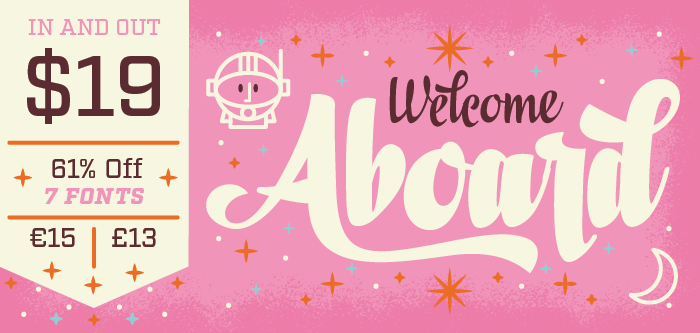
Below, you’ll see a sample of just one of the fonts available. If you’re in the market to pick up a few new fonts for your designer’s toolbox, now’s a good time to browse!
Share this:

Nuts and Bolts: Seller Commissions

What Are Seller Commissions & How Can I Earn Them?
There are a few different ways to make money on Greeting Card Universe. One is to make your own designs, upload them, do marketing and promotion, and make direct sales to consumers. The other two involve Seller Commissions, which we’ll explain below.
First, let’s be clear on a very important point: you will ONLY earn seller commissions on NEW customers. Meaning anyone who does not already have an account of any kind with GCU. If an existing GCU customer clicks one of your links and buys cards, you will not earn the additional seller commission.
By the way, since GCU Artists already receive a discount on self-purchased cards, you will not earn additional commissions by clicking your own links.
Now let’s talk about…
The GCU Card Widget
This is a piece of code you can place on your website (although it does not work in Facebook). The purpose of the widget is to drive traffic to GCU and does this by displaying cards. A potential new buyer clicks on the widget and is taken to GCU, where they can then purchase cards. For each card purchased, you will earn a flat 50-cent commission up to $25 per order. There is one other condition—see the very important point above.
You can have 1 widget at a time on a website and if the website doesn’t accept Flash, it won’t work. If you want the widget to display cards other than from your won shop, for which you will receive the exact same commission under the same rules and restrictions, you must sign up to be a Card Seller.
For more information, read the GCU Wiki entry.
Sell This Card Link
When you are logged in to your account, click the $ below each card on GCU to get a pop-up containing HTML code for text, image thumbnail, and full-sized image links that can be used on most websites, Pinterest, Facebook, etc. Most websites, including hosted sites, accept HTML code.
The advantage to using Sell This Card links is that you can pick and choose which cards you want to highlight. This allows you to create links to specific target markets and is a great way to promote your cards.
For more information, see the GCU Wiki entry.
For a great tip, see Promoting Your Cards on Pinterest.
How Does This Work?
When a shopper clicks your widget or one of your Sell This Card links, a cookie (a piece of code) is embedded in their browser. This cookie contains your unique Artist ID. For 30 days, unless the shopper clicks on a different Artist’s link, any card they purchase will earn you Seller Commission under the usual rules and restrictions.
Many of the most successful artists on GCU promote their cards this way. So be creative, do some marketing, and earn Seller Commissions while you’re doing it!
Share this:

Tips and Tricks: Cutting Background Out in Photoshop


We’ve all needed to remove an image from its background for one reason or another. Do it well, and the effect can be stunning. Get it wrong, and your design looks amateurish and just plain bad.
Spoon Graphics’ article, The Ultimate Guide to Cutting Things Out in Photoshop, contains a wealth of tips and techniques for removing the background from an image while working in Photoshop. From Quick & Dirty to Pro Tips, you’re bound to learn something.
Photoshop Elements users may find How to Remove Backgrounds in Photoshop Elements useful.
If you prefer Paintshop Pro, this Removing the Background tutorial will help.
There’s How to Erase a Background in Corel Draw (video) for those using that graphics editing software.
And finally, How to Remove a Background From an Image in Gimp.
Share this:

Dash of Inspiration: Chalkboard Goodies
A Dash of Inspiration, A Cup of Creativity by Doreen
Chalkboard Goodies

This week I ran across some fun CU Freebies that I wanted to pass on to those of you who love to create those trendy chalkboard designs and for anyone who wants to give this design style a try.
Elements for your designs:
Chalk Decorative Brushes A new set, 10 large (most around 1500px)
Typography Dividers by Roula33 at deviantART
Tutorials:
Tutorial Time: Make Your Own Chalkboard In Photoshop
Fonts:
Adhesive Nr. Seven – Rough Chalkboard Style Banner Dingbat Font
I LOVE Corrie’s Pet Sitter Thank You Photo Card – it should spark your imagination – there are few limitations to how far you can take this great design trend!

So until next week … Learn … Create … Inspire!
Share this:

Critique Clinic – October 17-19, 2014
How does it work? For three days a week (Friday-Sunday midnight), I will open the clinic to any artist who wants an honest peer review and critique of a card which gets plenty of clicks but no sales, so something’s probably not quite right, or you’ve got a new design you want to test drive, or you’re unsure about the marketability of a card. Or perhaps you’re a newbie who isn’t sure if a card is up to a marketable standard. Anyone is welcome to participate. In fact, I encourage everyone to at least look at the cards in question and read the critique comments – you may learn something. The purpose of the clinic is to help artists improve the commercial appeal and marketability of their cards.
THE RULES
- ONE card per artist only.
- Card must be intended for sale at Greeting Card Universe.
- To submit a card for critique, post a link to the card at GCU in the comments section of this clinic post. Allowances will be made if you’ve had a card declined, or made a new design you’d like advice on before submission. Give us the link where we can see the card, such as your private gallery, Flickr, Tinypic, etc. If you do give a private gallery link, be sure your private module gallery is ON. Please do not post links to your Manage Cards section – do you really want strangers tinkering with your cards? And please don’t ask us to critique a card that’s pending review – we can’t see it until it’s approved.
- Any artist is free to comment and/or give a critique of a submitted card. HOWEVER, post-and-run comments like “great card” or “you suck” will not be tolerated, nor will abuse. Criticism should be constructive, not destructive. Play nice or you will be banned.
- I also won’t tolerate temper tantrums if you decide your “artistic integrity” is being stepped on because you asked for a critique, and someone told you the photo you’re using isn’t in focus. If you can’t take honest criticism, don’t submit. Once gets you a warning; twice and you’re banned from submitting in the future.
- Artists who critique may do so by giving their opinion, posting an example of another card, or pointing the submitter to a video, on-line article, or other helpful suggestion.
- Don’t forget that artists who are giving you tips and helpful advice are volunteering their time and trouble. Be nice. A link back to their store on your website or blog is appreciated (but not mandatory).
- You are free not to take any advice offered. There’s no guarantee any card will be a bestseller, so don’t come into the clinic with unrealistic expectations.
- Rules may change as we go along and we see how things turn out, okay?
So without any further ado, I declare this week’s Critique Clinic open!
Share this:

Tips and Tricks: Identifying Fonts

Did you ever see a really cool web font on-line and wonder how you could find out the font’s name? We’ve got a few different places you can go to aid you in your search.
Whatfontis.com asks you to either upload an image with the font on it or submit the URL where the font is being used on an image, and Whatfontis will give their best educated guess. Once you know the font’s name, you can look up further details such as TOU, cost, etc.
There’s also Identifont.com which takes a more traditional route by getting you to answer questions and gathering details about the font’s appearance (serif or sans serif, etc). But you can also search for fonts by image.
WhatFont is a Chrome add-on you can download that will identify a font on a web page while you’re surfing the Internet. Fount will do something similar in Firefox, Safari, Chrome and IE8.
Finally, there are big font fan communities out there who run font identification forums, like Typophile and WhattheFont Forum. When all else fails, sometimes you need to rely on old-fashioned human knowledge.
Do you have a favorite font I.D. method? Let us know in the comments!
Share this:

Nuts and Bolts: Licensing FAQ
LICENSING – DO’s and DON’Ts
Sometimes, GCU artists are targeted by other companies wanting to license their greeting card designs. These companies might be PODs (Print on Demand) retailers like GCU or companies offering a more traditionally printed product. While it’s flattering that someone has come knocking on your door, you should keep a clear head and not allow yourself to fall into a bad deal.
Before we get started, this is our unprofessional advice taken from years of working in the art world. Should you have legal questions, consult an attorney or licensing agent.
We recommend artists educate themselves before entering into any licensing agreements. These books will help.
Licensing Art and Design: A Professional’s Guide to Licensing and Royalty Agreements by Caryn R. Leland
20 Steps to Art Licensing: How to Sell Your Designs to Card and Gift Companies by Kate Harper
Here are things you should look out for:
DO check to see how long any retail website has been live. The information is usually found at the bottom of the home page. If the site is less than a couple of years old, then this company may not have been in business very long. Many new businesses crash and burn fairly soon and only a handful will be successful. Choose carefully before you commit. Your time is too valuable to waste.
DON’T be afraid to ask questions. There is nothing wrong with getting more information and the more informed you are, the better the choice you can make. You want to be sure your designs and the company’s customer base mesh, otherwise you’re both wasting your time. The more common questions are:
- Payment: How is the company paying you? Do you get a flat fee or do they pay royalties based on product sales? If so, how much? Is any advance being paid? When can you expect to be paid? Is the fee negotiable?
- Terms: Is the license transferable? Is it exclusive (meaning, you can’t license that same design to anyone else.)
- Marketing/Sales: Does the company advertise? Attend trade shows? How will customers find your art? What are the company’s sales projection estimates?
- General: Who are the company’s customers? What style of art is the company looking for? What other artists does the company work with? How will the company protect your copyrighted material? Who retains the copyright to the work?
DO have any licensing contract checked by an attorney or licensing agent. Unless you or someone you know is an expert, get a lawyer to go over the contract and make sure there aren’t any hidden pitfalls. A little expense now could save you years of frustration in the future.
Do read this helpful article from the Graphics Artist’s Guild—License It—which contains some excellent information as well as helpful definitions of common legal terms used in licensing.
Just remember, never enter into any legal agreement without full knowledge of the terms being offered and ensure your rights and responsibilities are spelled out clearly.
Share this:

Tips and Tricks: Photoshop Actions

Photoshop Actions are procedures that have been pre-recoded, so to speak, that allow you to perform specific graphics editing tasks automatically. Giving photos a retro look, for example, or doing text effects without having to follow a tutorial.
If you’ve never worked with Photoshop Actions before, you might want to take a look at this article: How to Install and Use Photoshop Actions. Some actions can also be used in Photoshop Elements. Just remember, if you want to use Actions when making greeting card designs, choose the desired results that will conform to the GCU Submission Guidelines.
If you’ve upgraded your version of Photoshop, you can save actions to your new computer or Photoshop (video tutorial).
Here are some lists of fun, free Photoshop Actions. Have fun!
The Coffee Shop Blog – Photoshop/PSE Actions
Vandelay Designs: 45 Amazing and Free Photoshop Actions
There are lots of other sites offering Photoshop Actions for sale and for free. Have a look around for more.
Share this:

Dash of Inspiration: Text Style Tutorials
A Dash of Inspiration, A Cup of Creativity by Doreen
Text Style Tutorials
Though all ‘effects’ on text can quickly become excessive and gaudy, there are times when a hint of something different and unexpected is just the right touch to make your design pop. Here are some fun tutorials to give your designs a bit of an edge.
For a nice variation when creating chalkboard typography, this tutorial offers great tips on creating an outline-sketch effect.
Outline Sketch Text Effect Tutorial
This Tinsel Text Tut is great fun when used with care to not over-do your design.
This knit effect would be great for Christmas stockings as well as some of those cards for Dad.
For those of you who don’t want to do all the work yourself to create the text effect, grab one or all of these template sets which are ready for you to type your message.
Text Effects Packs – Check out the various sets and choose what you like.
What are a few fun text tutorials without a new font or two?
Nexa Rust is brand new at FontSquirrel and the purchased pack has 83 styles, but they offer a FREE CU pack of five from this big font family, so check it out.

So until next week … Learn … Create … Inspire!


