Design Spotlight: Angela Jolliffe

Our Design Spotlight falls today on new GCU artist Angela Joliffe who joined in March 2014 − her style is very cute!
_________________________

I am an illustrator based in Norwich, England.
I began my self-employed journey through various types of commercial commissions, craft markets and framed exhibitions. I have illustrated children’s picture books, board books and Children’s Bibles, greetings cards, magazines, calendars, and for the internet.
I enjoy creating characters for illustrated stories. Children’s books being my main passion. I also have had the privilege of creating crazy painted books with very young image makers in schools.
I love to illustrate greetings cards. They have so much potential for images to convey so many ideas in so many different circumstances. I have selected this card, “A wonderful Friend”, as I am so grateful for all the friends in my life. My hope is that friends on receiving this would feel very special, valued and celebrated.
This card style is a simple style with an outline. You can see variations of my illustration style if you visit my website.
I often use rich bright colors in my work, aiming to make my illustrations fun, to delight people and make them smile. My work is hand rendered, often using water-soluble crayons and other suitable Materials. Illustrations for cards may then be scanned and sometimes added to, to create further unique variations.
I am looking forward to adding further designs.
Share this:

Nuts and Bolts: Creating a Second Store

Some GCU artists adopt various different styles in their designs and want to keep Design Style A in a separate store from Design Style B rather than use the Sub-Galleries feature found under Manage Store > Images & Cards > Configure Sub-Galleries. So for those who want to open a second store, here’s are the answers to your frequently asked questions.
Can I Create a Second Store?
Yes, you can! As many as you like. But be prepared to jump through a few small hoops. More on the process below.
What Do I Need to Create a Second Store?
You will need a different e-mail address than the one you used to create your original account. Use this different e-mail address to create your new store with a new log-in. NOTE – if you intend to combine your stores’ earnings into a single payment, you MUST have the payment method the same on all your accounts.
Can I Integrate Earnings On Both Stores?
Yes, you can. Before the end of a payment quarter, send an e-mail to Support@ GreetingCardUniverse.com with the subject: Combine Store Earnings Request and include both your store ID#, NOT your Artist ID. One way to find your Store ID# – when you’re logged in, go to your storefront and click on your Private Gallery link. Check the end of the URL for your Store ID. Here’s an example of what you’ll see – http://www.greetingcarduniverse.com/community/store.asp?private=true&store_id=174
What About the Quarterly Threshold?
Here’s what Mindy (a GCU administrator) has to say:
Earnings from combined stores will be used to MEET the threshold, however the earnings from an individual store with less than the set Minimum Payment will not be paid and will not be calculated as premium earnings.
How Does That Work?
Again, we refer to Mindy:
Here is an example on how combined store earnings will work:
- 2 store fronts operated by the same artist
- Artist sends combine earnings request to GCU before 07/13/14
- Store 1 has $60 earnings and $25 minimum payment set
- Store 2 has $100 earnings and $25 minimum payment set
- Earnings used to meet threshold is combined $60 + $100 = $160 – threshold is met
- Store 1 standard earnings = $60 PLUS premium earnings = $60 SO total earnings = $120
- Store 2 standard earnings = $100 PLUS premium earnings = $100 SO total earnings = $200
- Any earnings not payed and rolled over to the following quarter will * NOT * be combined to meet the next quarterly threshold 9. ONLY earnings earned within the current quarter will be used to meet the current quarterly threshold.
- Rollover earnings from prior quarter(s) will still get rolled over, as they are earnings due to you, however they will NOT be used to meet that current quarter’s earnings threshold to achieve premium.
It’s worth noting that cards made with Bigstock do not count toward your quarterly goals.
You can also check Mindy’s Forum post on Quarterly Payments.
Why Have More Than One Store?
Some artists have reported increased sales after opening a second store. Your mileage may vary. It’s up to you, the artist, to decide what will be best for you.
Share this:

Tips and Tricks: Wanted – New Cards

As a GCU artist, you should be checking the GCU Forum frequently since that’s the place you’ll find lots of interesting information, announcements, even questions and answers. Among the categories, one of the most important to you is Wanted: New Cards. I’ll explain why and how you can easily fill customer requests.
When a shopper can’t find the perfect card they’re looking for, they can make a request. Mindy (one of GCU’s fine administrators) posts these requests in the Wanted: New Cards category on the Forum. These requests are usually very specific. For example, the most recent request (as of July 1, 2014) is for a Happy 70th Birthday Nana card. Here’s a card created by Micklyn LeFeuvre.

Most artists don’t take advantage of requests for a variety of reasons. Among the most common are: why spend the time required to design for a single card sale and/or they don’t have graphics/art that fits the occasion/purpose of the card. We’ll address both of those objections.
Why spend the time if the shopper will likely order only one card?
Every card you make increases your exposure in the huge GCU marketplace. And you never know how many other shoppers might want the same kind of card. We’ve filled Wanted: New Card requests in the past that have turned into nice earners for us, increasing our visibility and our commissions. You could be doing the same.
Lack of appropriate graphics/art
This isn’t an insurmountable problem. If you can’t adapt one of your existing cards, all you need to do is go to the Bigstock creation page and do a search for photo that fits the bill. Make a card. A simple, fast solution!
When you’ve made a card to fulfill a request, be sure to post the PID# on the right Forum thread so Mindy can forward it to the customer. Remember, you can Fast Track these cards, too, because they’re for a customer request.
There’s no reason not to take advantage of the fantastic opportunities in the Wanted: New Cards. So keep your eye on the category in the Forum and set yourself the goal of creating cards for shopper requests. It’s the smart thing to do.
Share this:

Dash of Inspiration: Nothing But Freebie Shapes
A Dash of Inspiration, A Cup of Creativity by Doreen
Organizing Resources

This week is nothing but freebies with a focus on Shapes – create patterns, clusters, borders for a unique look to your designs. Just play with shapes, add colors or patterns to each shape and soon you will have created something that inspires a great design!
Twirl Border Brushes By by kuschelirmel-stock
Radial Custom Shapes Vol. 2 By Web Designer Lab
Guilloche Brushes By Web Designer Lab
Set of 14 Photoshop Geometric Patterns, high resolution. Seamless patterns with circles, triangles, squares, hexagons and other geometric shapes. By Succo Design
Summertime Sunburst Textures by Zooll
Designs3 Dingbat Font – by Sassy Graphics
DLDesignsFour Dingbat Font – by Destiny’s Designs
Here are a couple of great tutorials to have fun with:
Using Photoshop custom shapes to create new patterns tutorial
How to Create Patterns in Adobe Illustrator by James George


So until next week … Learn … Create … Inspire!
Share this:

Critique Clinic – June 27-29, 2014

How does it work? For three days a week (Friday-Sunday midnight), I will open the clinic to any artist who wants an honest peer review and critique of a card which gets plenty of clicks but no sales, so something’s probably not quite right, or you’ve got a new design you want to test drive, or you’re unsure about the marketability of a card. Or perhaps you’re a newbie who isn’t sure if a card is up to a marketable standard. Anyone is welcome to participate. In fact, I encourage everyone to at least look at the cards in question and read the critique comments – you may learn something. The purpose of the clinic is to help artists improve the commercial appeal and marketability of their cards.
THE RULES
- ONE card per artist only.
- Card must be intended for sale at Greeting Card Universe.
- To submit a card for critique, post a link to the card at GCU in the comments section of this clinic post. Allowances will be made if you’ve had a card declined, or made a new design you’d like advice on before submission. Give us the link where we can see the card, such as your private gallery, Flickr, Tinypic, etc. If you do give a private gallery link, be sure your private module gallery is ON. Please do not post links to your Manage Cards section – do you really want strangers tinkering with your cards? And please don’t ask us to critique a card that’s pending review – we can’t see it until it’s approved.
- Any artist is free to comment and/or give a critique of a submitted card. HOWEVER, post-and-run comments like “great card” or “you suck” will not be tolerated, nor will abuse. Criticism should be constructive, not destructive. Play nice or you will be banned.
- I also won’t tolerate temper tantrums if you decide your “artistic integrity” is being stepped on because you asked for a critique, and someone told you the photo you’re using isn’t in focus. If you can’t take honest criticism, don’t submit. Once gets you a warning; twice and you’re banned from submitting in the future.
- Artists who critique may do so by giving their opinion, posting an example of another card, or pointing the submitter to a video, on-line article, or other helpful suggestion.
- Don’t forget that artists who are giving you tips and helpful advice are volunteering their time and trouble. Be nice. A link back to their store on your website or blog is appreciated (but not mandatory).
- You are free not to take any advice offered. There’s no guarantee any card will be a bestseller, so don’t come into the clinic with unrealistic expectations.
- Rules may change as we go along and we see how things turn out, okay?
So without any further ado, I declare this week’s Critique Clinic open!
Share this:

Tips and Tricks: Public Domain Quotations

Copyright and public domain are tricky and sometimes murky legal areas. In general – though exceptions exist – works published before 1923 are considered public domain in the United States. On our Artist Resources page, you’ll find links to a number of articles we’ve published regarding copyright and public domain.
Some artists would like to use motivational and inspirational quotes on their greeting cards. It’s worth noting that if you want to use a quote from someone, just because they’re deceased doesn’t mean their work is in the public domain. Here’s a table from Wikimedia Commons that explains how copyright works in the U.S.
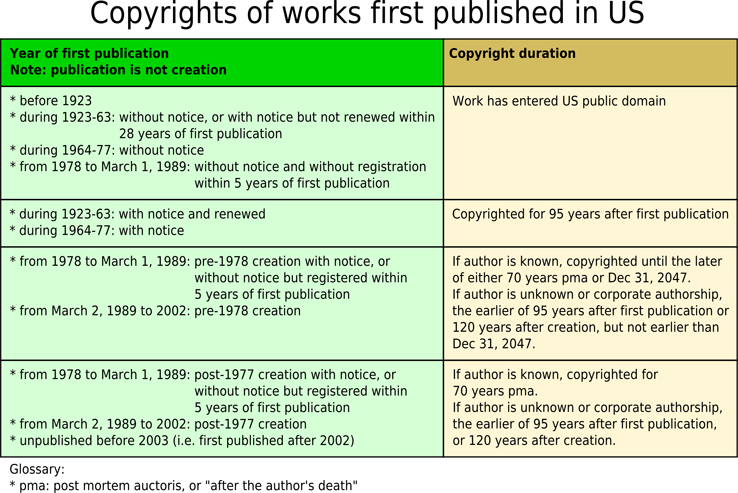
As you can see, things can be quite complicated. For example, some of the poet Emily Dickinson’s work remains under copyright and would therefore be unacceptable to GCU.
While you will still always need to do your research homework to figure out if a work you want to use is actually in the public domain or not, one possible source for pre-1923 quotations is Bartleby.com which contains numerous quotation sources. Here are some other resources that you may find helpful:
Project Gutenberg contains public domain books of quotations, toasts and sayings which can be downloaded in e-book format or viewed in HTML on the site.
Christian Classics Ethereal Library contains many public domain Christian works, though some parts of a PD work, such as an Introduction, might still be copyrighted. See their Copyright page for more information. Be aware Bible quotations on this site are from the copyrighted English Standard Version (and they have permission to use, you don’t).
Google Books has digitized a number of public domain quotations books.
Again, we remind you to double-check any public domain work you intend to use in your designs. Just because something is on the Internet doesn’t mean it’s free to use as you wish.
Don’t forget that if you use a public domain quote, you will need to include a link to the source for the Review Team in your Notes to Reviewers (same thing goes for public domain images). Have fun!
Share this:

Inspiration Station: What to Say


Since savvy GCU artists know cards with an inside verse tend to sell better than blank cards, it’s to your benefit to craft good text. Obviously, if you’re writing a humorous card, the inside verse is usually the punchline. But if you’re writing another kind of card, figuring out the right inside verse can be difficult.
While we totally advocate writing verse that speaks from the heart, if you get really stuck, here are a few places you can visit for inspiration on what to say. Please don’t plagiarize – when you write, make sure it’s in your own words, not someone else’s. Even if a site says the verses are “free,” that doesn’t mean they’re okay to pick up verbatim and use in commercial work.
RESOURCES FOR INSIDE VERSE INSPIRATION
Greeting Card Messages
Many occasions represented here.
What to Write in a Card
Another all occasion site.
Greeting Card Poet
Lots of generic ideas here, good basic stuff.
Greeting Card Messages
A collection of useful links to other resources, including videos.
Writing Greeting Card Verse
A how-to for those who prefer to go it alone.
How to Write Greeting Card Sentiments
A collection of useful links from Kate Harper, a veteran of the greeting card business.
Share this:

Font Frenzy: Che’s Bones

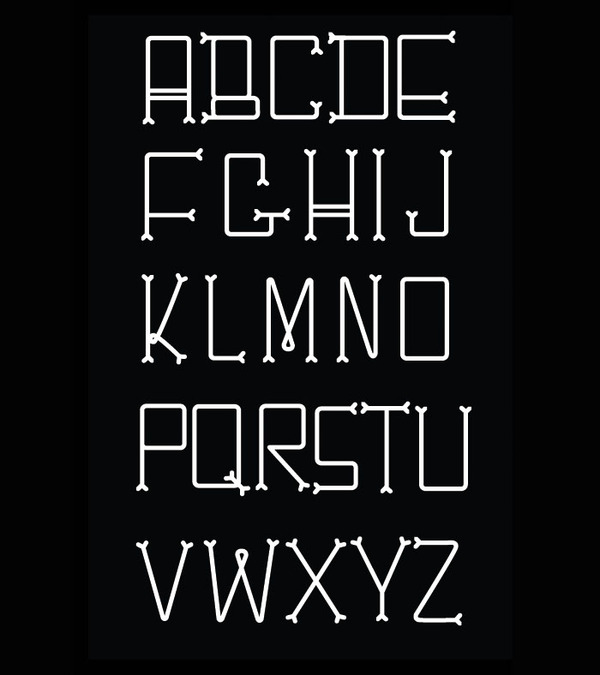
As Doreen pointed out the other week, greeting card designers working the recommended 3-6 months in advance of a holiday should be working on Halloween cards. In the spirit of the season, here’s a FREE for commercial use font that’s deliciously spooky – Che’s Bones. According to the font designer, her dog inspired her to create this cute font. The bones are great for Halloween but still quite legible and would mix nicely with another plain serif or sans serif font. See an example below and have fun!
Share this:

Dash of Inspiration: DIY Public Domain
A Dash of Inspiration, A Cup of Creativity by Doreen
DIY Public Domain
Do your own research before you use/submit a design which may contain a song lyric, poem, quote, bible verse, slogan, clip art, photographs, and the like. You, as a designer creating a for profit design in a public market have the full responsibility to ensure you are adhering to any and all license agreements (TOU) for the elements used in your design.
Here are some great links to help you get that research done. DIY and add the URL link for each entity you use in your card design to your Notes to Reviewer field, and you’ll be saving precious review time.
Remember … just because it says in Public Domain you:
- Still MAY NOT be able to use it for profit
- MAY NOT be able to use it in a stand alone manner (non-derivative work)
- MAY NOT be able to use it without attribution (credit to the author)
So you need to understand the various licenses, how to recognize them, and how to interpret them properly. View and read these licenses:
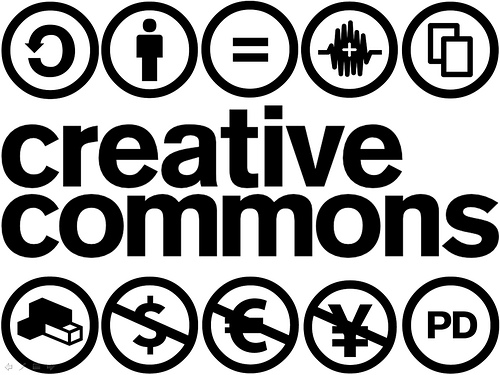
Here are some great links for DIY research in Public Domain:
How To Find Public Domain Works with Google By Wendy Boswell
Looking for a Specific Phrase? Use Quotation Marks By Wendy Boswell
Discover whether a work is under copyright or in the public domain. Here’s how.
What Is Creative Commons?
Here are some helpful resources:
Free public domain bibles and commentaries
Savetz’s Unofficial Internet Public Domain Index – this is an old list no longer maintained so there are so bad links, but also lots of links which are still very helpful.
Wikipedia: Public Domain Resources
So until next week … Learn … Create … Inspire!
Share this:

Critique Clinic – June 20-22, 2014
How does it work? For three days a week (Friday-Sunday midnight), I will open the clinic to any artist who wants an honest peer review and critique of a card which gets plenty of clicks but no sales, so something’s probably not quite right, or you’ve got a new design you want to test drive, or you’re unsure about the marketability of a card. Or perhaps you’re a newbie who isn’t sure if a card is up to a marketable standard. Anyone is welcome to participate. In fact, I encourage everyone to at least look at the cards in question and read the critique comments – you may learn something. The purpose of the clinic is to help artists improve the commercial appeal and marketability of their cards.
THE RULES
- ONE card per artist only.
- Card must be intended for sale at Greeting Card Universe.
- To submit a card for critique, post a link to the card at GCU in the comments section of this clinic post. Allowances will be made if you’ve had a card declined, or made a new design you’d like advice on before submission. Give us the link where we can see the card, such as your private gallery, Flickr, Tinypic, etc. If you do give a private gallery link, be sure your private module gallery is ON. Please do not post links to your Manage Cards section – do you really want strangers tinkering with your cards? And please don’t ask us to critique a card that’s pending review – we can’t see it until it’s approved.
- Any artist is free to comment and/or give a critique of a submitted card. HOWEVER, post-and-run comments like “great card” or “you suck” will not be tolerated, nor will abuse. Criticism should be constructive, not destructive. Play nice or you will be banned.
- I also won’t tolerate temper tantrums if you decide your “artistic integrity” is being stepped on because you asked for a critique, and someone told you the photo you’re using isn’t in focus. If you can’t take honest criticism, don’t submit. Once gets you a warning; twice and you’re banned from submitting in the future.
- Artists who critique may do so by giving their opinion, posting an example of another card, or pointing the submitter to a video, on-line article, or other helpful suggestion.
- Don’t forget that artists who are giving you tips and helpful advice are volunteering their time and trouble. Be nice. A link back to their store on your website or blog is appreciated (but not mandatory).
- You are free not to take any advice offered. There’s no guarantee any card will be a bestseller, so don’t come into the clinic with unrealistic expectations.
- Rules may change as we go along and we see how things turn out, okay?
So without any further ado, I declare this week’s Critique Clinic open!


