Artist Interview: Michelle Dokos, Momo Cards

Today we’re interviewing Michelle Dokos of Momo Cards, who joined GCU in 2011!
_________________________
 Michelle, tell us what drew you to join GCU?
Having won a few Hallmark contests, I got “bitten by the bug” of creating greeting cards. I looked around the web for a reputable creative outlet and everything I read pointed to GCU. So here I am!
Tell us who you are, where you are, and what you do.
I’m originally from beautiful Western Pennsylvania, but split my time between there and equally beautiful Greece. Until recently, I was in restaurant management, but I took a u-turn and switched to creative writing, especially poetry and children’s books. Quite a change of direction, but one I’m glad I took.
What’s your favorite greeting card on GCU that you’ve created?
My “10 bucks” greeting card is my favorite since my husband and I worked on it as a team. Being that he’s a much better illustrator than myself, he was able to execute my idea exactly the way I wanted.
Where else can we find you?
What or who inspires you?
My husband and children, nature and life in general!
What’s the most indispensable item you use to create your art?
My Leica digital camera.
What tools do you use to create your work?
Apart from my trusty Leica, I use Photoshop CS and CorelDraw! X3
What do you do to promote your greeting cards on GCU?
I mostly do my promotion using Facebook. I’m in the process of setting up my personal web site to add to that.
Is there something you’re really proud of having done?
Last spring I published my first children’s poetry book with all illustrations done by my two children.
_________________________
Thank you, Michelle, for sharing that with us! I wish you much success at Greeting Card Universe. Welcome to the community!
Share this:

Dash of Inspiration – May 30, 2011
A Dash of Inspiration…A Cup of Creativity by Doreen
Spooktacular Inspiration!
 As Corrie keeps us on our toes with her continuously updated list of HOLIDAY CARD 4-6 MONTH LEAD-IN, you can see that we should be thinking about Halloween! I know, I know…good grief it’s June and you have laying by the poolside, barbeques and camping on your mind. Well, if you want to have Halloween cards and party invitations ready for customers to start buying in September/October, then you need to switch over to a more ghoulish mindset!
To help motivate and inspire your creative juices, I’ve found some wonderful Tricks and Treats for you! Though I certainly found plenty of gore, that isn’t always the best for cards and invitations, so I chose this exhibit of 40 Spooky Wallpapers from our friends and Noupe for your weekly dash of inspiration…
And to help you along, here is a Photoshop Tutorial for creating a very cool Jack-o’-lantern and you can use what you learn to experiment creating other spooktacular effects. A nice set of Halloween Shapes for Photoshop & GIMP composed of various vector Halloween images from ObsidianDawn, and lastly three Free Commercial Use Fonts to give your text a creepy touch! Trick or Treat!
Free Commercial Use Creepy Fonts
Bat Font
Dripping Font
Swamp Font

Share this:

There’s Still Time to Monkey Around!

We’re in the midst of a LIGHTNING ROUND – Just make a new blog post or Squidoo lens on or before May 31st with the theme MONKEYS, including links to 3 monkey-themed GCU cards. You could win 20 FREE CARD CREDITS, so get on with your monkey business and go bananas!
I’ve already gotten entries from Sun at Night, Brenda Thour, Naquaiya, Madeline Allen and Janet Palaggi. Don’t you want to play with us? And since sending your GCU greeting cards to friends and family is a promotional tool that’s proven to work, what are you waiting for? You could be a winner, but only if you enter!
Send me the link to your post or Squidoo lens to get in on the fun.
Share this:

The Rainbow Connection
HOT COLORS 2011
In her guest blog post about her experience at the recent New York Stationery Show 2011, Mindy mentioned a couple of trendy colors – charcoal and honeysuckle (Pantone’s Color of the Year) in combination. I thought it would be nice if I gave you swatches and HEX numbers so you can incorporate these colors easily into your new designs. I’ve also included a couple of other colors I’ve seen recommended on fashion sites as complementary to the scheme.
Some of these colors – Orchid Hush, Bamboo, Honeysuckle, and Quarry – are among Pantone’s Fall 2011 Fashion Color Report. I don’t know about you, but I tend to keep to the same colors a lot of the time in my designs. I’ve been making an effort lately to branch out, and I find these color reports helpful in spotting combinations I might not have otherwise thought of myself.

Honeysuckle – D65076







Share this:

Promotion in Motion: Getting Started at Squidoo

Getting Set for Your First Squidoo Lens
What is Squidoo? Squidoo is a popular content-sharing site where users build a free webpage (called a lens) using modules. While no knowledge of HTML is required, you may want to brush up on your basic skills at some point.
How does Squidoo help you? To put it simply, Squidoo not only pays you according to how much traffic your lens pulls in, it also allows you to do some affiliate marketing to earn revenue by using “profitable” modules from Amazon, CafePress, Zazzle, etc. so if anyone buys something by clicking one of your links, you’ll earn commission.
However, that’s not the only reason you want to build a Squidoo lens. Quite apart from making revenue, you’ll be able to use your lens to increase sales of your greeting cards by using links to point customers to your product. More traffic = more sales. Currently, Squidoo allows up to 9 links to GCU per lens so choose your links wisely.
Before you jump in and begin building your first lens, you’ll need to consider a couple of things.
First, think long term. You aren’t going to see results overnight. In fact, it can take a year or more, not a few weeks, before you start seeing significant traffic to your lens and in turn, increased traffic to your GCU links. And you’re going to have to actively promote your lens, too. Cross-pollinate on your blog or website – that’s a good start. Comment on other relevant Squidoo blogs and include the URL of the lens you want to promote.
Don’t go into this thinking you’ll earn a thousand bucks a week in a month’s time. You need to be in this for the long haul and be prepared to work.
Second, choose your topic with care. While hot topics (topics that are currently trending) may get you a spurt of traffic at the get-go, they don’t last long and you’ll soon find your lens languishing. Consider a subject that’s a perennial favorite, one which you can tie into your cards. Or choose a seasonal theme. For example, I have a lens about all natural sunscreens for children that’s popular throughout spring and summer, but gets only a little traffic in autumn and winter. It’s your choice how you want to swing it.
Third, be aware that creating a lens which is nothing more than a promotion for your greeting cards with little or no additional content is unlikely to get you results. Therefore, once you choose your topic, consider how best you want to present your content, and how you can make that into a natural link to your greeting cards.
The best lenses – the lenses that achieve longevity and continue to draw traffic years after their creation – have CONTENT. Yes, the dreaded ‘c’ word (get your mind out of the gutter). Search engines and seekers LOVE content. Just don’t copy and paste someone else’s work. Be original, not naughty.
But how to make a natural fit between your topic and greeting cards? For example, suppose your cards feature nature photography, and you have some with butterflies on them. You can make a lens about photographing butterflies, how and when and where, give tips, etc., and link to a selection of your butterfly cards. It’s a natural fit, and doesn’t look remotely like the dreaded spam. And hey, you can include an Amazon module with books about butterflies, a Zazzle or CafePress module featuring butterfly designs, and so forth.
One of the best things to do at this point is download the free official Squidoo step-by-step guide.
I recommend this guide for anyone considering starting a new lens, and anyone who already has a lens (or two, or three, or more) under their belt. There’s a lot about promotion in there that I’ve found very valuable. There’s also a checklist for newbies they’ll find helpful.
What about me? I have 36 lenses at present (I added a new one yesterday, in fact). My oldest lens is 3 years old, and it’s a vehicle I use to promote a certain collection of my cards at GCU. I’ve mainly promoted it on one of my blogs and through commenting on other Squidoo lenses with relevant content. Guess what? I get well over 1,000 visitors a week (the numbers jump up considerably during the holiday season, believe it or not), and according to my stats, almost 3/4 of them click on one of my links. If I can do it, so can you. Believe me, I wasn’t born with this knowledge. I had to put my nose to the grindstone and work, learn what works for me, accept my failures as learning experiences, and move on.
Squidoo can be effective at promoting your card designs. It’s all in how you work it.
Registering at Squidoo

This is where you sign up for a Squidoo account. Even if you don’t particularly want to make lenses, it’s a good idea to register if you want to try and promote your blog or GCU store via commenting on relevant lenses and leaving a link. This is very straightforward. Fill in the blanks, and press CONTINUE.

Whatever you say your page is about, that will become the title of the lens. You can play around with this later, but don’t just plonk down the first thing you think of. Consider carefully, grasshopper. Then CONTINUE.
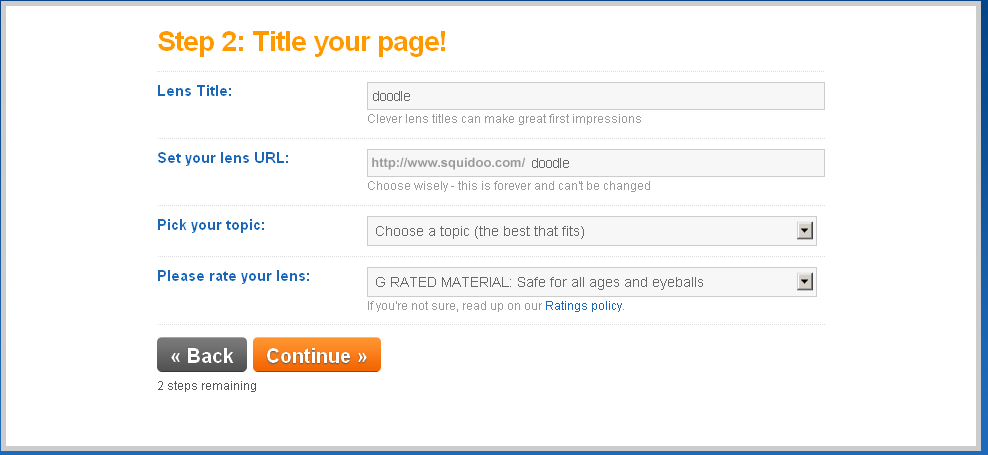
This is where you must take time and give serious thought to your lens. You can always tinker around with the lens title – that’s what will appear at the top of the lens page (don’t veer too far away from your topic – deceptive tactics won’t win you any brownie points) – but the URL is important. If possible, you want a URL to reflect the topic of your lens in a way that people can remember. For example, you’re writing a lens about photographing pets. You might try petphotography. Remember, if you use spaces between words when you’re setting up your URL, it will come out like pet-photography. People may not always remember to put in hyphens or underscores (like pet_photography) so avoid that if you can. When you’re done picking topics (and you’ll be asked to add relevant sub-topics as well), hit CONTINUE.

Add some keywords here. Long-tail keywords – that is, keywords that consist of a phrase rather than a single word, are super for zeroing in on your target audience. You can add more tags to your lens later. Now CONTINUE.

And voila! Here’s your dashboard. All you need to do now is CREATE A LENS. From here you can manage all your content, check your stats, see how you’re doing in the affiliate marketing, etc. Now go and get started making lenses!
Next time on Promotion in Motion, I’ll share a couple of my favorite tips for promoting your lenses.
Share this:

Lightning Round – MONKEYS
 And the monkey business continues!
We’re having a Lightning Round – just make a new blog post (or Squidoo lens) about anything to do with the subject monkeys – use your imagination. C’mon, you know you want to. Add 3 links to monkey-themed cards at GCU (there’s 37 pages, so you shouldn’t have any trouble finding something to suit you). You’ve got until May 31st, and you’ll be entered in a drawing to win a cool mystery prize that is a mystery no longer – I’ll be giving away 20 FREE CARD CREDITS from GREETING CARD UNIVERSE! Whoo-hoo! A number of artists have commented that they buy their own cards and send them out as an effective form of promotion. If you win, you’ll get to test that out yourself. Are you excited yet?
P.S. – I’ve got 2 entries already. Are you going to be left behind while everybody else goes bananas?
Share this:

Nuts and Bolts: Categories

How To Choo-choo-choose the Right Categories
Greeting Card Universe has a dizzying variety of categories including unusual and obscure ones. As a business, this is their strength: the ability to provide cards to fit a customer’s every need. As artists, the category system can be puzzling, confusing and downright frustrating at times. However, don’t tear your hair out. Help is on the way.
The first thing artists need to understand is that GCU’s category system is highly specialized and incredibly specific. Because of this degree of specialization, every greeting card must be designed to fit exactly into its desired category.
This is a difficult concept, I know. No other POD is as stringent. Nobody else seems determined to make you conform. Newcomers especially seem to have a hard time adjusting their thinking. Let me break it down for you as simply as I can: you must categorize a card only by WHAT IT ACTUALLY IS, not what it could be.
For example, you’ve got a beautiful picture of a dewy red rose. You think this image is appropriate for a number of categories like Valentine’s Day and Mother’s Day. You even put “I love you” in a lovely script font on the front. Okay, you’re right – it could fit either category. Problem is, unless the card actually has “Happy Valentine’s Day” or “Happy Mother’s Day” somewhere on it, you cannot put it in those categories. As it stands, if you submit this card as is, you can only put it in Collections >> Flowers & Garden (where there are over 130,000 cards right now).
Repeat after me: WHAT THE CARD ACTUALLY IS, not what it could be.
It sounds counter-intuitive, but it’s actually a very logical system once you wrap your brain around it, and GCU has made category selection even simpler during the card creation process.
Bottom line: think like a shopper, not an artist.
No one is out to stifle your creativity. No one at GCU is deliberately trying to make you cry, I promise. I know the concept can be difficult, and it’s a major reason for card returns. You need to understand that the Reviewers aren’t going to correct categories for you. In rare instances, they might add a second category if you haven’t and it’s appropriate, but do not count on their intervention. It’s YOUR responsibility to get the categories right, and if you don’t…well, you’ll be seeing a lot of those Returned for Edits notifications in your e-mail.
Best advice: don’t try to shoehorn an existing design into a category it doesn’t fit exactly. Seasoned artists know the best way to design cards is to look at the categories first. This can actually help you make future sales – you can find niche or orphan categories that have few or no cards in them, and be able to design cards to fill those categories.
Why should you care about niche and orphan categories? Let’s face it – there are literally thousands and thousands of general birthday cards (over 8000, in fact, as of this writing). Shoppers doing an on-site search or browsing certain categories receive pages and pages of search results. Chances are, if your card isn’t in the first couple of pages, you’ll miss out. Cards in niche and orphan categories don’t have a lot of competition. This is a golden opportunity you shouldn’t miss.
So before you design a card, take a look at the categories list. Just go to the GCU homepage (you’ll see a “Home” link at the top of every page, click the link “Browse Our Entire Selection of Holiday Cards, and you’ll be able to find and click on whatever categories interest you. What makes this list worth your while is that you can instantly how many cards are in each category and sub-category – valuable information for any artist serious about wanting to sell greeting cards.
Sometimes there’s a little confusion when it comes to age- or relationship-specific cards. Let me clarify GCU’s current policy: you should place such cards in the exact category and sub-category that fits it (ie, Happy Mother’s Day to my Birth Mom goes into Holidays >> Mother’s Day >> For Birth Mother) PLUS a collections category if it fits (ie, your Mother’s Day card has a cow on it, so it can also go into Collections >> Animals/Pets >> Farm Animals as the second category.
Now we have to talk about General vs. specific categories. This one can be tricky. Here’s how it works: a general greeting card can be sent to anyone for that occasion (ie, a card that simply says Happy Grandparents Day can be sent to any grandparent, and goes into Holidays >> Grandparents Day >> General Grandparents Day), while a specific greeting card would go into the appropriate sub-category (ie, a card that says Happy Grandparents Day from Your Grandkids goes into Holidays >> Grandparents Day >> From Grandchildren).
A card in either General or a specific category can also go into an appropriate Collections category. However, you cannot put a General card into a specific category. Scratching your head yet? Let’s take my previous example.
The general Happy Grandparents Day card I mentioned… just because a shopper COULD send it as a “missing you” card doesn’t mean you can put it into the Missing You on Grandparents Day subcategory. Only if the card SAYS “missing you”, and then it wouldn’t go into the General category, only into the appropriate subcategory.
Repeat after me again: WHAT THE CARD ACTUALLY IS, not what it could be.
If you grasp this principle, I guarantee you will have less cards returned for edits, and you will save yourself a lot of frustration. Let that be your mantra, and you’ll be all right.
Share this:

GCU Community Newsletter #5 – May 26, 2011

Shedding and Shredding (Cat Activities I Could Live Without)

Hidden Gems: Boss Birthday Humor - artist Tammy Moody
Early summer, but winter hasn’t quite lost its grip yet. We’ve had a couple of days where it was nice and warm, then the temperature dropped. The cats don’t seem to mind, except when it rains. Then they want to stay indoors and nap. Truth to be told, so do I!
Last week, we had some fun times with interesting guest posts about the New York Stationery Show 2011: Mindy Rosso and Pamela Jorgensen gave us their accounts and observations. Another guest blog by Doreen Erhardt informed us about how to profit from the GCU Widget. Our weekly Design Spotlightwas on Mary Kay Mickiewicz at Sign Language Greetings – her story was truly inspiring for many of us. Doreen Erhardt’s column, A Dash of Inspiration – a Cup of Creativity talked about Photo Manipulation and gave us some tutorials. And our first Blog Carnival, SUMMERTIME, AND THE LIVING IS EASY, was a smashing success. Kudos to everyone who participated!
I’m so chuffed, I’ve decided to start a new contest – a Lightning Round! What’s that, you ask? Keep reading and find out! You could win a really neat mystery prize (no, I’m not telling, but I’ll give you a hint: it’s not only useful, it’ll help make your GCU store promotion a snap.) See the Contest below for details.
Keep up the good work, and don’t forget the pass the love around!

_________________________
 What You Should Know

Hidden Gems: Martial Arts, Monkey Fu - artist Corrie Kuipers
Whether you’re new to blogging or an experienced blogger, there are some things you may not know, information that can help you better your blog, enhance your experience, and ultimately bring success. Here are my top five tips on what you should know about blogging.
Be Yourself: It’s tempting to want to copy a popular blogger’s style, but you should work on developing your own unique style. “Fake it till you make it” isn’t a good philosophy. I’ve got some tips about finding your “voice” in Newsletter #3, and this takes me to…
Don’t Forget Your Readers: You’re writing a blog for readers, not for yourself. Remember that! Before you write that post, think about what YOU (as a reader) would like to see in a blog. Does your post inform? Entertain? Would it be interesting to people who share your passion? By all means, put your personality into it (see Be Yourself above), but never, never, never forget your audience.
Update Frequently: Easier said than done, right? But it’s true…if you don’t update your blog often, you won’t see much traffic or readership. Readers get bored of seeing the same old stuff you haven’t updated in months, and they’ll stop visiting. Useful, updated information is beloved by search engines and readers alike.
You Won’t Get Results Overnight: Even the most interesting and informative blog needs time to develop a readership. Don’t go into this with high expectations, and please don’t be discouraged. Seek out ways to promote your blog, which leads me to…
Promote Yourself: Yep, the dreaded “p” word. No doubt about it – if you’re using your blog as a vehicle to market your art, you need to promote it. Don’t make a couple of posts and expect the world to flock to your door. You have to get out there and promote. There are a lot of ways, including commenting on other relevant blogs, or joining in blog carnivals (also called blog hops). However you decide to do it, make the time. You’ll be thankful in the end.
_________________________
 I’m not monkeying around – it’s a Lightning Round! Let’s see how many of you fantastic bloggers can make a new post with the theme MONKEYS. You heard me, it’s time to go bananas! You have just ONE WEEK (until May 31), so you’d better work like lightning! Use your imagination and include 3 links to GCU cards with a monkey theme. I’ll get you started with this link to the collection of monkey-themed cards. You could write about monkeys in general, specific types of monkeys, a trip to the zoo to see monkeys, the Chinese Year of the Monkey, a recipe for monkey bread, the history of the monkey puzzle tree, the origins of phrases with monkey in them (cold enough to freeze a brass monkey, etc), the depiction of monkeys on TV and in movies – the possibilities are endless. Squidoo lensmasters, you’re in on the fun as well, same rules apply. Send me your entries. On June 1st, I’ll make a master post you can share AND I’ll have a drawing for a cool mystery prize that will help you promote your cards. This’ll be more fun than a barrel of monkeys, and you don’t want to miss out. Hurry and get your monkey business on!
_________________________
 GCU uses a formula to determine a card’s rank (position on the page). This formula includes how long since the card was created, number of clicks, number of sales, number of times it has been favorited, number of times it’s been in a shopper’s cart, number of reviews, number of times customized, number of times it has been a GCU pick, etc. The position is also relative to the popularity of adjacent cards. So now you know just about what it takes to get to the #1 spot!
Want more comments on your blog posts? Don’t sit behind your desk and wait for the crickets to stop chirping their lonely song. Get out there and comment on other relevant blogs, and be sure to provide a link to YOUR blog. Make your comments thoughtful, useful or at least show you’ve actually read the post you’re commenting on and you’re not a spammer. Don’t be afraid… I don’t know of many blog owners who discourage commenting.
DID YOU KNOW you can “like” this newsletter or any post on the GCU Community blog, or include them in your social bookmarks? Just click the title of the post, which takes you to the permanent link page. At the bottom of the page you’ll see buttons for social sites like Facebook, Reddit, StumbleUpon, etc.
_________________________

Lightning Round – MONKEYS

Hidden Gems: Miss You - artist Allan Howell
Ook ook ook! We’ve gone bananas ‘cause we’re having a Lightning Round! What does that mean? You’ve got one week (till May 31) to make a new blog post on the topic MONKEYS. Include 3 links to monkey-themed GCU cards. Squidoo lensmasters, your brief is the same. On June 1st, I’d make the master post of links public so you can share AND I’ll have a drawing for a cool mystery prize that will help you in your promotional efforts. Better hurry, you don’t want to miss out!
Photography Tip
From Sun at Night on the GCU Forum: “Just a few pointers when photographing textile arts:
- Most designer fabrics are licensed, that usually means that a photographer should not photograph the fabric for commercial uses. This includes objects made from the fabrics. As an example: Laurel Burch designs. Plain fabrics, polka dotted, checked all those are just fine. It’s just the artistic repeating patterns. Most fabric stores will label these designer fabrics. (Licensed designs) often include Disney and college mascot themes. Stay away from these.
- Unless it is your own original embroidery design, you should not use it for commercial purposes.
- There is no copyright on sewing patterns. You can photograph apparel and just about anything you can make.
- Keep in mind your keywords. Since these are printed cards and not embellished cards, keywords should not include lace, ribbon or basically any notions.”
Facebook Tip: How to Share a Card Link on a Fan Page
From Doreen Erhardt at Salon of Art: “Re: the share button under the card You’ll see in the upper right margin of your Facebook Fan Page it says, “Post as Judith’s Business” or something like that. What I’ve found is you need to OPEN your Fan Page, click on that link so you are posting as your business, leave that window open, then when you click on a FB link it will post on your Fan Page. Default is will always be your Personal page.”
_________________________
The next Newsletter will be published on June 2, 2011
Share this:

Today’s guest post is from Mindy, who lets us in on her experience at the National Stationery Show in New York City. Pay attention, folks…there’s some interesting tidbits in there that could help you to design trendy cards that sell.
_________________________
 Our visit to the National Stationery Show was fun and fruitful. Witnessing the wide variety of designs was impressive and inspiring. Booth after booth, aisle after aisle of talented and hopeful artists. Big sales, little sales… all money in the bank (or at least enough to recoup conference expenses they hope) but what seemed to be just as important as sales was affirmation – a nod to the value of their creative work. Such commitment and bravery to create a product, put it out on display to be judged and scrutinized. It must be an emotionally draining as an exhibitor to “present your wares” for 2 and a half days having thousands of attendees stroll by, glancing, evaluating, all the while wondering, Do they like my art? Is it good enough? Why is that other booth so busy? Have I missed the mark?
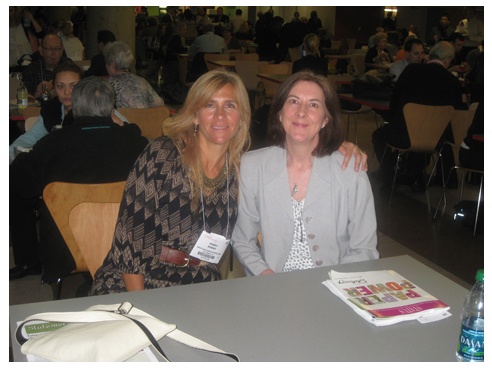
Certainly a highlight of the NSS was getting to meet in person GCU artists Sandra Rose and Pamela Jorgensen (of PamJArts) and bestow upon them both, whether they liked it or not, a great big California hug. I felt like I was hugging 4,445 artists all in one. Did you feel it?
Design Trends worth noting:
- Eco-chic – A twist on the past years’ trends of organic and recycled. Still earthy but now modern and elegant.
- Humor – Plenty of dry, sassy, snarky, irreverent, blunt humor which was few and far between when we attended in 2008
- Pretty Ladies – different variations on stylish, stiletto clad beauties toting miniature pooches or oversized martini glasses
- Popular Colors – long gone is the trendy chocolate brown & pink combination, giving way to charcoal and Honeysuckle (2011 color of the year)
- Animals – the popular penguin seems to have been trumped by his woodland friend, the hedgehog
We spoke with many artists and hope to see some of them join our GCU community to help expand their reach and grow their sales. Seeing how hard these artists work in preparation for and at the show makes me realize even more what a great opportunity GCU affords artists.
Too many to list but here are a few artists that we hope to see join our team:
Steven of Frog Greetings – fun and beautiful live frog photos. Reminded me of GCU artist Ellen van Dellen and her darling Dumbo rat.
Carla of Viva Greetings – bilingual and bicultural with a touch of fun
Melissa of Made to Keep – funny & direct “sh*t happens” cards
Foxy Blunt – bold designs with devilish humor
Tattoo Cards – cool & edgy, “not your grandma’s greeting cards”
Kristin of Hearts Happen – nature inspired hearts
Tammy of Brave Heart Greetings – uncommon cards; divorce, cancer support, morning sickness, etc.
Peter, Josh and Cathy of J-Dig – ridiculous & fresh twist of humor and clever play on words
Nina of Gooseberry Press – the cutest, custom maps you’ve ever seen. Take me away!
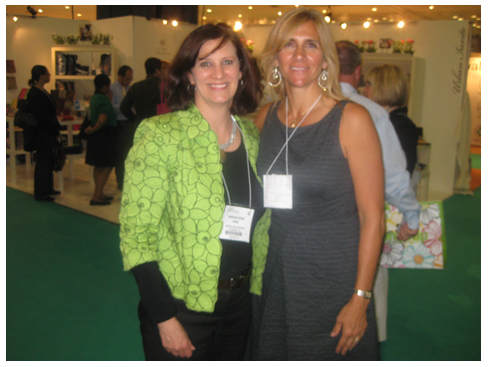 Nasser and I attended the Opening Night Party. We wondered why it would be held nearly 45 minutes away from the Javits Convention Center at the Battery Party Gardens. Once we arrived it was quickly obvious as we were welcomed by a superb view of Lady Liberty herself.
Making good use of our time on the East Coast we also met with a PR firm we’ve just contracted with to help us spread the word about GCU. We’re expecting great things with this effort and exposure, exposure, exposure. The first of which included 2 radio interviews I had on Monday, May 13th: WDIS-AM of Boston, Massachusetts on “Talk of the Town” with Dan Collier, and CKMN-AM of Colorado Springs, CO on “Tron Talk Live” with Tron Simpson.
Next year we hope more of our artists are able to attend, even if to just walk the show floor for an eyeful of inspiration and for me to deliver a big California hug.
_________________________
Thank you, Mindy, for that informational and inspiring report! We look forward to greeting new artists, and we especially look forward to seeing Greeting Card Universe continue to grow!
Share this:

Blog Carnival I
 *insert calliope music here* It’s carnival time, folks, and we’re feeling hot, hot, hot! Yes, our first Blog Carnival is a stunning success. Seventeen artists participated, and I’ll be announcing the lucky winner of our contest prize below. But first, here’s the master list of posts. This master list will be shared on the blogs of all participants.
For participants, I will be sending out the master post of links as well as your blog carnival star individually. If you don’t receive an email from me by the end of the day, check your spam folder.
Don’t forget to visit (or Share or Like) and comment these posts, everybody. That’s part of the carnival fun – so get out there and share the love, people!
If you want to share this post on your blog or website, but you didn’t join in the carnival, you can just link to this post or to the GCU Community blog. And without further ado, let’s get to the action!
BLOG CARNIVAL I: SUMMERTIME, AND THE LIVING IS EASY
Floating Lemons, Mariana Musa – Summertime at Greeting Card Universe
The days are full of sunshine and the temperatures are slowly rising…
It’s a Beautiful World, Catherine Sherman – Summertime Flowers and Fruit
The fragrance of roses all summer long, the juice of ripe fruit on our lips…
Sun at Night Studios, Sun at Night – Summer Celestial Events and Art
The summer month of June is just around the corner…
What Dreams May Come, Maryann Nolan – Discontent for Summers Past
Ah summertime, full of sunny days, steamy temperatures, blue skies … I long for thee!
I Love Cuttables, Cindy Johns – More Father’s Day Cards
While I’m on the topic of Father’s Day (see the ‘funner’ stuff below)…
Naquaiya’s Cards, Naquaiya – Summertime, and the Living Is Easy
Summer is a time for a little fun, a little soaking up some nice warm rays…
Shelley’s Card Creations, Shelley McLeod – Is Summer Almost Here?
Well, after two 80 degree days, we are back to 50s and raining…
Painted Cottage, Judith Cheng – Summertime
Nothing beats sketching by the water after our long winter…
DogBreedz, Peggy Mundell – Summertime, Meet the Breed
Summer is around the corner…
Dragonfire Graphics, Betsy Bush – It’s Summertime and the Living is Easy!
It’s hard to believe it is approaching summer what with all the rain we are getting in the northeast…
Salon of Art, Doreen Erhardt – Ah, Sweet Blessed Summertime
I was born in 1961 in a suburban area and the memories of those summers will always make me grateful…
DB Visual Arts, Denise Beverly – Summertime, Summertime, Sum, Sum, Sum, Summertime
That song always makes me sing it whether I want to or not…
Cherie’s Arts ‘N Crafts, Cherie – Summertime, and the Living Is Easy
One of the things that I love most about summer is being able to lay outside…
Janet Lee Designs, Janet Palaggi – Summertime Food ‘n Fun
That`s right folks, Summer Is Finally Here…
Sheryl Kasper Card Store, Sheryl Kasper – Summertime Grilling
Have you been thinking about the warm days of summer during the cold days of winter…
Card Art From the Heart, Sue Baumgardner – Summertime and the Kids’ Education Goes Out the Door?
Learn how to teach your own children and as many others as you decide to include…
Aura2000, Aura2000 – I Love Summer!
Maybe it’s because I’m born in Summer, but I just love this time of the year…
_________________________
And the winner of our contest by random drawing is… *drum roll please*…
Peggy Mundell at DogBreedz! Yay!
Peggy wins a $50 gift certificate to Amazon.com.
You know, this was so much fun, let’s do it again. I’ll shortly be announcing the theme of our Blog Carnival II, and I hope to see all of you there on the merry-go-round (and some new faces, too).